

Why Product Photo Retouching Matters More Than Ever for Online Stores

When people shop online, they will make an immediate decision based on what they can see but can’t directly interact with your product. This means that customers can only judge products based on how the product appears through pictures. Hence, in 2026, product photo retouching will be the most profitable conversion tool in ecommerce.
It’s important to understand that the purpose of product photo retouching is not to make products look fake, but instead to make them appear real, have clear detail and be immediately ready for purchase. Whether you sell on Amazon, Shopify, Etsy or via your DTC site, this guide outlines precisely how professional retouching operates, how it influences revenue, and how to create a workflow that grows from an initial batch of 10 products to a final total of 10,000—all with no degradation of quality.
What Is Product Photo Retouching?
Retouching product photos is an intentional enhancement of a product image through pixels after the photo has been taken, to correct errors the camera made, and to make the product look like what the customer will receive in their hands.
Think of it in three layers:
1. Editing is global. You adjust exposure, white balance, crop, and contrast for the entire image. This is done in Lightroom or Capture One.
2. Retouching requires local modification. For example, you may remove a dust particle from a diamond, repair the crushed corner of a shoebox, and equalise the sweater’s colour over a series of 12 images by making shadow that you created in the studio look natural even though it has been digitally reproduced.
3. Optimization is delivery. You export to the exact size, format, and compression each platform demands.
Because the camera tends to be exceedingly truthful, all ecommerce businesses need images repaired. For example, a studio strobe will create a bluish tint on silver items. Macro lenses will often pick up factory dust that may not be able to see until magnified through the macro lens.
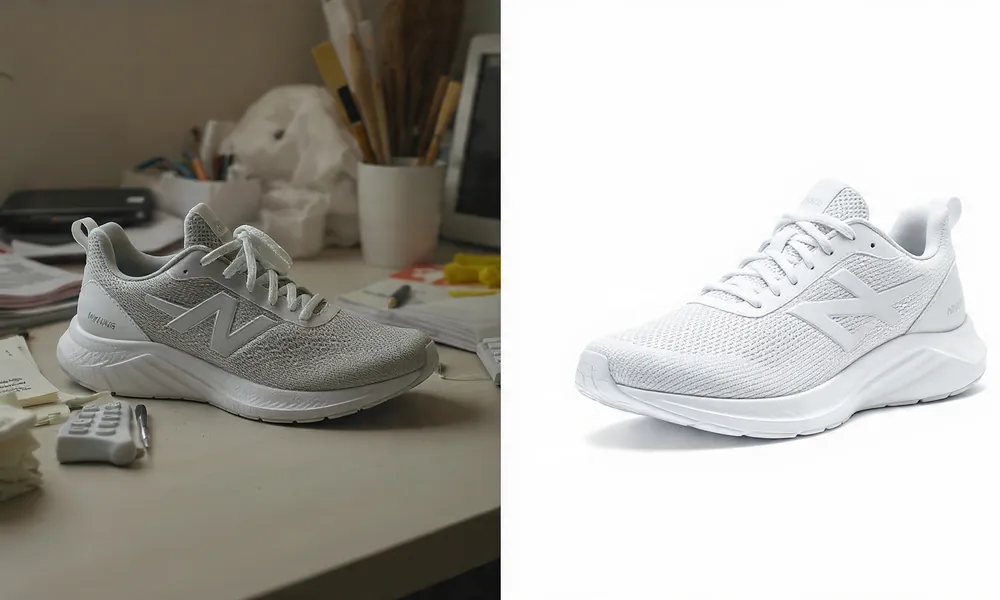
Wide angle lenses will create bowed edges on items such as the legs of furniture. If these apparent imperfections are not retouched, the prospective buyer will see these imperfections and assume that the item is of poor quality.
Industries that rely on product photography retouching:
- Fashion: Ghost mannequin assembly, wrinkle removal, fabric de-pilling (especially with sweaters), and color matching across sizes
- Jewellery: Dust removal at the microscopic level, polishing of metal, enhancing facets, controlling reflection
- Cosmetic/Skincare: Colour accuracy to what they are in real life, preserving surface texture, cleaning up glass reflections
- Furniture/Home Decor: Perspective correction, woodgraining enhancement, alignment of pattern on fabrics
- Electronics: Removing glare from the screen, cleaning fingerprints, detailing the ports
- Food and beverage: color vibrancy, condensation enhancement, crumb and spill removal
- Footwear and bags: shape correction, stitching cleanup, logo sharpening
Did You Know: OMS Photo has been in business for over 30 years. The studio specializes in high-end commercial photography, primarily retouching images to ensure consistent and brand-reflective imagery used in e-commerce, clothing and food photography.
Why Product Photo Retouching Is Important for Ecommerce
People make visual decisions based on first impressions. According to research done by Mastercard, 93% of consumers make their purchasing decision on the quality of e-commerce photos. This means that for every $1 spent at an e-commerce retailer, consumers will spend $1.30 because they were able to see an optimized visual representation (retouched) of a product.
E-commerce shoppers will look at the image grid first, then read the bulleted list of product benefits.
Returns Are Killing Margins
Ecommerce return rates were an average of 16.9% in 2024, costing merchants $890 billion per year. In 2025, the National Retail Federation estimates $849.9 billion in returns with a return rate of 15.8%. A research study done by Nfinite and Coresight has found that 20% of purchases made online are returned which results in $600 billion in lost revenue each year, and 69% of merchants considering returns to be a significant headache.
What is the reason for returns? The main issue is having the wrong expectations. The effect of having proper product images on return rates was shown to be significant since 20% of returns were due to people believing they had ordered a different product. In the case of fashion, the expected average return rate of 30% has to do with both the poorly fitting products (70%) and the descriptions not matching the actual product (16%).
Product retouching ensures colour, texture and shape are as accurate as possible rather than creating a false impression.
Psychological Conversion
As a company that provides images to over 2,500 companies, through the process of retouching you reduce your bounce rate and improve your conversion rate and average length of visit to your website.
According to a Cloudinary survey, visual content has influenced customers when they shop for items. It does show them what they are purchasing through user-generated images. It is also stated that 3-dimensional and 360-degree images could give up to 57% higher conversions from potential customers.
A significant number of shoppers who purchase from brands they don’t know (47%) will be influenced by the number of image reviews. The other 37% will look for video of the item being used. Therefore, visually building trust is essential to purchase.
Marketplace Compliance
Etsy hides items that do not have clear images. Amazon suppresses listings with off-white backgrounds. Having cleaner images visually can help improve how many people see your products.
Benefits of Professional Product Photo Retouching
1. High Quality Image at 2000-3000px Zoom — When you upload a photo without retouching it can become dirty or full of dust and when you zoom in, it may appear like you are looking at a boulder. If there are boulders on the image then your image will not be displayed in search results.
2. CTR Increase — In search results, if one image has a clean background, that image is 100 percent more likely to earn a click. According to Photoroom, when sellers upload an AI enhanced product photo retouching image rather than an unretouched photo, they will often see a +23 percent improvement in their conversion rates.
3. Increased Revenue: Consistent imagery builds perceived value (i.e., a $40 shirt will look like a $70 shirt), which increases sales.
4. Consistent Branding: Having the same background, shadow angle, and color temperature across 500 SKUs promotes recognition.
5. Improved Social Media Performance: Instagram and TikTok compress images aggressively; clean edges will survive compression.
6. Fewer Returns: Colour accuracy means fewer returns, which Cloudinary data shows has the potential to reduce returns by 33%.
7. Premium perception is an important aspect when shopping for luxury items; many shoppers will inspect items at 400% zoom before making final selection. Craftsmanship is a quality that can be seen in the differing levels of manual retouching.
Unedited vs Professionally Retouched:
- Unedited products will typically show a yellow cast because of the light source and will have variances from shot to shot. Professionally edited images will be calibrated to an sRGB color space or Pantone.
- Backgrounds will show off-white, shadows, lint with unedited images. With ecommerce photo retouching services, you get pure white 255,255,255 or controlled brand color.
- All visible dust will be removed using professional retouching; therefore, the product will look as if it just came from the factory.
- Unedited images will be distorted due to lens. Professionally retouched images will have corrected geometry and perfect alignment.
- Unedited images will have different editing styles. Professionally retouched images will employ the style guide throughout the catalog.
- The file size of unedited JPEGs is generally around 5 MB and will slow the website. What is the size limit for WebP? Is it really possible to achieve a fast load time while still keeping the image size under 300KB? Yes – with proper ecommerce image editing services.
Business Effects: Higher returns, lower trust with unedited. With professional product photo retouching: increase sales 30%+, decrease returns, increase ranking.
Common Product Photo Retouching Techniques
Background Removal
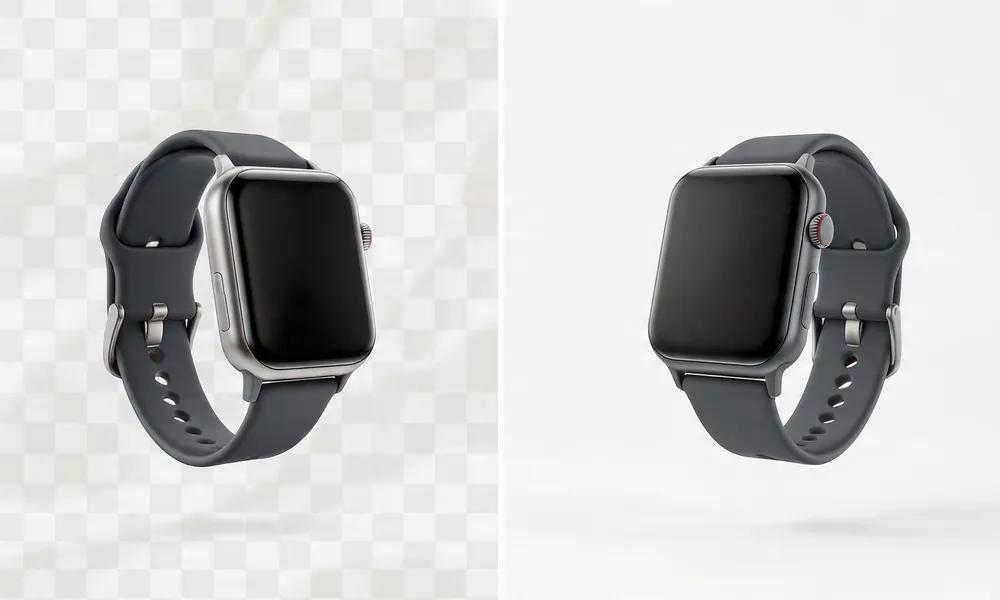
Purpose – To isolate the product for display on Amazon, Shopify, and advertising.
Workflow: Use the Pen Tool for harder edges. Use select and mask for softness of edge (e.g., fur). Check at 300% to make sure there are no halos. Save your paths.
Usage: Main image criteria for Amazon compliance.
Mistakes to avoid: Allowing 1-pixel fringe on white.
Dust & Scratch Removal
Objective: To see what the human eye can’t see.
Steps: Start with a blank layer, then go to the spot healing brush set to 100% hardness at 200% zoom. For jewelry, use frequency separation to keep the original look of the metal.
Color Correction
Purpose: Matches product between photo and real-world colors.
Workflow: Perform out-of-camera adjustments in RAW using white balance with an X-Rite ColorChecker. Use curves for each channel and selective color to adjust fabrics. Compare to physical sample under 5500K light.
Use: Fashion, beauty products – avoid turning “dusty rose” into “hot pink”.
Mistake: Edited on an uncalibrated monitor.
Shadow Creation
Goal: Make the product grounded naturally.
Workflow: Create duplicate layer, fill with black, distort with perspective and Gaussian blur from 8-15px, lower opacity to 30-50%, mask to fade. Light direction should match shoot.
Mistake: Photoshop default drop shadow appears fake and floating.
Reflection Enhancement
Goal: To create depth for bottles and gloss products.
Process: Flip vertically, make gradient mask, warp to match surface, set opacity at 20%.
Skin and Texture Retouching of Models
Goal: To make appearance clean yet realistic.
Process: Dodge and burn on 50% grey layer, therefore will not blur pores.
Use: Apparel on model, beauty brands.
Mistake: Customers don’t trust AI smoothing that takes away all texture.
Wrinkle Removal
Purpose: To make an item look brand new.
Workflow: Uses liquify tool gently and clone stamp at 20% opacity to maintain natural folds. Do not iron completely flat.
Use: All shirts, dresses, linens.
Mistake: Over-pressed look with no character.
Shape Correction
Purpose: Correct distortion in your lens.
Workflow: Use warp and puppet warp to straighten bag handles and bottle caps. Use guides.
Use: Furniture, bags, shoes.
Mistake: Do not stretch logos or patterns.
Ghost Mannequin Effect
Purpose: Show 3D shape while minimizing model distraction.
Steps: 1) Take front on mannequin. 2) Take shot of inside neck label. 3) Take backside shot. 4) Mask each image to align at pixel level and rebuild interior shadow.
Standard for fashion ecommerce product photo retouching.
Mistake: Collar misalignment produces broken neck.
Jewelry Retouching
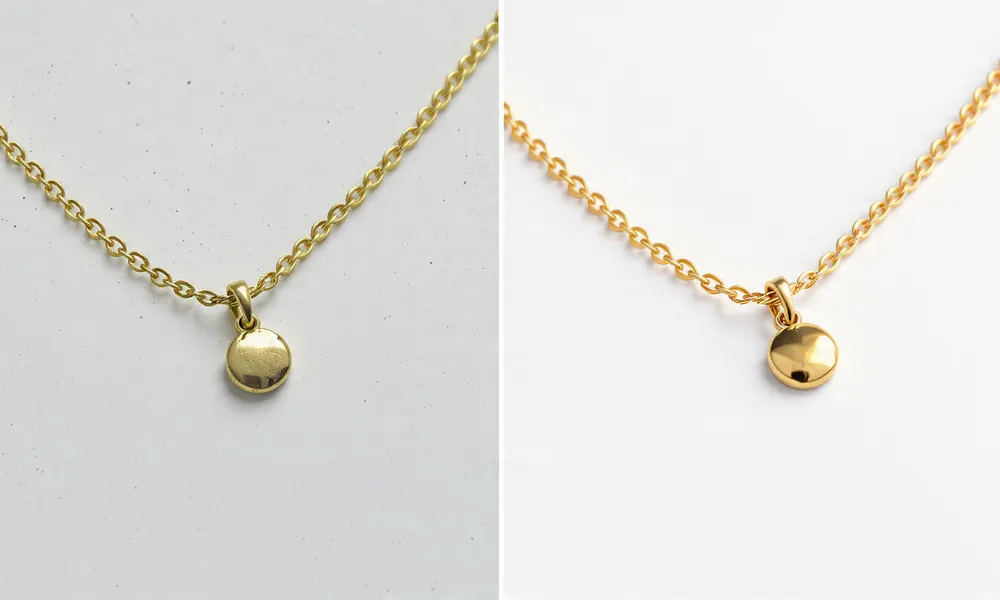
Goal: Maximum sparkle, zero dust.
Process: Stack 5-12 images using focus stacking, manually paint out dust at 400%, enhance stones using dodge, use curves to control metal highlights, add subtle glow.
Use: Rings, necklaces, watches.
Error: Over-sharpening results in white halos.
High-End Beauty Retouching
Goal: Luxury cosmetics must be flawless.
Process: Frequency separation (blur 8px for colour, retain texture), micro-dodges, colour grading to match brand palette.
Use: $80 lipstick listings.
Mistake: Changing actual product color.
Clipping Path Techniques
Function: Hard-edge precision.
Workflow: Pen tool at 200% zoom, 0.5px feather, saved as Path 1. For holes, create compound paths.
Use: Hard goods, electronics.
Mistake: Using magic wand creates jagged edges.
Image Masking
Function: Soft, complex edges.
Workflow: Select subject, refine edge with smart radius, output to layer mask, paint with black/white brush at 30% flow.
Use: Fur, knitwear, hair.
Mistake: Hard edges on soft items.
Reflection Clean-up
Purpose: To eliminate studio items from chrome.
Workflow: Use gradient tool to rebuild reflections, clone clean areas, paint highlights by hand.
Use: Watches, kettles, sunglasses.
Mistake: Photographer’s silhouette still appears.
Symmetry Correction
Purpose: To create premium feel.
Workflow: Split photo vertically, flip each side, blend at 50%, mask uneven areas.
Use: Sneakers, bottles.
Error: Creating perfectly symmetrical products that look CGI.
Proficient Tip: Do all retouching in non-destructive layers. When the client asks “Can you take off a little bit of the shadows,” your future self will appreciate it.
Product Photo Retouching Workflow Step-by-Step
- Choose pictures and delete unclear ones. Put them into Lightroom, only keep pictures with no blinking or blurring. This will save hours.
- Processing from RAW. Load camera profile, set white balance with eyedropper on gray card. Make highlight recovery -30 and shadow +20. Set clarity +5 for products.
- Exposure adjustments – use tone curve instead of brightness slider. Histogram should touch both ends without clipping. White backgrounds should read 250-253.
- White balance correction – Match using HSL panel to physical product in 5000K viewing booth.
- Clean up. Remove sensor spots first, then product spots, go top to bottom.
- Retouching. Shape corrections, wrinkle removal and jewellery work take up 80% of time. Use tablet instead of mouse.
- Optimize the background – Use clipping path for hard goods and mask for soft goods. Use Levels to set background to pure white, but protect edges with mask.
- Enhance shadows and reflections – add to separate layer underneath. Name layers “Shadow_Main” or “Reflection_Bottle”.
- Export Settings: Export master as 3000px TIFF, and web copies as JPEG 2000px sRGB quality 90 for Amazon and quality 80 WebP for Shopify.
- Web Optimization: Use TinyPNG or Photoshop. Make sure file size remains below 500KB, and test on mobile.
Tools Used: Capture One for tethered shooting, Lightroom for culling, Photoshop for retouching, Photoroom for removing backgrounds from batches of 300 images within five minutes.
Best Software for Product Photo Retouching
| Programs | Best Suits | Pros | Cons | Pricing 2026 | Difficulty |
|---|---|---|---|---|---|
| Adobe Photoshop | High-end retouching by hand | Pixel control, actions, frequency separation | Subscription only, too slow for bulk | $22.99 monthly | High |
| Lightroom Classic | Batch process RAW | Presets, sync 1,000 images | Cannot do ghost mannequin | $9.99 monthly | Medium |
| Capture One Pro | Tethered shooting | Best colour engine | Fewer plugins | $24 monthly | Medium |
| Photoroom (AI) | Quick background removal | Processes 300 images in 5 minutes, 93% reduction in editing costs | Limited manual control for jewelry | Free, Pro $9.99 | Easy |
| Canva Pro | Quick marketplace resize | Templates, background remover | Non-professional retouching | $14.99 monthly | Simple |
| GIMP | Free alternative | No cost | Slower workflow, no CMYK | Free | Medium |
| Pixelz/Auto Retouch | High volume flow | 75% automated, scalable | Requires QC team | $0.50-$1.50 per image | Simple |
The global photo editing software market was projected to reach $2.50 billion by 2026 due to AI-assisted technology.
AI vs Manual Product Retouching
AI benefits are time and price. Shopify sellers are using programs like Rewarx Studio AI instead of costly photography. According to industry sources, conversion rate increases up to three times when photo editing software converts ecommerce product photos in less than ten seconds.
Photoroom’s AI Product Beautifier enhances lighting, angles, and details in seconds, with users reporting +56% higher sell-through rates.
AI has limitations in transparency, accurately reproducing fabrics, Pantone brand colours. AI creates generic shadows. For jewellery, AI tends to over-sharpen and produce artifacts.
Manual strengths are artistry and judgement, combined with the experience of OMS Photo team, using Photoshop to produce high quality images for brands like Hershey’s. Manual retouching retains micro texture.
When manual is essential: Luxury goods over $200, products with clear brand colors, ghost mannequin with complex interiors, and any image that will be printed.
Hybrid workflow for 2026: AI performs initial pass for background removal and dust cleanup, humans complete final color correction, shape and quality checking. Digi-Texx processes over 65,000 images per month using this method with over 60 experts, meeting ISO 27001.
Ecommerce Platforms and Their Image Requirements
Amazon: Images should have white background and 1000-3000 pixels longest side. Best practice 2000×2000 px sRGB JPEG (85% fill). Main image must be RGB 255,255,255. No text, logos, or props. Retouching standard: clipped perfectly, no shadows.
Shopify: Minimum 1024×1024 px, optimum 2048×2048 px. Accepts JPG, PNG, WebP. Retouching standard requires same background for collection, natural shadows acceptable.
Etsy: JPG, GIF or PNG with minimum 2000 pixels (shortest side). Lifestyle backgrounds recommended.
eBay: Minimum 1600 pixels wide, white background preferred, max 12 images. Props may be included.
Walmart: Requires 2000×2000 px, white background, sRGB.
Compression tip: Export at quality 85-90, then compress. Aim for under 500KB for Shopify, under 1MB for Amazon.
Industries That Need Ecommerce Photo Retouching Services
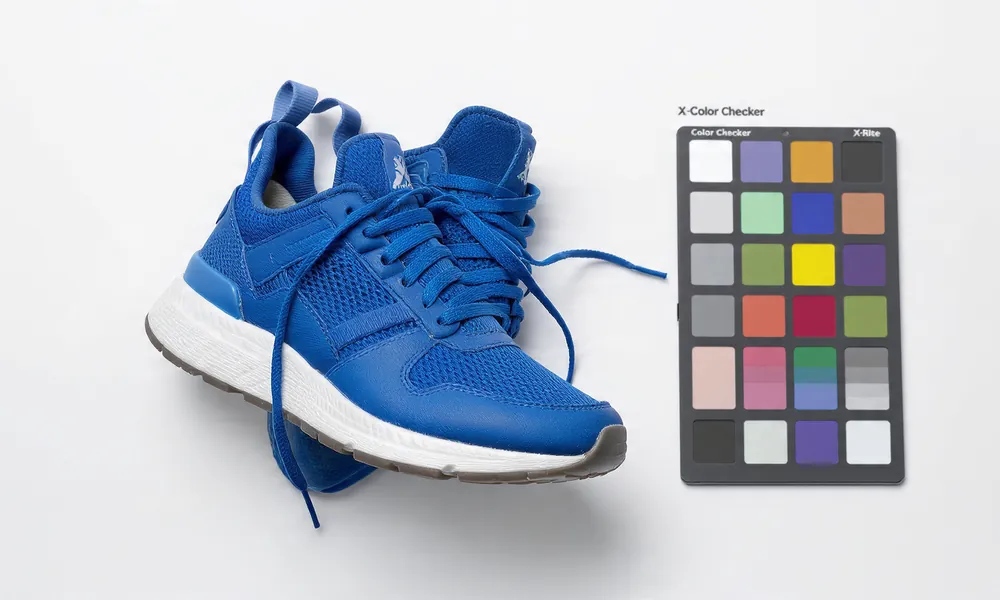
Fashion requires ghost mannequins, colorway development and wrinkle management. One dress with five colours means retouching once and accurate colour match each time. Precision retouching leads to accurate colour reproduction.
Jewelry has highest demand and requires focus stacking, removal of dust at 400%, smoothing metals without losing brushed texture. Pricing reflects this: $5.00-$25.00/image.
Beauty requires color accuracy to legally sell, and skin texture must be retained while removing blemishes. Retouching too much leads to complaints and returns.
Furniture: Oversized items require perspective corrections and stitching. Wood grain needs enhancing, not adding. Shadows need recreating.
Electronics: Dust and fingerprints appear larger. Screens need reflection replacement to show UI. All ports must look clean.
Food: Improve freshness, generate steam, adjust color saturation for realism while remaining appetizing. Must comply with advertising guidelines.
Luxury Products: Manual only. Buyers expect flawless. One bit of dust could prevent $5,000 watch sale.
Avoid Common Errors When Retouching
- Over editing: Editing leather to look like plastic eliminates tactile cues.
- Color accuracy: Primary reason for returns. If “burgundy” arrives as “bright red,” you incur shipping both ways.
- Fake shadows: If shadow goes left and light is right, brain assumes artificial.
- Plastic textures: Removing all pores or wood grain makes products look fake. 2026 trend is hyper-realistic retouching.
- Over sharpening results in white halos and cheap impression, especially on jewelry.
- Inconsistencies in lighting make catalog look unprofessional.
- Poor cropping leaves product out of focus or wastes mobile screen space.
Each error creates cognitive friction. When buyers hesitate, conversions are adversely affected.
How Product Photo Retouching Increases Sales
Signals of Trust – Clean, consistent images provide trustworthy brand image. Since 82% of buyers want free returns, they look for reasons to trust first.
Emotional purchasing: Improved tactile attributes through retouching make cashmere feel soft before touch.
Visual branding: Consistently using common light source increases brand recognition. Larger companies utilize style guides.
Mobile buyer behavior: 75% of traffic comes from mobile. Small screens do not tolerate clutter. Clean edges and bright contrast win.
Psychology of social proof: 47% of those who purchased from unknown brand said user reviews with images helped decide.
Example: A Shopify apparel brand switched from supplier images to professionally retouched ghost mannequin photos. This resulted in 28% increase in click-through rates and decrease in return rates from 24% to 18% within 90 days due to accurate coloring.
How to Choose the Best Photo Retouching Services
- Quality of Portfolio: Request full size images at 100%, including fabrics and jewelry. Edges should be clean.
- Turnaround Time: Simple jobs 24 hours, complex 48-72 hours. Digi-Texx provides 24/7 assistance.
- Pricing Transparency: Avoid companies without public price list. PicsRetouch has received poor reviews due to lack of transparency.
- Revisions Policy: At least 2 free revisions. Ensure layers kept.
- Scalability: Can they handle Black Friday? Prove capacity 65K+/month like Digi-Texx.
- Communication: Dedicated Slack or art director? Critical for color matching.
- Consistency: Do they use style guides?
- Security: NDA, ISO 27001, secure file transfer?
Checklist for hiring:
- Three test images (white product, black product, jewelry)
- Request before/after PSDs
- Confirm Amazon/Shopify export presets included
- Ask how they handle color matching
- Verify data security protocol
Professional Ecommerce Photo Retouching Services
In-house vs outsourcing: In-house provides immediate access but costs $45,000-$70,000 per year for mid-level retoucher, plus $700 software, plus management. Outsourcing costs $0.50-$5 per image without overhead.
Brands with fewer than 500 SKUs should utilize outsourced ecommerce product photo retouching services. Brands with over 5,000 SKUs should use hybrid model with in-house art director.
Choosing a Reliable Retouching Partner
Look for efficient process rather than promises. A solid partner provides onboarding call, style guide development, batch testing, and dedicated QC.
Some ecommerce businesses collaborate with organizations like PixelShouters, which offer scalable editing processes and consistent product image improvement when supervising periodically released catalogs across numerous markets. The value originates from documented workflows, revision tracking, and ability to meet your brand’s unique shadow and color standards.
If you find any service offering unlimited editing for $0.19 without providing full-resolution examples, proceed with caution. True quality at volume requires AI and human oversight.
Product Photo Retouching Pricing
| Service Type | Price (USD) | Time Required | Best For |
|---|---|---|---|
| Basic Background Removal | $0.29 – $0.99 | 3-5 Minutes | Amazon Bulk |
| Standard E-commerce Retouch | $1.00 – $2.50 | 8-12 Minutes | Shopify Stores |
| Advanced Retouching | $2.50-$5.00 | 15-25 Minutes | Electronics/Furniture |
| Ghost Mannequin | $2.00 – $7.00 | 20-30 Minutes | Fashion Brands |
| High-End Jewelry | $5.00 – $25.00 | 30-60 Minutes | Luxury Watches |
| Creative Compositing | $10.00 – $50.00 | 1-2 hours | Campaign imagery |
Factors: Complexity, volume commitment, turn-around time, number of revisions, security requirements. Costs for editing jewelry at Digi-Texx range from $0.29 to $25/image.
Save money: Batch similar items together. Retouch one hero, make actions, apply to others, then QC. Can save up to 40%.
Not Every Retouching Company Does Everything
The product photo retouching market is broad, and many companies offer many products or services under one roof — from basic background removal to advanced jewelry retouching.
It’s also normal for studios to specialize in one vertical. For example, in services like real estate photo editing by PixelShouters, the entire workflow is built for property marketing, not ecommerce products. That means HDR blending, sky replacement, perspective correction, virtual twilight, and lawn enhancement — techniques designed to make listings stand out on Zillow or Realtor.com.
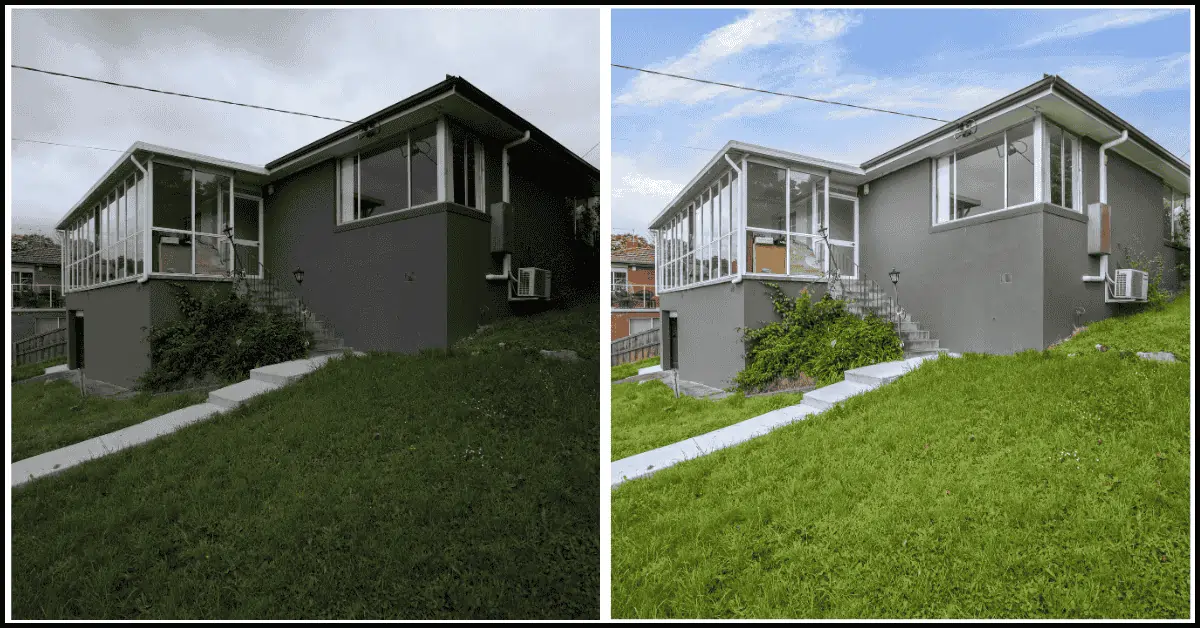
This is an important distinction for ecommerce brands. A studio that excels at real estate will have different tools, color profiles, and turnaround systems than a team that does daily ecommerce product photo retouching services for Amazon and Shopify.
Why this matters for you:
- Product retouching requires sRGB color accuracy, Pantone matching, and 1:1 white-background compliance
- Real estate retouching prioritizes dynamic range and environmental enhancement
- Choosing a specialist reduces revisions and protects your conversion rate
So when you’re comparing providers, don’t just ask “do you retouch photos?” — ask “what do you retouch every day?” The best results come from teams who live in your specific niche, whether that’s product, fashion, jewelry, or real estate.
Future Trends in Ecommerce Product Retouching
- Large Scale AI Automation – AI market for product photography expected to be worth $8.9 billion by 2034. Expect 15% annual growth.
- 3D and CGI substitution. 63% of retailers plan CGI to reduce returns.
- AR shopping integration will utilize retouched textures as base for try-ons. Accuracy becomes even more important.
- Hyper-realistic editing – 2026 trend is natural edits with ethical procedures focusing on authenticity. Preserve texture.
- Mobile-first optimization means vertically cropped 4:5 ratio, under 200KB, instant load. Google prioritizes Core Web Vitals.
- Quicker workflows – From 8 business days to same day. Squareshot delivers in 8 workdays, AI tools take less than 10 seconds.
- Generative AI for Backgrounds – Generate contextually accurate scenes while keeping product 100% real. Trust is maintained when scaling content.
FAQs About Product Photo Retouching
What is product photo retouching?
Process of cleaning dust, correcting color, removing backgrounds, adjusting shape, and adding shadows so images accurately represent products and convert customers.
How long does it take?
AI: 5-10 seconds. Human basic: 5-10 minutes. Human jewelry: 30-60 minutes.
Can AI replace retouchers?
AI can manage repetitive tasks. Humans do fine-quality judgment. Ecommerce teams prioritize tools that maintain accurate representation.
Why outsource editing?
To lower costs, reduce turn times, and maintain consistent quality. Most brands cannot manage 65,000 images per month internally.
What format should be used?
Capture RAW, edit as PSD/TIFF master, deliver JPEG for Amazon or WebP for Shopify.
Does retouching help sales?
Yes. High resolution photography makes up 93% of buyer decisions and improves sales by 30%, while reducing returns by as much as 1/3.
What are Amazon main image dimensions?
1000 pixels minimum, preferred 2000-3000 pixels, square 1:1, pure white background.
How to maintain color consistency?
Use calibrated monitor, sRGB workflow, provide Pantone codes, request colour proof.
Should I retouch lifestyle photos?
Yes. Remove distractions while maintaining natural balance. Customers distrust overly perfect lifestyle images.
Can I do it myself?
If editing less than 20 products in Photoshop, yes. Over 100 products, outsourcing is more affordable.
What to send a retoucher?
Three reference images, platform specs, Pantone codes, and areas to change.
Will AI make products look fake?
Only if overused. Best practice in 2026 is AI for speed, human for final 10% polish to maintain authenticity.
Conclusion
The connection between a photographed product as captured by a camera and how a customer sees the product when they purchase it is done through product photo retouching. In an environment where returns cost businesses $849.9 billion per year and 20% of purchases are returned because the product did not match expectations, accuracy is not a creative option; it’s a method of increasing profits.
In 2026, those who prevail will not simply pick AI or manual, but instead will be creating hybrid workflows that include using AI for background removal and initial clean-up, while employing skilled retouchers to adjust colour, shape and texture along with having rigid style guides to ensure consistency. They will invest in retouching as conversion rate optimisation rather than as an expense – with ability to measure ROI.
Start by taking your top 10 selling SKUs and having them produced with professional product photo retouching with correct cropping, color correction and natural shadows. A/B test over 30 days against current photography. Track click thru rate, conversion rate and return rate.
The data will tell you what 93% of shoppers already know: they buy with their eyes first. Give them something worth trusting.