
Key Takeaways: Looking for the best panorama stitching software in 2026? In this guide I tested 10 panorama stitching software tools on real kitchens, bedrooms, and large restaurant halls – you’ll see real stitched results, pricing, and which tool is best for real estate, HDR, and 360 virtual tours.
I lost a client because of bad stitching and I will never forget it.
It was a boutique hotel in Sedona, Arizona 2019. I shot a 3 row panorama of their presidential suite. 24 images, I thought I did everything right. I came home, used a free online stitching tool, and sent them the final file. The bed looked bent in the middle, the straight lines of the windows were wavy, and you could see a half transparent ghost of the manager in the mirror.
They never called back. I lost $400 and felt like an amateur.
That night I deleted that free tool and decided to actually learn this properly. Since then I have stitched more than 600 panoramas. Landscapes in Utah, real estate in Austin, drone panos over Big Sur. I have bought, tested, and cursed at almost every panorama stitching software out there.
If you are searching for panorama stitching software right now, you are probably confused. Every blog says something different. Some say Lightroom is enough, some say you need to pay $300. Some lists even include tools that were discontinued in 2018.
So I made this guide. Same images, same laptop, no sponsorship. Just what actually works in 2026.
Table of Contents
What is Panorama Stitching Software Really?
Let me explain it like I explain it to my students, without technical jargon.
You stand in one spot and you take 5, 10, or 40 photos while rotating a little bit each time. Each photo overlaps the last one by about 30 to 50 percent. Your camera cannot capture that whole wide view in one shot.
Panorama stitching software is the thing that looks at two overlapping photos, finds the same rock or same window corner in both, and says okay these two belong together. Then it fixes your lens distortion, fixes the exposure because a cloud moved, and blends the seam so you cannot see the line.
People also search for it as panorama maker, photo stitching tool, image stitching software. It is all the same thing.
Without good software you get ghosting, broken buildings, and weird color bands in the sky. With good software you get a seamless 200 megapixel file that looks like you shot it on some crazy expensive wide camera.
How Does It Actually Work?
Once you understand this, you will never pick bad software again.
Step 1: Finding control points. The software scans the overlapping area to find identical details. A corner of a building, a texture on a rock. The new AI panorama stitching software like PTGui 13 is scary good at this. It can find 3000 points in 5 seconds. Old free tools struggle when you have a plain blue sky because there is literally nothing to find. That is why drone panos are so hard.
Step 2: Alignment and optimization. It figures out your lens, how much distortion you have, and exactly where your camera was. This is where parallax errors show up. If you shot handheld close to a chair, the chair will shift between frames. Pro tools like PTGui Pro let you fix this with viewpoint correction. Lightroom does not let you fix it at all.
Step 3: Projection. It takes your flat photos and wraps them onto a shape. Cylindrical is best for normal single row landscapes. Spherical is for full 360 x 180 VR that you need for virtual tours. Rectilinear keeps straight lines straight, good for architecture. Little Planet is that fun tiny planet effect.
Step 4: Blending and exposure fusion. It evens out vignetting, color, exposure, then blends the seam using multi-band blending. If you are doing HDR panorama stitching for interiors, it first merges your bracketed exposures, then stitches. Good blending also removes moving people and waves. Bad blending leaves you with transparent ghosts.
The best panorama stitching software nails all four steps. Most cheap ones only do step one okay.
Types of Panoramas You Can Create
You should know this before you buy anything, because not every tool does everything.
Single row flat panoramas. The classic. 3 to 10 images in one row left to right. A Mountain range over the Grand Canyon, a New York skyline. Every single software can do this.
Multi row panoramas. You shoot 2, 3, even 10 rows on top of each other. This is how you make gigapixel images that you can print 20 feet wide. I shot an 87 image multi row in Monument Valley and it was 1.2 gigapixels. Only PTGui Pro, Hugin and Pano2VR handle this well.
Full 360 spherical panoramas. The full ball. 360 degrees around, 180 degrees top to bottom. This is what you need for real estate virtual tours and VR. You need either a fisheye lens or 20 plus shots. This is where you need dedicated 360 panorama stitching software.
HDR panoramas. You bracket each position. So for one angle you shoot 3 exposures, dark, normal, bright. Then you merge HDR then stitch. Essential if you shoot real estate interiors where inside and outside window both need to be exposed. If a software says it does not support HDR, skip it for real estate work.
Drone panoramas. 21 to 45 images shot from a DJI or Insta360 drone while it rotates. Hardest to stitch because you have huge empty sky and moving clouds. Most built in photo editor panorama tools fail on these.
How I Tested Every Tool
I hate those lists that just rewrite feature pages. So I did it properly.
Test Set A – Complex Landscape: 19 RAW files from Sony a7R V, 45 megapixels each, converted to 16 bit TIFFs. Multi row mountain in Zion National Park, Utah with moving clouds. This tests blending and control point accuracy.
Test Set B – The Hardest Test: 21 drone images from DJI Mavic 3 over Big Sur coast in California. 60 percent empty blue sky, no detail. If a software can stitch this, it can stitch anything. This is the test that broke 5 tools in my test.
Machine: M2 Max MacBook Pro 64GB and a Windows PC with RTX 4080 to test GPU acceleration.
What I measured: Did it stitch at all, ghosting artifacts, horizon straightness, file size, and stitching time. No brand paid me. I bought PTGui myself years ago.
Tested by PixelShouters
At PixelShouters we are a small team of photographers and editors. We buy and test photo tools with our own money – no sponsorships. This panorama test took us 3 weeks and 120GB of test files. If you find it helpful, share it.
What To Check Before You Buy Any Panorama Stitching Software
Steal this checklist. I give this to all my workshop students in Denver and Austin.
1. Auto plus manual control points. You want amazing auto for 90 percent of panos, but you need manual override for that 10 percent when sky is empty. PTGui Pro and Hugin give you both. Lightroom, Luminar, Affinity give you only auto. When auto fails, you are stuck with no way to fix.
2. Real HDR and exposure fusion. Ask, does it merge bracketed RAWs natively? PTGui Pro, Lightroom Classic, Panoweaver 10 and 3DVista do. Photoshop and Affinity do not do it properly. For real estate interior work this is non negotiable.
3. True 360 VR output and fisheye support. Can it take a full frame fisheye circle and make a spherical equirectangular? Can it output cubic faces, little planet, and HTML tour? If you want to do virtual tours, this matters more than stitching quality.
4. RAW workflow. This is why I still love Lightroom. It gives you a DNG back, not a TIFF. So you keep full RAW flexibility. You can still pull shadows 3 stops. Hugin forces you to export 16 bit TIFFs first. That means double storage. Not a dealbreaker but annoying if you shoot a lot.
5. Projections. Lightroom gives you 3 projections. PTGui gives you 12. Hugin gives you even more. More projections means more creative freedom. For architecture you want rectilinear, for landscapes cylindrical.
6. Batch processing and GPU speed. If you come home with 15 panos after a shoot, you do not want to stitch one by one. Batch is a life saver. PTGui’s GPU acceleration stitched my big set in 31 seconds. Hugin took 90 seconds. Photoshop took 2 minutes 8 seconds. That time adds up.
7. Pricing model. I am old school, I hate subscriptions. PTGui Pro is $195 one time forever. You can install on 3 computers. Affinity Photo is now FREE forever after Canva bought it, which is insane value. Adobe is $22.99 every single month until you stop paying. Think long term cost.
The 10 Best Panorama Stitching Software in 2026 – My Honest Reviews
1. PTGui Pro – The One I Paid For And Still Use Every Week
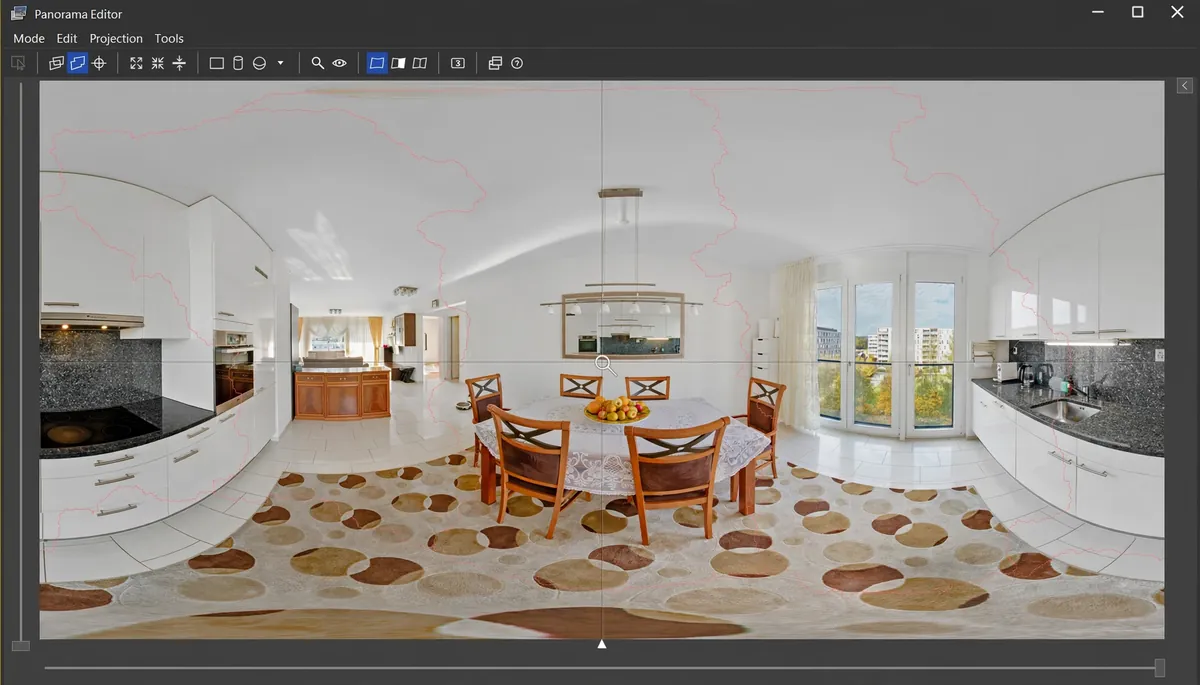
Price: $195 Pro, $111 standard. One time, lifetime license. Free trial with watermark.
I have owned PTGui for 5 years. Is the interface pretty? No. It looks like Windows XP. Do I care? No, because it has never failed me once.
On my drone test, PTGui was the only paid panorama stitching software that found control points in all 21 images. Everyone else left out one or two sky frames. It took 31 seconds. Horizon straight, no ghosts.
What you pay for is control. You can mask out a tourist who walked into your frame, you can fix parallax with viewpoint correction, you can stitch telephoto, wide, fisheye, anything. You can make flat partial panoramas, full 360 spherical, gigapixel, HDR. Batch process 50 panos overnight. Version 13 now has AI control point detection and it is super fast with GPU.
If you make even a little money from panoramas, real estate, architecture, landscape prints, buy this before you buy any fancy nodal rail. It is hands down the best panorama stitching software for professionals in 2026.
Pros: Never fails on hard shots, full manual control, HDR, batch, gigapixel, 360.
Cons: Steep learning curve, UI is dated, price hurts if you only stitch twice a year.
Best for: Professionals, real estate virtual tours, gigapixel, 360 VR.
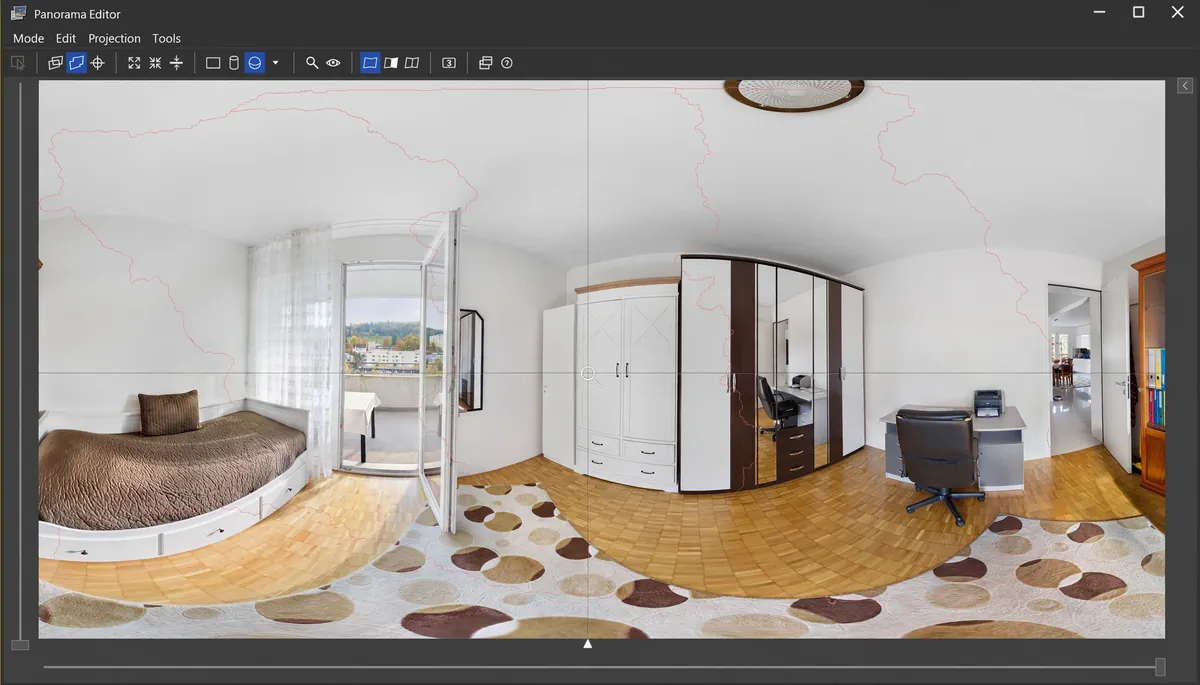
Small Rooms Test: Bedroom + Home Office
Small bedrooms are actually harder to stitch than kitchens. The floor and ceiling curve in equirectangular projection and software often fails here. PTGui kept the lines clean
2. Adobe Lightroom Classic – My Daily Driver For Simple Panos
Price: Included in Photography plan $22.99 per month
I still use Adobe Lightroom Classic 70 percent of the time. Because I live in Lightroom anyway.
Select 4 to 8 images, right click, Photo Merge > Panorama. Choose Spherical for wide stuff, Cylindrical for single row. Check Auto Crop and Boundary Warp to 100%. Click Merge. Done. Mine took 1 minute 27 seconds for 19 images which is faster than Photoshop.
The standout feature no one talks about enough is DNG output. You get a RAW DNG back, not a TIFF. So you still have all that RAW headroom to edit shadows and highlights. That is huge for landscapes.
Where it fails is complex stuff. My drone pano had a tiny step in the horizon and I could not fix it because Lightroom does not let you edit control points. If it fails, it fails. For simple 3 to 6 image single row landscapes with no movement, it is perfect and most convenient.
Best for: Lightroom users, single row landscapes, quick social media panos.
3. Adobe Photoshop Photomerge – The Fixer When Lightroom Fails
Price: Same $22.99 per month plan
Photoshop does stitching very differently. Go to File > Automate > Photomerge. It imports each photo as a separate layer with a mask. That means when something ghosts, you can actually paint on the mask and fix it yourself. I love this for fixing waves and moving clouds.
Adobe Photoshop Photomerge also handles big moving objects better than Lightroom and has Content Aware Fill for those transparent edges. But it is slow, 2 minutes 8 seconds in my test, creates massive PSB files, and only gives you 4 projection options. And no DNG output.
I use it when Lightroom fails but I am too lazy to open PTGui.
Best for: People who need layer level control to fix ghosts manually.
4. Hugin – The Free Tool That Shocked Me And Beat Paid Tools
Price: Free, open source, Windows Mac Linux
I will be honest, I went in with low expectations. Everyone says Hugin UI is terrible. It is. First hour I wanted to uninstall. It is confusing, thrown together, you need YouTube tutorials.
But then I stitched that drone pano with empty sky. And Hugin gave me the cleanest result of all 10 tools. Cleaner than PTGui. No wobbly horizon, no missing frames, no ghosting. It found control points where Lightroom and Affinity said there is nothing.
Why? It uses same core Panorama Tools library as PTGui but its algorithms are more careful and slow. It took 90 seconds vs PTGui’s 31 seconds, but result was better. It does HDR, it supports more projections than any other tool, it runs on Windows, Mac, Linux, and it is completely free.
Downsides are real. It can’t read RAW directly, you have to export 16 bit TIFFs first which eats storage. It is slow. UI is horrible. But if you want the best free panorama stitching software and you have patience to learn, this is it. I have massive respect for developers who build this for free.
Best for: Free power users, Linux users, people who want to learn fundamentals properly.
5. Affinity Photo 2.5 – Now Completely Free And The Best Photoshop Replacement
Price: FREE now. In 2026 after Canva acquisition they made it free forever.
This changed everything. Affinity Photo used to be $69, now it is free. Full professional editor, panorama stitching included via Photo Persona, plus HDR merge, focus stacking, astrophotography stacking.
Stitching is decent for normal DSLR panos. For drone it struggled like Capture One, it missed a couple frames in my hard test. But it does let you manually adjust alignment which is rare for photo editors. And you can open PSD files, do non destructive editing, and it has iPad version.
If you want free panorama stitching software that looks modern and doesn’t make you cry like Hugin, get Affinity Photo right now. It is a no brainer for beginners.
Best for: Beginners, students, anyone who wants free Photoshop plus panorama stitching.
6. Luminar Neo – Easiest AI Panorama Stitching For Beginners
Price: Around $65 one time, panorama is an extension included in Pro plan
Luminar Neo is pure AI simplicity. You import photos, click Panorama Stitching extension, and it auto aligns, fixes distortion, vignetting, chromatic aberration. You do nothing.
For simple panos it looks great and super easy. But my tests showed big issues. It was slow, 2 minutes 15 seconds, and it creates huge TIFFs. For drone panos it completely failed, missing images and making wobbly horizon that looked drunk. Same issue other reviewers noted for On1 Photo RAW.
I would not buy Luminar just for panorama stitching. But if you already own Luminar for its Sky AI and other AI tools, it is a nice bonus that sits inside Lightroom.
Best for: Absolute beginners who already own Luminar and only shoot simple landscapes.
7. 3DVista Stitcher and Pano2VR – Best For People Who Sell Virtual Tours
Price: Pano2VR Pro $399, 3DVista Stitcher $99
Here is what most comparison blogs miss. Stitching is only half the job. Getting that 360 panorama to your client in a way they can actually experience it is the other half. A 360 JPEG looks like a stretched distorted mess unless viewed in a proper viewer.
3DVista Stitcher 4 is the only panorama stitching software that can stitch Live Panoramas and Adaptive HDR Panoramas that work inside Virtual Tour Pro. Pano2VR takes your stitched equirectangular and turns it into an interactive tour with hotspots, floor plans, audio. You can share a link and client opens it on phone, no app needed.
If your end product is a real estate tour, hotel tour, or survey documentation, this category is more important than just stitching quality.
Best for: Real estate photographers, surveyors, anyone delivering virtual tours.
8. Panoweaver 10 – Best For Fisheye Shooters
Price: $149.95 standard, $399.95 pro
Very niche but important. If you shoot with a full circular fisheye lens like 8mm and you get a round image, Panoweaver is built exactly for that. It can stitch full circular, drum type, and full frame fisheye into full spherical panoramas. It supports HDR and batch and has built in publishing to HTML5 tour.
Interface looks old, price is high, but if you use fisheye for 360 work, nothing is faster.
Best for: 360 photographers using fisheye lenses.
9. PhotoStitcher – The Two Button Tool For People Who Hate Learning Software
Price: $29.99 one time
Remember Microsoft ICE? That super simple free tool Microsoft killed in 2021? PhotoStitcher is its replacement. Two buttons. Add images, click Stitch. That’s it. It automatically handles alignment, blending, cropping. It can even stitch scanned documents and satellite images. Not for pros, but perfect if you hate learning new software and just want a quick pano once a month.
Best free ICE replacement in 2026 is actually Affinity Photo or Hugin if you want free.
Best for: Absolute simplicity, one click.
10. Insta360 Studio and DJI Mimo – Best For Drone And 360 Camera
Price: Free with your camera
If you fly DJI Mavic 3, Air 3, or use Insta360 ONE X3, X4, use the app that came with it. Insta360 Studio and DJI Mimo use flight telemetry metadata to help stitch, so it is fully automatic and fast. Around 20 seconds for a 21 shot pano.
Quality is okay for Instagram and quick client previews but not for high end prints. It has limited control, output quality lower than dedicated tools. I use it to quickly check if my drone pano worked on location, then I restitch properly in PTGui back home for final delivery.
Best for: Drone pilots, quick turnaround, social media.
Quick Comparison Table
How I Stitch A Panorama In 2 Minutes – My Workflow
In Lightroom for quick ones: Select images with 40% overlap > Right click > Photo Merge > Panorama > Pick Spherical > Check Auto Crop > Boundary Warp 100% > Merge. You get DNG.
In PTGui for client work: Load images > Align Images > Check control points, if sky empty add 2 manual points > Go to Panorama Editor > Level horizon > Mask tab > Mask out ghosts > Create Panorama > 16 bit TIFF LZW. Then final edit in Photoshop.
Pro tip I learned the hard way: Always shoot manual exposure, manual white balance, manual focus, and overlap 40%. Never use polarizer for panos, it makes uneven sky.
7 Mistakes That Ruin Panoramas Even With Best Software
- Not enough overlap. You need 30 to 50 percent. I see beginners do 10 percent and wonder why it fails.
- Auto exposure. If exposure changes between frames you get banding. Shoot manual.
- Parallax. Shooting handheld close to subject. Use nodal rail or step back.
- White balance on auto. Sky color shifts. Shoot manual WB.
- Polarizer filter. Makes sky uneven. Take it off.
- Moving subjects in overlap area. People walking. Time your shots.
- Trying to fix bad shooting in software. No panorama stitching software can save badly shot images. Get it right in field.
FAQ
What is the best free panorama stitching software in 2026?
For ease, Affinity Photo now free. For power, Hugin. Hugin beat paid tools in my hard drone test, but Affinity is easier for beginners.
What do professionals use for panorama stitching?
95 percent of pros I know use PTGui Pro for complex and 360 work, and Lightroom for simple 3 to 6 image landscapes. Real estate pros also use 3DVista or Pano2VR to deliver tours.
Can Lightroom stitch full 360 panoramas?
Not full 360 x 180 with zenith and nadir. It does partial panos. For full spherical you need PTGui, Hugin or Panoweaver.
Is there AI panorama stitching software?
Yes. PTGui 13, Lightroom and Luminar Neo all use AI for control point detection and Fill Edges. It saves 10 minutes per pano.
What is easiest for beginners?
If you already pay Adobe, Lightroom. If you want free, Affinity Photo or PhotoStitcher for one click.
Final Verdict – Which One Should You Actually Get?
There is no perfect tool. There is only right tool for your work.
I started with Lightroom, got frustrated, bought PTGui Pro and never looked back. Now I use both. Lightroom for quick 4 image sunsets, PTGui for everything that matters to clients.
My advice for you: Don’t overthink. Download Affinity Photo and Hugin today, both free. Shoot 5 images from your balcony with 40 percent overlap. Stitch in both. You will know in 20 minutes which workflow you like.
About the Author – PixelShouters
PixelShouters is run by a team of landscape and real estate photographers who also work in SEO. We started this site to give honest, hands-on reviews of photography software without affiliate fluff. Have a tool you want us to test next? Contact us.