
AI vs professional real estate photo editing is not a simple software-versus-human choice. AI is useful for fast bulk corrections, while professional real estate photo editing is stronger for luxury listings, accurate colors, window pulls, twilight edits, and consistent brand style.
Some photographers also search for this decision as AI vs human photo editing. In real estate, the human side matters most when an image needs accurate color, natural light, clean window views, and judgment that a preset cannot apply.
Short answer: Use AI when speed and low cost matter most. Use a professional real estate photo editor when image accuracy, buyer trust, and listing presentation matter more than a quick automated result.
Reviewed June 2026: This guide is written for real estate photographers, agents, and marketing teams comparing AI editing tools with professional real estate photo editing services for live listing workflows.
Imagine this. A photographer in Phoenix just finished shooting 12 properties back to back. He gets home, opens Lightroom, and sees 480 images that need to be bright, straight, and blue-sky perfect by 7 am. In Austin, a boutique brokerage uploaded 1,800 square feet of virtual twilight shots and the MLS rejected half for dark windows and yellow walls. In Miami, a luxury agent is waiting on just eight hero photos, but those eight will decide if a buyer books a showing.
This is where most teams get stuck. AI photo editing promises speed. It can batch brighten interiors, swap gray skies, straighten verticals, and remove a trash can from a driveway in seconds. That is why busy real estate teams use it for volume.
But speed is not judgment. AI does not know your brand prefers warm but not orange wood tones. It does not know that a high-end listing needs natural window pulls, not fake HDR. It cannot read a note that says keep the view soft, do not blow out the pool lights.
That is why professional real estate photo editors still have waitlists. They blend exposures by hand, keep paint colors true, and make twilight shots feel like a magazine cover, not a filter.
Table of Contents
What Is AI Photo Editing?
Think of AI editing as a very fast apprentice who has studied millions of photos.
How AI Learns to Edit Images
It is not guessing. AI image editing tools use computer vision to segment your photo: this is sky, this is skin, this is product, this is background. Then machine learning models trained on before-and-after pairs predict adjustments.
The process looks like this:
AI Real Estate Photo Processing Workflow
Upload a raw real estate image directly from the photographer’s camera.
Detects lighting issues, shadows, color casts, windows, sky, and room details automatically.
Applies exposure balancing, white balance correction, denoise, masking, perspective adjustments, and image enhancement.
Delivers a clean, bright, MLS-ready image for review before final delivery.
In practice, Adobe Photoshop with Firefly analyzes a product shot, finds the edges, removes the background, and relights it in one click. Luminar Neo does sky replacement by recognizing horizons. Canva’s AI enhancer balances a social post in seconds. Pricing in 2026 ranges from $7.99 to $277 annually for these tools.
What AI Does Best
- AI photo enhancement: auto tone, dehaze, noise reduction
- Background removal: essential for ecommerce, done in under 10 seconds
- Batch color balancing: 1,000 images with one preset
- Object removal: generative fill for distractions
- Quick style trends: film grain, Y2K looks, cinematic grades driven by prompts
What AI Still Struggles With
- Context. It does not know your brand forbids orange skin tones.
- Physics. Reflections in watches, glass, and jewelry confuse it.
- Texture. AI retouching often removes pores along with pimples.
- Consistency across mixed light. A living room with tungsten lamps and daylight windows will get uneven color.
- Subtle feedback. “Make it feel more premium” is not a slider.
Use AI when the goal is clean, fast, and good enough. Do not use it when the goal is distinctive.
What Is Professional Photo Editing?
Professional photo editing is human judgment with tools, not tools alone.
A human editor starts with a brief, not a button. They ask: where will this live? Print or Instagram? What did the client reject last time? What is the brand’s red value?
The Professional Editing Workflow
- Photo review: cull, flag technical issues, check focus.
- Color correction: match to reference, not to “pleasing.” For product photo retouching, this means hitting Pantone 186C exactly.
- Detail enhancement: local dodge and burn to shape a face, frequency separation to keep skin texture while cleaning tone.
- Retouching: remove temporary blemishes, keep permanent features. For commercial image editing, remove dust, not character.
- Quality check: zoom to 200%, check edges, check for banding, check file specs.
- Delivery: named layers, correct color space, versioned files.
This is why human specialists charge $0.50 to $15.00+ per image for complex work, while AI sits at $0.05–$0.08 for basics. Small businesses often see $25–$100 per hour for pro work. You are buying decision-making, not just clicks.
AI vs Professional Real Estate Photo Editing
Comparing speed, creativity, quality, scalability, and long-term business value.
| Factor | AI Editing | Professional Editing |
|---|---|---|
| Speed | Processes thousands of images overnight. | Reviewed individually for higher quality. |
| Accuracy | Strong for standard images and repetitive tasks. | Handles difficult lighting and details precisely. |
| Consistency | Can vary between projects and scenes. | Maintains a consistent editing style across listings. |
| Creative Control | Relies on presets and automated decisions. | Customized to match brand and listing requirements. |
| Complex Work | Limited with advanced composites, reflections, and masking. | Ideal for detailed retouching, window pulls, and composites. |
| Revisions | Quick reruns but limited interpretation. | Supports detailed feedback and subjective quality requests. |
| Scalability | Virtually unlimited processing capacity. | Scales through trained editing teams and quality control. |
| Cost | Lower cost per image. | Higher investment with stronger quality control. |
| Best For | High-volume listings, drafts, rentals, and social media. | Luxury listings, twilight edits, print marketing, and premium branding. |
In short, AI editing advantages are speed and price. Benefits of professional editing are control and trust.
Decision rule: Treat AI vs professional real estate photo editing as a risk decision: automate basic photos, then send brand-critical images to a human editor.
AI vs Human Photo Editing: What Changes in Real Estate?
AI vs human photo editing is the broader version of this comparison. AI can process a room quickly, but a human editor decides whether the wall color still looks true, whether the window pull feels natural, and whether the final image supports the listing price.
- Choose AI for bulk exposure correction, simple straightening, basic sky replacement, and fast previews.
- Choose human editing for luxury homes, twilight images, mixed lighting, brand-critical galleries, and final quality review.
- Choose both when you need speed across the full shoot and human judgment on the hero images buyers notice first.
10 Situations Where AI Editing Is the Better Choice
1. Large image batches
- Why AI wins: A real estate team shooting 15 homes weekly cannot hand-edit 7,500 frames. AI does auto-straighten, HDR merge, and exposure lift.
- Risks: window color shifts between rooms.
- Best practice: create a reference image, run 20 test files, lock the preset.
2. Social media content
- Why: You need 30 posts this week. AI photo enhancers create bright, punchy images fast.
- Risks: everything looks the same.
- Best practice: use 3 presets max, rotate them.
3. Basic color correction
- Why: White balance and exposure are pattern problems. AI is 95% accurate.
- Best practice: shoot a gray card, let AI sync.
4. Background removal
- Why: Marketplaces require pure white. AI tools do this in under 10 seconds.
- Best practice: check edges on hair and transparent products manually.
5. Quick ecommerce uploads
- Why: Cost. At $0.05 per image, 2,000 SKUs cost $100 vs $3,000+ for humans.
- Risks: color inaccuracy leads to returns.
- Best practice: AI for all, pro for top 5% sellers.
6. Simple portrait enhancement
- Why: Internal headshots. AI whitens teeth and brightens eyes.
- Best practice: set smoothing to 20–30%, never 100%.
7. Fast previews
- Why: Clients decide faster with edited proofs.
- Best practice: watermark “AI preview – not final.”
8. Draft marketing assets
- Why: Test five looks before paying a retoucher.
- Best practice: export low-res to avoid accidental use.
9. Content testing
- Why: A/B test thumbnails cheaply.
- Best practice: track CTR, not likes.
10. Budget-conscious projects
- Why: Startups facing $500–$2,000 per shoot plus editing find AI offers 95–98% lower costs.
- Best practice: reinvest savings into pro retouching for hero images.
10 Situations Where Professional Editing Wins Every Time
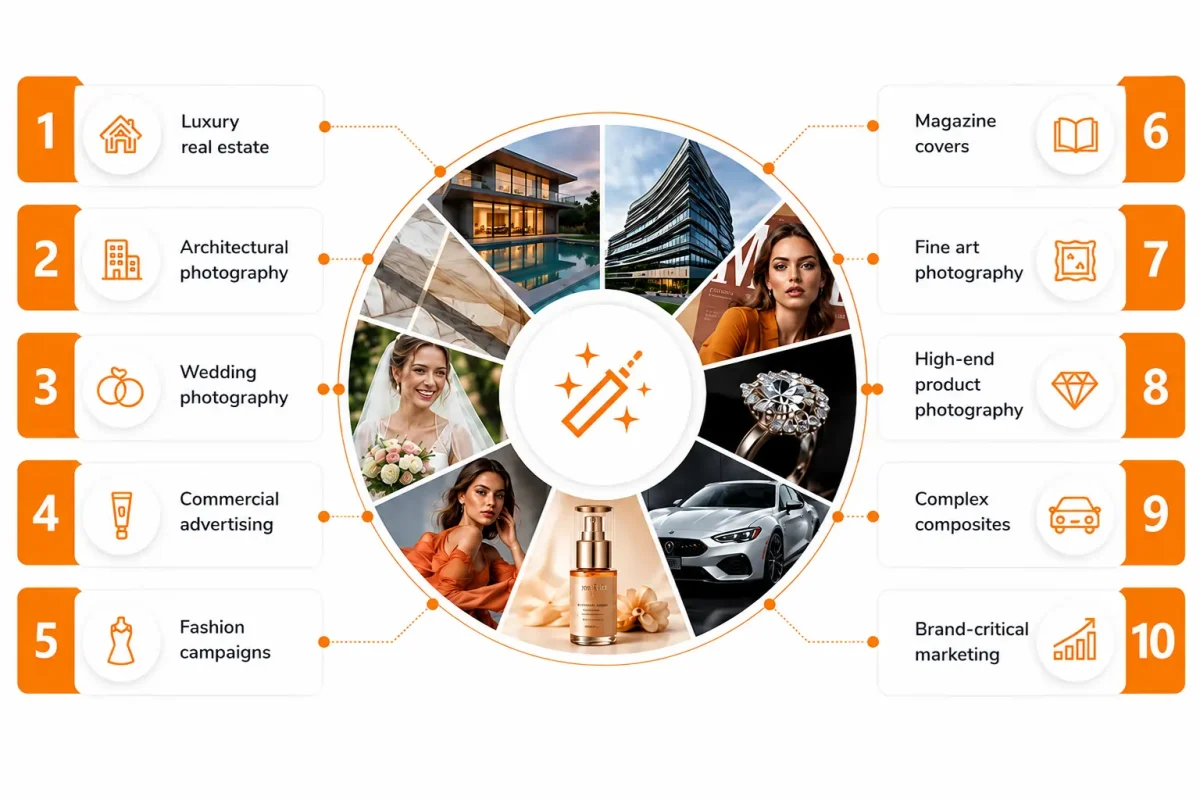
1. Luxury real estate
AI blows highlights in marble. A pro blends 5 exposures, keeps window views natural, corrects verticals without warping furniture.
2. Architectural photography
Mixed CRI lighting needs selective color. Human editing expertise preserves material truth.
3. Wedding photography
A bride wants her laugh lines kept. AI removes them. A pro uses manual photo editing to clean only temporary blemishes.
4. Commercial advertising
A skincare campaign needs identical skin tone across 40 images shot over 3 days. Only a human can match.
5. Fashion campaigns
Fabric texture sells. AI smooths it away. Professional retouching keeps weave while removing dust.
6. Magazine covers
Frequency separation, dodge and burn, and color grading to a specific Pantone. AI cannot follow an art director’s markup.
7. Fine art photography
Intent matters more than correction. A human interprets.
8. High-end product photography
Jewelry. AI creates gray reflections. A pro paints realistic highlights.
9. Complex composites
Replacing a car background while keeping correct reflections and color spill requires problem-solving.
10. Brand-critical marketing
When AI-enhanced product photos boost conversions by 30–40%, the final 5% polish from a pro often adds another 1% lift, which pays for the entire edit.
The Hybrid Workflow: Why Smart Businesses Use Both
This is the core of the modern AI vs Professional Editing Guide. Stop debating. Stack them.
Step-by-step SOP:
- Shoot with edit in mind. Use gray card, consistent light.
- AI cull. Use Aftershoot or similar. It finds blinks and blur in 60 seconds.
- AI bulk. Run exposure, white balance, background removal.
- Human triage. Editor flags 3 categories: Good, Needs Fix, Hero.
- Pro retouch. Heroes get manual work: skin, product color, composites.
- QA. Check on calibrated monitor, compare to brand reference.
- Deliver. Export variants for web, print, social.
Why it works:
- Agencies cut turnaround from 14 days to 4.
- Photographers keep creative energy for selects, not 3,000 RAWs.
- Ecommerce brands get AI editing advantages for scale and professional editing quality for conversion.
Hybrid is not compromise. It is leverage. Companies looking to implement similar AI-powered image processing workflows at scale often collaborate with CISIN to develop custom AI solutions that combine automation with human oversight for consistent, high-quality results.
Industry-by-Industry Analysis
- Real Estate: Use AI for rentals, pro for luxury. AI handles sky swaps. Pros handle twilight blends and verticals. Winner: Hybrid.
- Ecommerce: AI for 95% of catalog. Pro for hero, color-critical apparel, and jewelry. Winner: Hybrid. AI boosts conversions up to 3x when done right.
- Portrait: AI for corporate batches. Pro for actors, executives, matrimonial. Winner: Professional.
- Wedding: AI cull + base color. Pro for album and prints. Winner: Hybrid.
- Automotive: Reflections need manual work. Winner: Professional.
- Food: Color accuracy is revenue. Winner: Professional.
- Hospitality: AI for daily social, pro for website and OTA hero images. Winner: Hybrid.
- Marketing Agencies: AI for speed to test, pro for client finals. Winner: Hybrid.
How Most Real Estate Teams Actually Do It
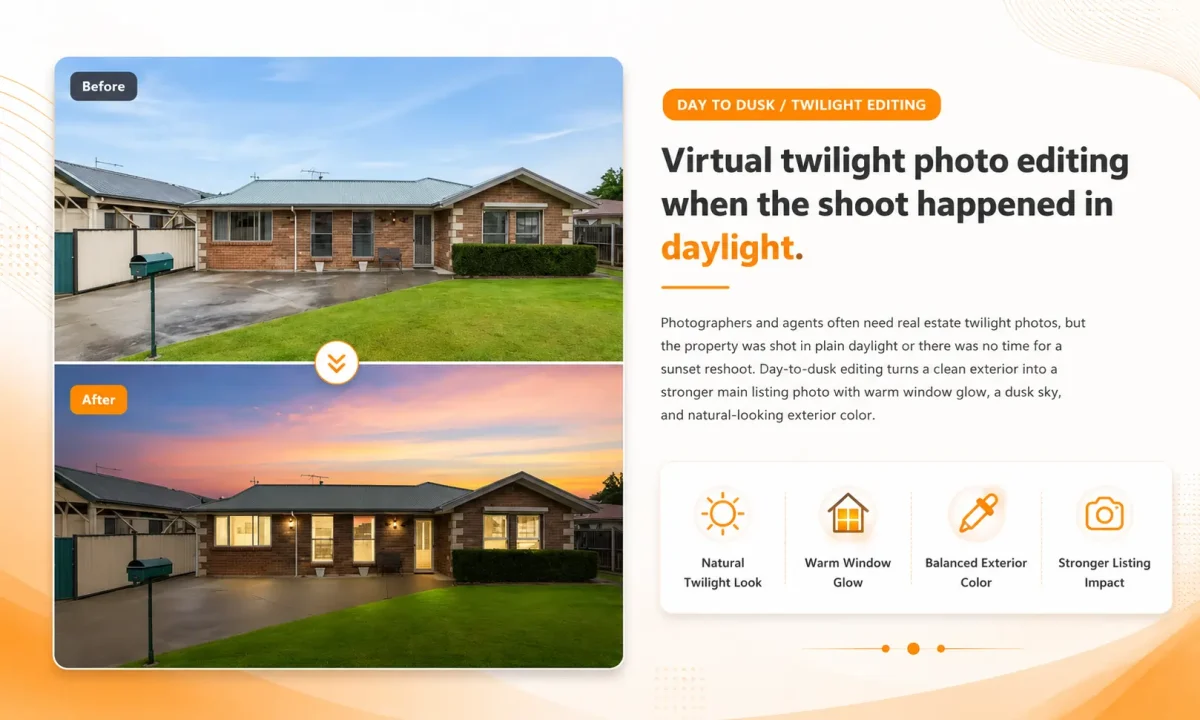
The teams that hit their deadlines do not pick AI or a human. They use both in layers.
In production, AI vs professional real estate photo editing works best as a layered workflow rather than a winner-take-all choice.
First pass is AI. It handles the bulk work that does not need taste — straighten verticals, lift shadows, correct white balance, batch sky replacement for standard listings. This gets 400+ photos to about 80% in an hour.
Second pass is human. A professional editor opens the 8 to 12 hero shots only — the twilight exterior, the kitchen, the primary bedroom, the living room with the view. They hand-blend the windows, keep the wall color true to the paint sample, and make sure the grass is green without looking neon.
This hybrid model is what we use daily at PixelShouters for real estate clients and in our professional real estate photo editing workflow. It keeps the per-image cost low for volume, but protects the listing quality where buyers actually make decisions. For agents, that means next-morning delivery without the over-processed HDR look that turns off luxury buyers.
You do not need a big studio to copy this. Run your AI preset, flag your heroes, and send only those for hand editing.
AI Editing Tools vs Professional Editing Services
Do not ask “which tool is best.” Ask “what job am I hiring for.”
- Need speed and 80% quality? Choose AI enhancers like Photoshop Firefly or Luminar Neo.
- Need pixel-perfect cutouts at scale? Choose background tools like Remove.bg or Claid.ai.
- Need natural skin? Hire a human retoucher who uses frequency separation.
- Need creative direction? Hire a studio, not software.
Think in tiers:
Tier 1 AI: social, drafts, bulk
Tier 2 Hybrid: ecommerce catalog
Tier 3 Pro: luxury, print, campaigns
Future of Photo Editing: AI and Human Collaboration
In the next five years, AI will not replace editors. It will become their apprentice.
We will see personalized models trained on your past pro edits. Your AI will know you never desaturate reds, you always keep grain, you lift shadows by 8 points.
Generative editing will handle background replacement and outfit changes from text prompts, but quality control will be human. The best creatives will spend less time clicking and more time directing.
The skill that wins: taste.
Bottom line: AI vs professional real estate photo editing is not about replacing editors. It is about using automation for scale and professional judgment where listing quality affects buyer trust.
FAQs
Is AI or professional editing better for real estate photos?
AI is better for fast, repetitive corrections on large batches. Professional real estate photo editing is better when the listing depends on accurate colors, natural window views, twilight quality, and a consistent brand style.
When should real estate photographers use AI editing?
Use AI editing for rentals, previews, basic exposure correction, straightening, batch white balance, and social media assets. It works best when the lighting is simple and the final image does not need detailed manual judgment.
When should you hire a professional real estate photo editor?
Hire a professional editor for luxury listings, day-to-dusk edits, HDR blending, window pulls, virtual staging support, difficult mixed lighting, and any photo where color accuracy or buyer trust matters.
Is AI vs human photo editing the same as AI vs professional editing?
AI vs human photo editing is a broader comparison between automation and manual judgment. AI vs professional real estate photo editing is the real estate-specific version, where the human editor handles listing accuracy, window views, twilight quality, and final delivery standards.
What is the best hybrid workflow for real estate photo editing?
The best workflow is AI for the first pass and a human editor for the final pass. AI can clean the full batch quickly, while a professional editor reviews hero images, fixes problem rooms, and protects the listing from an over-processed look.
For a fully managed option, review PixelShouters’ real estate photo editing services and send a sample set before scaling a full workflow.