
Real estate photo editing turnaround includes file checks, editing, quality review, export, and delivery. Agree when that clock starts and what happens if the brief changes before committing to an agent’s listing deadline.
PixelShouters standard turnaround is 12 hours for photo enhancement and HDR after the files and brief are confirmed. Complex retouching, staging, twilight work, large batches, and revisions need an agreed timeline. Ask the team to confirm availability before relying on an urgent delivery.
Send your image count, required edits, export format, and delivery deadline with its timezone. Clear instructions help your editor confirm the schedule and return files ready for your listing. Review the current PixelShouters service scope or request a quote and confirmed delivery time.
Table of Contents
Turnaround is, therefore, a capacity planning tool—photographers who treat it as a promise get burned. Photographers who treat it as a system build their shoot schedule around cutoff times, queue load, and revision buffers for real estate photo editing services.
Who This Is Really For
High-volume photographers
Shooting 5 to 15 properties per week, often 100 to 600 images per day. You depend on overnight delivery to clear your morning.
Pressure point: a single late batch backs up your entire next-day schedule and forces you to choose between delivering late or shooting late.
You also live with culling debt. If ingestion is slow, you cannot start the next cull. That is why consistent 12-hour return matters more than occasional 6-hour return.
Media companies
Managing multi-shooter pipelines across markets. You need queue visibility, not just speed.
Pressure point: three shooters uploading at 10pm creates a spike that overwhelms a vendor without capacity caps.
You need batch-level tracking, not inbox delivery. Without it, your production manager spends mornings chasing files instead of scheduling.
Boutique studios
Scaling from DIY Lightroom to outsourcing. You care about flambient consistency and window pulls.
Pressure point: you send mixed HDR and flambient in one folder and expect the same timeline.
Your clients notice color matching across rooms. That requires the same editor across a set, which adds assignment time but prevents rework.
Brokerage teams
Running hybrid in-house plus outsourced workflows with fixed internal deadlines.
Pressure point: marketing needs files by 8am for email drops, but revisions are requested at 9am after the listing is live.
You need split-shift coverage, not just overnight. Otherwise revisions sit until the next production cycle.
Turnaround Factors Vendors Don’t Show
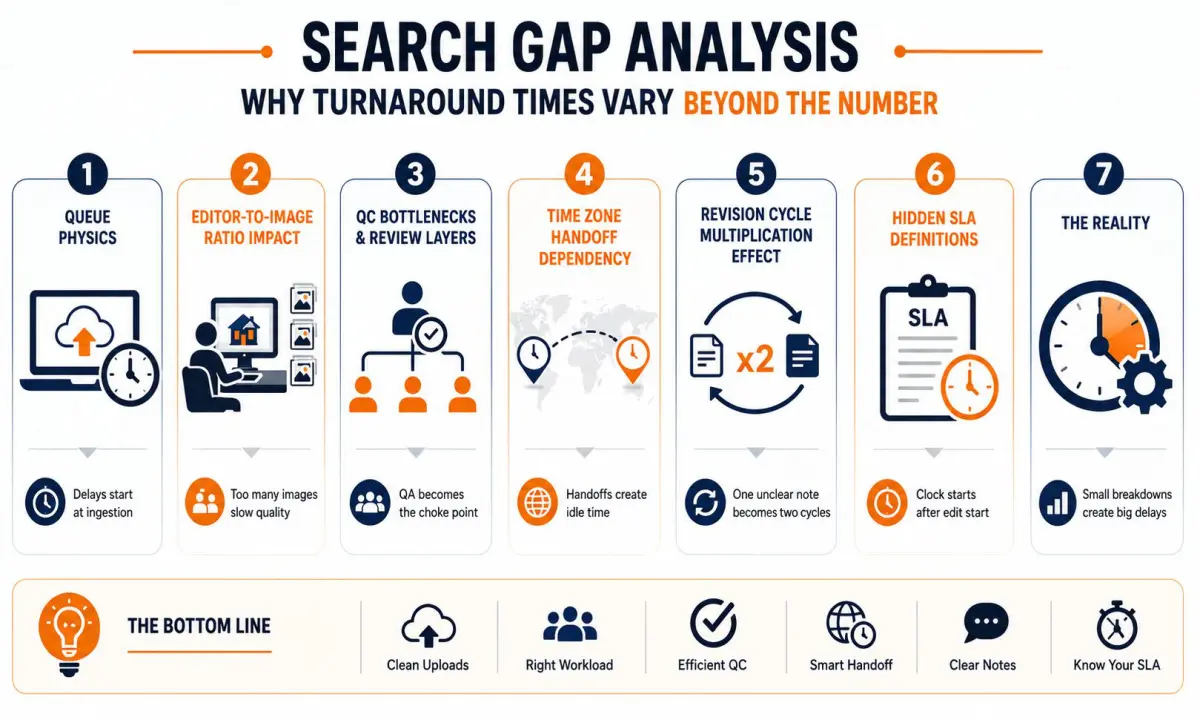
Most provider pages list a number. They rarely explain production physics.
- Queue physics: delays happen at ingestion, not editing. Missing brackets, mixed RAW and JPEG, or wrong folder structure stop the clock before an editor sees anything.
- Editor-to-image ratio impact: One editor can reliably process 120 to 180 HDR frames per 8-hour shift with QC. Assigning 300 images to one person guarantees overtime or skipped QC.
- QC bottlenecks and review layers: a single lead QA reviewing 10 editors creates a choke point at 6 am when overnight batches finish simultaneously.
- Time zone handoff dependency: offshore overnight teams work well for US evening uploads, but US morning revisions sit idle until the next shift starts.
- Revision cycle multiplication effect: one unclear revision note creates two cycles. Two cycles turn a 12-hour job into a 20-hour job.
- Hidden SLA definitions: “12-hour turnaround” can mean 12 hours from edit start, not upload. Edit start might be 4 hours after upload during peak.
Key Factors That Control Turnaround
1. Edit complexity
HDR 3-bracket is baseline speed. Flambient with 5 to 7 frames requires manual masking and doubles handling time. Day-to-dusk needs sky builds and window glow control. Virtual staging adds render and placement review. Each adds a separate queue with different staffing.
2. QC structure
Self-review by the editor catches 70 percent of issues. A second lead QA pass adds 20 to 30 minutes per 25 images but prevents rework. Compliance checks for verticals, color temperature, and export specs add another layer. Skipping lead QA saves time today and costs three hours tomorrow.
3. Staffing model
Pure offshore gives strong overnight coverage but weak US daytime revisions. Pure onshore gives daytime speed but costs more. Hybrid shifts with overlap from 6am to 10am PST solve most revision delays because the same team that edited overnight is still online.
4. Submission efficiency
Culled, sequenced brackets with consistent naming cut ingestion from 30 minutes to 5 minutes. Unculled dumps with duplicates force manual sorting and reset the SLA clock. Portal uploads with checksums beat email links every time.
5. Queue load
Capacity caps matter. A vendor taking unlimited uploads on Friday will push everyone’s delivery. Good operations publish peak load limits and offer priority queues for rush.
Workflow Explanation
- Upload completion: True start point. Clock starts when last byte lands.
- Job ingestion & validation: Files are checked for count, bracket grouping, corrupt frames.
- Editor assignment based on skill: HDR editors do not get flambient. Mismatch causes rework.
- Editing execution: Base blend, vertical correction, color balance, window pull, sky replacement per preset, lawn and cleanups.
- Internal QC review: Editor reviews at 100 percent zoom against reference.
- Lead QA pass: Lead checks consistency across the set.
- Final export & formatting: MLS, web, and print sizes with correct sharpening.
- Delivery to client portal: Structured folders, same filenames.
- Revision loop: Notes tied to filenames return to original editor when possible.
Production Timeline
Batch size affects queue priority. A complete 30-image set moves faster than three 10-image drips because it stays with one editor.
Real Estate Photo Editing Turnaround Tiers
- Same-day (limited scope): Small HDR batches under 20 images uploaded before noon local.
- 12-hour workflows: Standard for US evening uploads to offshore overnight teams. Works for HDR and light flambient.
- 24-hour standard pipelines: Covers most flambient, twilight, and mixed sets. Allows full two-pass QC.
- 48-hour complex edits: Day-to-dusk and virtual staging. Includes render time and staging QA.
- Rush workflows: Priority queue handling with dedicated editor.
| Tier | Best For | QC Depth | Typical Use Case |
|---|---|---|---|
| Same-day | Agent needs images by 6pm | Self-review only | Small HDR, pre-noon upload |
| 12-hour | Overnight HDR | Self + spot QA | 7pm to 7am cycle |
| 24-hour | Flambient, twilight | Full two-pass | Luxury listings |
| 48-hour | Dusk, staging | Full + staging review | Marketing campaigns |
| Rush | Small urgent sets | Reduced QA | Limited capacity, higher cost |
Speed vs QC depth vs revision risk is the real choice. Faster tiers reduce QA time. That works for standard HDR, not for luxury flambient.
Real-World Scenarios
200-image high-volume shoot day
- Situation: Media company, 8 properties, all HDR, uploaded 9pm to 11:30pm.
- Workflow: Batch split across 3 editors, shared QC lead.
- Bottleneck: All batches hit QA at 5:30am simultaneously.
- Outcome: 6 properties delivered by 7am, 2 delayed to 8:15am.
- Lesson: Stagger uploads by 30 minutes or request split QA leads for large days.
Flambient luxury property deadline
- Situation: 38 frames, 7-frame flambient, agent needs 8am launch.
- Workflow: Upload 6pm, assigned to senior flambient editor.
- Bottleneck: Two window pulls needed manual masking, added 90 minutes.
- Outcome: Delivered 7:40am with full QC.
- Lesson: Budget 16 to 18 hours for true flambient, not 12.
Dusk marketing campaign pressure
- Situation: Day-to-dusk for 12 exteriors, broker ad spend starts 6pm.
- Workflow: Upload 10am, rush queue.
- Bottleneck: Sky library mismatch required custom build.
- Outcome: 5:30pm delivery, tight but met.
- Lesson: Pre-approve sky style to avoid custom work on rush.
Overflow capacity spike during peak season
- Situation: Spring market, Thursday volume 3x normal.
- Workflow: Vendor without capacity cap accepted all jobs.
- Bottleneck: Queue grew, ingestion delayed 4 hours.
- Outcome: Standard 12-hour jobs became 22-hour.
- Lesson: Choose vendors who publish capacity limits.
Common Mistakes
- Misinterpreting SLA start time: Happens because pages say “12 hours” without defining start. Causes missed launches. Correct approach: confirm the SLA starts at upload completion with timestamp.
- Sending unculled or poorly structured files: Happens when rushing from shoot. Causes ingestion delays and wrong bracket grouping. Correct approach: cull in camera, use property folders, sequential naming like 01_Living_001.
- Ignoring revision timelines: Happens when agents request changes after listing is live. Causes emergency re-edits. Correct approach: build 2 to 4 hour revision buffer into your delivery promise to agents.
- Choosing vendor only on speed claims: Happens under price pressure. Causes quality drops and rework. Correct approach: test consistency across 5 jobs, not one rush.
- Ignoring time zone mismatch: Happens with pure offshore teams. Causes US morning revisions to sit idle. Correct approach: require overlap shift coverage from 6am to 11am your time.
Vendor Evaluation Checklist
Use this during vendor calls, not just on websites.
FAQ
What are realistic turnaround times per edit type?
HDR: 12 to 24 hours. Flambient: 16 to 24 hours.
Day-to-dusk: 24 to 48 hours.
Virtual staging: 24 to 48 hours depending on furniture complexity.
How much slower is flambient vs HDR?
Typically 30 to 50 percent longer due to flash layer masking and window pulls. A 12-hour HDR batch is usually 17 to 18 hours as flambient.
What should I expect for revision time?
With clear notes and filenames, 2 to 4 hours during coverage shifts. Vague notes like “fix windows” add a full cycle.
How does time zone impact delivery?
US evening uploads fit offshore overnight production well. US morning revisions need a vendor with AM overlap shift, otherwise you wait until next night.
How is rush pricing logic structured?
Rush moves your job to a priority queue with a dedicated editor and reduced batch size. It costs more because it displaces standard jobs and limits QC to one pass.
Does RAW vs JPEG impact speed?
Yes. RAW adds ingestion and export time but gives better window recovery. JPEG is faster but limits correction latitude, which can create revisions later.
Can I mix HDR and flambient in one upload?
You can, but they will split into two queues with different timelines. Label folders clearly to avoid delays.
What upload method is fastest?
Direct portal with resume support beats Dropbox links. Large single ZIPs ingest faster than hundreds of individual files.
Conclusion
Real estate photo editing turnaround is a production system built from queue logic, staffing coverage, QC layers, and revision discipline, not a single promise on a homepage.
Consistency across 100 jobs matters more than peak speed on one job. Workflow design, clear SLAs, and honest capacity management determine whether you hit listing windows reliably.
Test with real files. Review the Portfolio, submit a Sample Edit Request to measure your actual upload-to-delivery time, and request a consultation to map your shoot schedule to a production plan using our outsourcing checklist for real estate photo editing.
Turnaround is a system, not a slogan. Send us a sample batch to test your real upload-to-delivery time, ask for expected timing for your typical volume, view our portfolio examples to see the QC difference between tiers, then contact us and we’ll map a production plan that fits your deadlines.