
![9 Best AI Kitchen Design Tools I Tested [Free Trial + Pricing Compared]](https://www.pixelshouters.com/wp-content/uploads/2026/10/AI-Kitchen-Design-Tool-Before-and-After-Transformation.webp)
Key Takeaways: Looking for ai kitchen design tools? We reviewed 9 highly rated tools people love — all paid with free trial credits from $12/mo — to test cabinet colors, countertops and layouts in your own kitchen photo before you spend.
Look, planning a kitchen remodel used to be a nightmare. Weeks of Pinterest boards. Showroom visits.If your kitchen needs to look good in photos too, we already covered how pros do it in our guide on staging a kitchen for a photoshoot.
And you still hope the cabinets you ordered actually look right at home. Been there. AI kitchen design changes that completely, honestly.
So what is an AI kitchen? It’s not a smart fridge that orders milk for you. No. It’s a set of AI tools. You upload one photo of your current kitchen. And boom. Real-looking new designs in seconds. You can test cabinet colors, countertop materials, layouts, lighting, full styles. Before spending a dollar. I mean, before you even call a contractor.
Most people think you just type “modern kitchen” and get a random pic. The best-reviewed ai kitchen design tools work differently and people love this workflow:
Table of Contents
What Is an AI Kitchen?
Okay, so an AI kitchen is just a workflow. AI looks at your kitchen photo and shows you a new version. That’s it.
Old software? You had to build a 3D model by hand. Pain. An ai kitchen design generator is different. It uses computer vision. Finds your walls. Cabinets. Appliances. Windows. Counters. Which way light comes in. Then it rebuilds the scene with new finishes that actually fit your room size. This is different from a full virtual renovation where you remove walls — here we only swap finishes.

Think of three simple ideas working together, right?
1. Space recognition. AI finds your wall edges, cabinet shapes, appliance sizes, walking paths. That’s why good ai kitchen design tools keep your fridge and sink where they are. Instead of moving them randomly. Which weak tools do, by the way. Super annoying.
2. Material understanding. The system knows cabinet finishes, countertop surfaces, backsplash textures, flooring, metal handles. So it can swap them in a real way. Not fake.
3. Style transfer. Based on your style prompt, it puts on matching materials, lighting, decor. While keeping room structure right.
So yeah. Ai for kitchen design is not about making fantasy kitchens that could never exist. It’s about seeing real remodel choices in your own space. Your actual space. That’s what makes ai kitchen so useful, you know?
How Does AI Kitchen Design Actually Work?
Most people think you just type “modern kitchen” and get a random pic. Nah. The best ai kitchen design tools work differently. I tested this.
Here’s what tools like FiltrixAI, KitchenGPT, Home-Design.ai actually do:
Upload and analysis. You upload a clear, well-lit photo. I mean, really well-lit. Daylight is best. For best results, shoot like you would for interior design photography — wide angle, straight lines. AI finds room edges, spots cabinets, islands, appliances. Checks how light falls. This step is key for any free ai kitchen design generator.
Style and constraint selection. You pick a style. Scandinavian Warmth? Modern Minimalist? Mediterranean Light? Or write your own prompt. You also pick how much to change. Just refresh surfaces? Remodel cabinets and counters? Full redesign? Your call.
Generation. Model makes 2 to 4 versions. Keeps layout same. Walls, windows, doors stay. Only changes what you asked. Cabinet color. Countertop material. Backsplash. Floor. Lighting. Hardware. Simple.
Refinement. You can focus on one decision. This focused approach is highly rated – change only cabinet color. Only backsplash. Only floor. Only hardware. This focused approach is what makes a top-rated ai kitchen design tool different and loved by pros.
Comparison and export. Save versions side-by-side. Download high-quality images. Share with contractor or partner. Done.
Best-reviewed tools keep layout right 70-90% first try according to user reviews. People love generating 2-3 times and picking the cleanest result.
Why Use AI for Kitchen Design?
1. See before you spend. Kitchen remodels cost $25K to $75K. Average. Picking wrong white? Five-figure mistake. Many homeowners report ordering white cabinets that looked blue in kitchen light – a common costly mistake. Ouch. With ai kitchen design you preview quartz vs marble, shaker vs flat-panel, matte black vs brass hardware in your own light. At home.
2. Save weeks. Old design needs meetings. Mood boards. Revisions. Weeks. AI? Concepts in 15 to 45 seconds. I’m not kidding. 15 seconds.
3. Avoid costly mistakes. HomeAdvisor found people using AI first see up to 30% less in overall costs source. Fewer mistakes. Better planning. Coohom survey? 92% said AI layout ideas made workflow better and cut errors. Big win for any ai kitchen project.
4. Communicate clearly. Instead of saying “warm oak with white quartz and subtle veining” – you just show it. Show. Don’t tell. Contractors get it instantly. Partners get it. Showrooms get it.
5. Explore styles you can’t name. You might not know you love Japandi or Wabi-Sabi until you see it in your own kitchen. Many discover they love it with ai design kitchen tools, If you love that look, see our 15 japandi interior design ideas for real examples.
7 Features to Look For in an AI Kitchen Design Software
Not all ai kitchen design software is same. Highly rated by users, here is what people love to check before picking one:
1. Layout preservation. Does it keep fridge, sink, range, windows where they are? For official clearance rules, check NKBA kitchen guidelines — they require at least 42 inches walkway.
Best ai kitchen design software does. Weak tools? Add extra cabinets. Delete appliances. No.
2. Dedicated kitchen controls. Look for cabinet color visualizer, countertop swapper, backsplash tool, floor swap, hardware replacement. Generic interior tools don’t have these. But real ai kitchen design tool does. Must have.
3. Style depth. Count real kitchen styles. Not marketing numbers. You want at least 15-30. Modern, Farmhouse, Scandinavian, Industrial, Mediterranean, Coastal, Mid-Century, Traditional, Transitional, Minimalist, Japandi, Rustic, Contemporary, etc.
4. Free tier that actually works. Best free trial ai kitchen design should give 1-3 trial renders to test before paying. Not heavily watermarked previews. Important when you search free ai kitchen design.
5. Speed. Under 30 seconds per generation is normal now. Unlimited designs or credit packs both work. But unlimited is better when exploring different ai kitchen looks. Just feels free.
6. Reference image support. Can you upload 2-12 inspiration photos plus your kitchen? Tools like HomeVisualizer allow this. Makes results much more personal. Top ai kitchen design tools have this.
7. Export quality. High-res PNG. Before/after slider. Commercial use rights if you’re pro. Any good ai kitchen design software should offer this. Otherwise, what’s point?
9 Best Free AI Kitchen Design Tools
Okay, I checked tools based on output quality, layout keeping, kitchen controls, free access, clear pricing. Here’s honest list covering free ai kitchen design to premium ai kitchen design software.
1. Home-Design.ai
What is it: Home-Design.ai is a is a paid AI kitchen design generator with watermarked free trial. No signup needed for first watermarked ideas. Offers work triangle optimization, cabinet layout analysis, appliance placement detection. Pretty solid ai kitchen option.
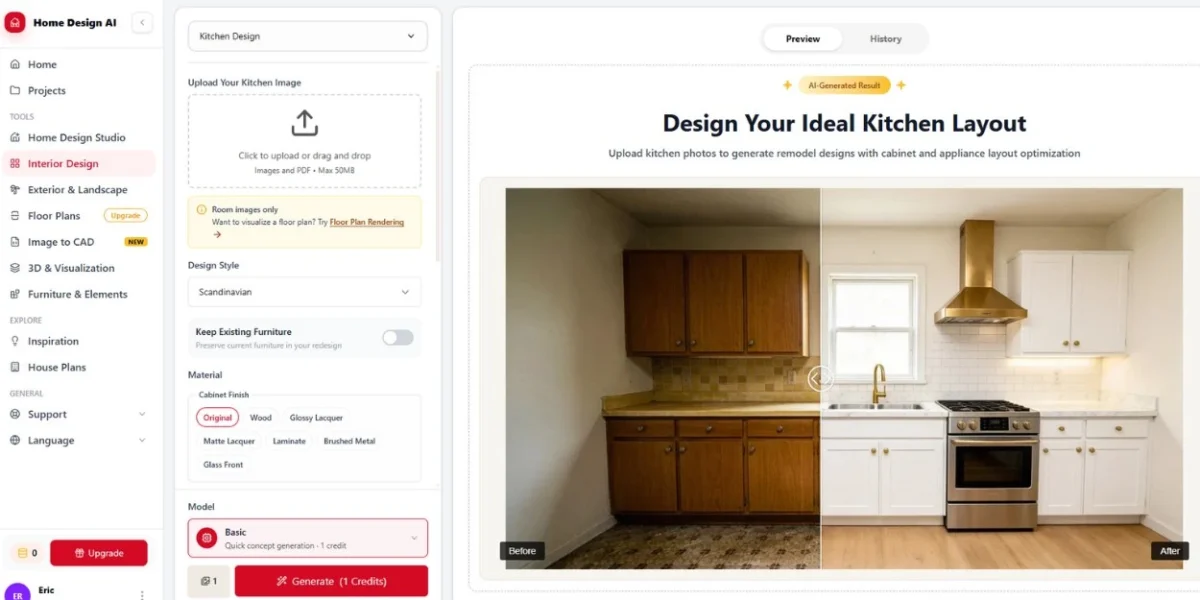
Free Trial: Watermarked free credits to test, no card needed. Full-quality no-watermark downloads require paid plan from $19/mo.
Strengths: Smart layout finding. Ergonomic workflow. Learns what you like. Works for small, galley, open-concept. Great example of free ai kitchen design generator done right.
Best for: First-timers testing ideas before hiring anyone. And if you’re searching ai for kitchen design.
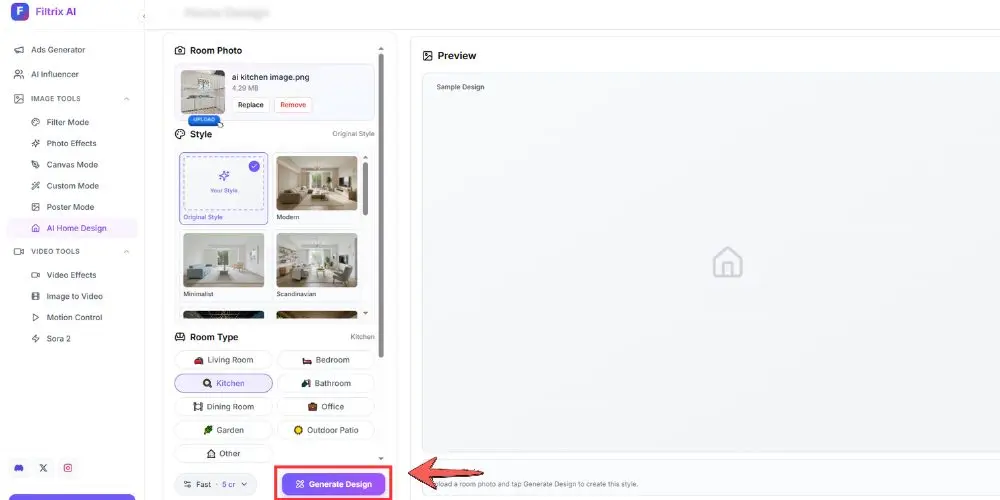
2. Filtrix AI
Filtrix AI is a is a paid AI kitchen planner with limited free trial. 30+ styles. Instant results in under 30 seconds. Photo-to-remodel view. Very good free ai kitchen design generator.
Limited free trial available. No downloads. JPG/PNG/WEBP up to 50MB. Best paid trial for quick tests. Premium $12/mo, Advanced $39/mo. Full-quality requires paid plan ved for 30-second results.
Built as cabinet color visualizer, countertop swapper, layout generator. Strong before/after inspiration. Modern, farmhouse, luxury. If you need free ai kitchen design generator, this is it.
3. KitchenDesign.io
KitchenDesign.io is a AI kitchen design tool with 18 preset styles. Three levels: Refresh, Remodel, Redesign. A trusted ai kitchen design tool.
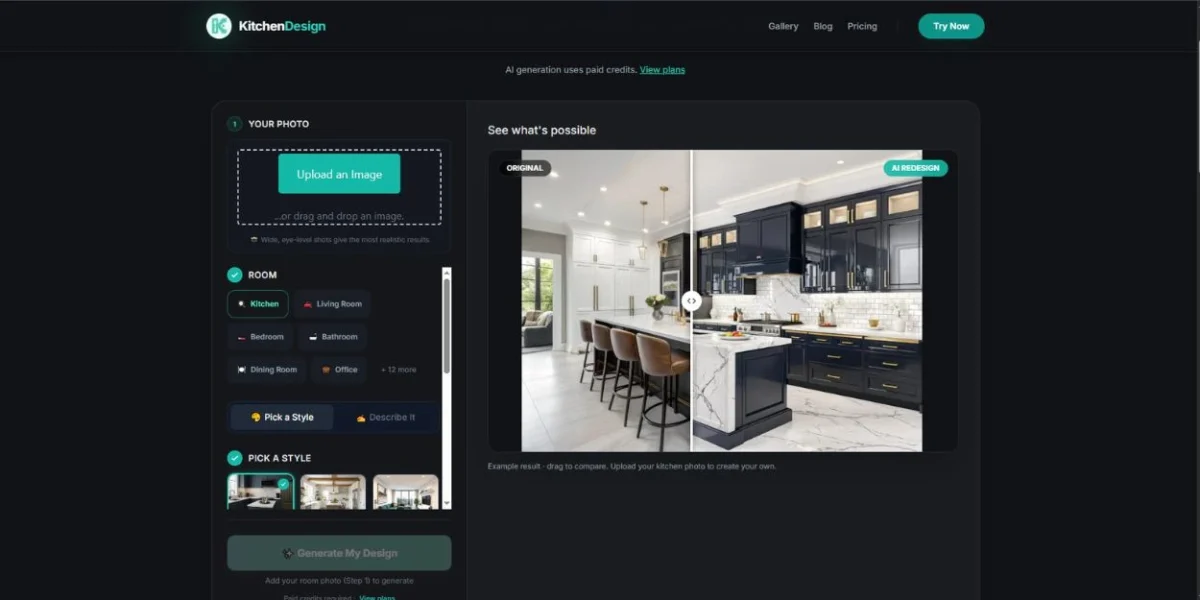
Pricing: $14/month Mini (25 credits) to $36/month Premium (200 credits). Free 2D planner included. Fair pricing for ai kitchen design tool.
Clear pricing. Keeps original photo as reference. Material references. Custom instructions. Explains AI images can change details and need checking. Honest.
No free image generation though. But interface exploration free. Best for users who want controlled, real-looking previews.
4. Fotor
Fotor is a AI image generator powered by Nano Banana model. Made for natural-language editing. Like “Change cabinet to sage green shaker with matte black hardware.” Perfect for ai design kitchen work.
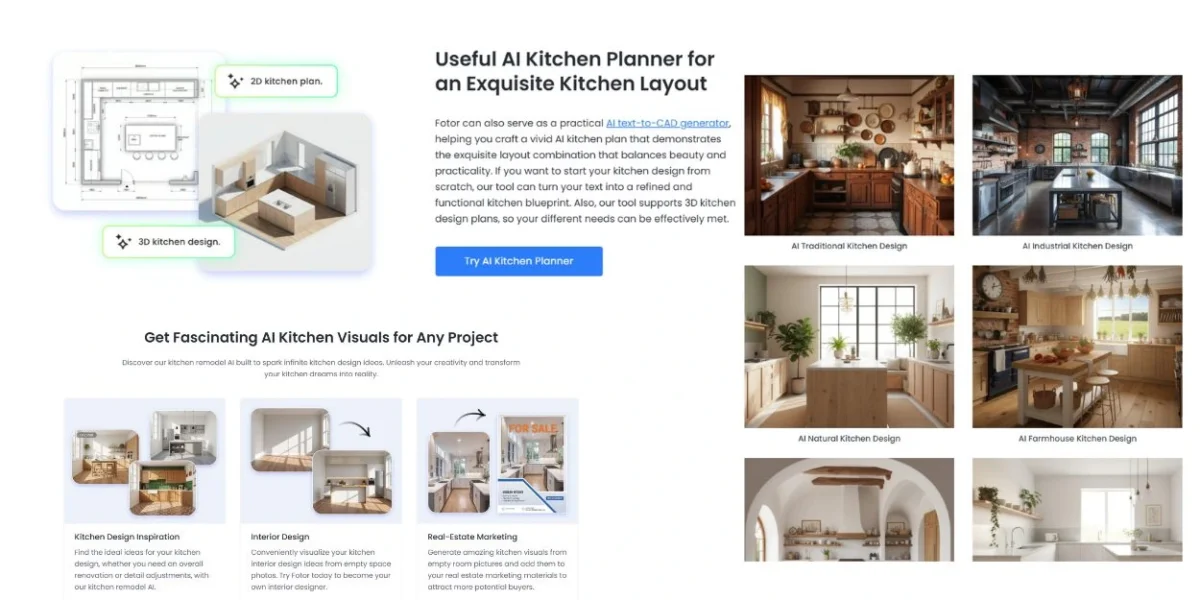
Color adjustment. Texture change (marble to wood). Object replacement (replace fridge). Layout update. Plus 2D and 3D kitchen plan generation. Full ai kitchen design tool features.
Mobile app for Android and iOS. High-res PNG export. Easy for detail renovation without brush tools. Great ai design kitchen experience.
Best for people who like typing prompts rather than picking presets.
5. KitchenGPT.io
KitchenGPT.io is a tool built around “your photo is the floor plan.” Keeps walls, windows, doors, appliance positions exactly where they are. Very accurate ai kitchen design tool.
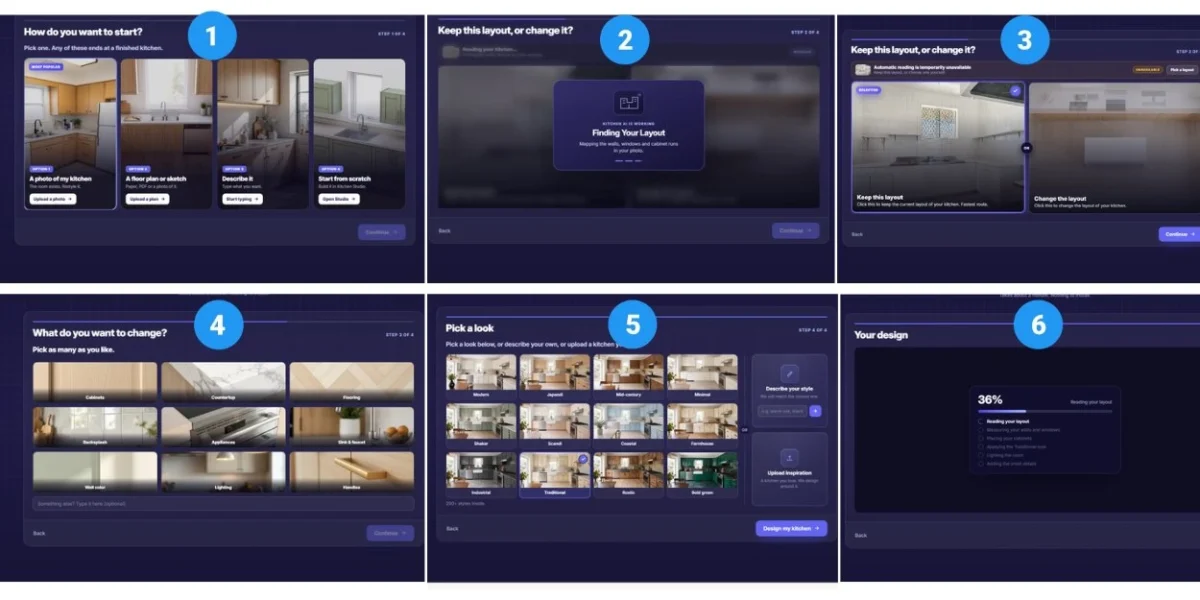
Free 2-min quiz, then paid plans for design tools, styles, exports. Focused tools for paint, fronts, floor, backsplash, handles, appliance, island.
Saved design history in My Designs. Side-by-side decisions. Honest disclaimer that concept is visualization, not measured drawing. Good ai for kitchen design approach.
Best for homeowners stuck on one decision. Like cabinet color or countertop material.
6. ArchiVinci
ArchiVinci is a full AI suite with 7 modules. Interior Design Module, Furnish Room Generator, Modify Room Generator, Remove Furniture AI, Different Angle Generator, Moodboard to Render AI, Style Transfer AI. Pro-level ai kitchen design software.
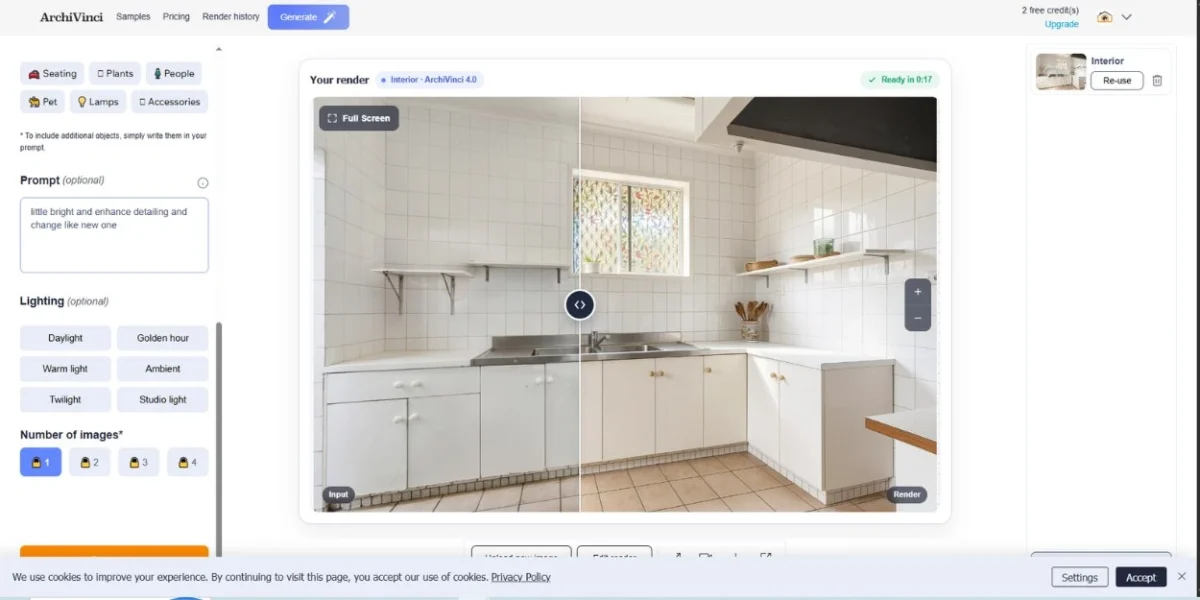
Deepest explanation of how AI understands wall edges, material properties, light, appliance size, workflow. Optimizes work triangle, visual weight, daylight use, symmetry. Top ai kitchen design software for pros.
Styles? Modern Minimalist, Scandinavian Warmth, Mediterranean Light, Industrial Character, European Chic, Zen Japanese, Wabi-Sabi Essence, Futuristic Vision, Retro Revival and more. Huge library for any ai kitchen.
Best for designers who need multi-angle views.
7. Remodel AI
Mobile-first app scored 9.3/10 in RemodelAI’s own 6-app test on 1990s builder-grade kitchen. Honey oak cabinets, beige laminate. You know that kitchen.
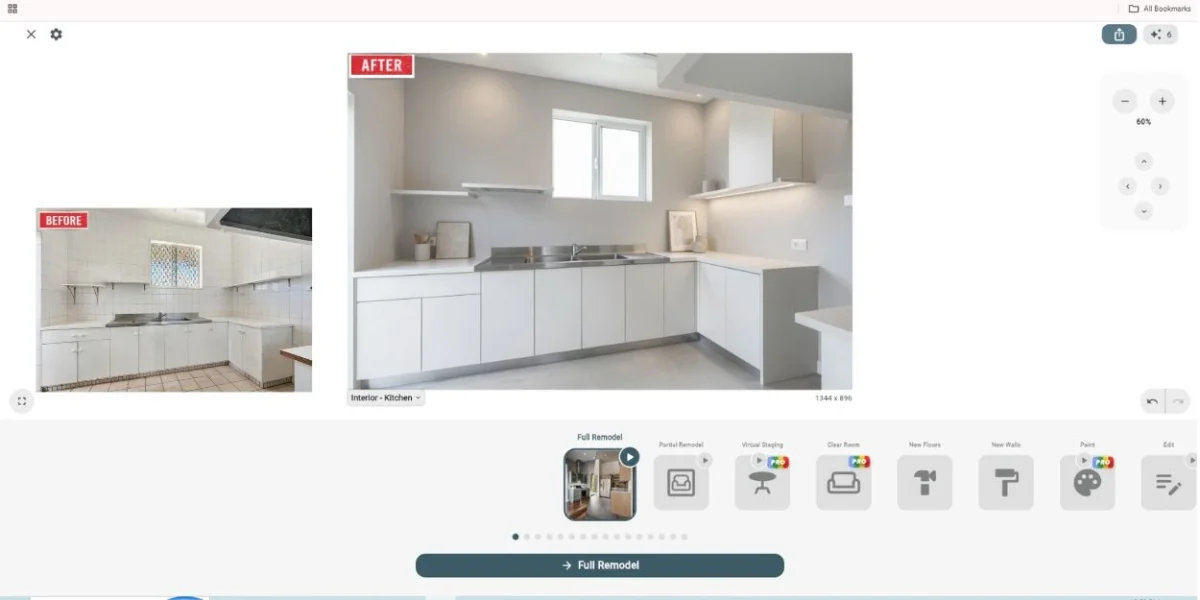
Pricing? 3 free designs with full feature access, then $29/month Pro or $49/month Premium (annual ~$17/month). Good value for best free ai kitchen design trial.
30+ kitchen-ready styles. Dedicated wall paint tool that doubles as cabinet color preview. Floor replacement. Object removal. Furniture swap for island-only changes. 73% first-try “show your contractor” quality. Great ai kitchen design tool results.
Best for renovation planning where cabinet color preview and floor swap matter more than full restyle.
8. DecorAI
Tool tested on contemporary kitchen with exhaust duct challenge. Scored 9.3/10 in DecorAI’s 8-tool test. High-quality ai kitchen design tool.
$24/month unlimited, 1-day free trial with 3 full-quality watermark-free designs. Good best free ai kitchen design trial.
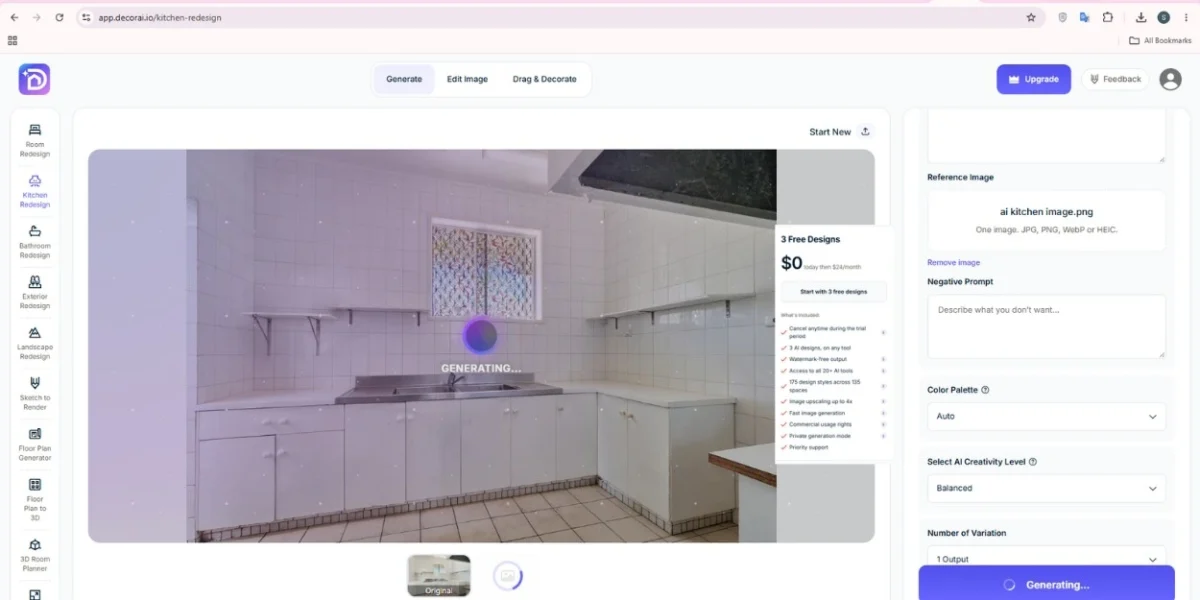
Simple mode (7 kitchen types, 10 styles, 15 cabinet colors), Pro mode (cabinet and island sizes, seating, countertops, flooring, appliance finishes, lighting, 7 cabinet styles), text description mode. Full ai kitchen design software features.
Only tool in test that hid exhaust duct with covered cabinets. Kept appliances perfectly. Widened island with extra seating. Post tools: Magic Edit, Inpaint, Surface Editor, Relight, Style Swap (40 styles), Image to Video. Top ai kitchen result.
Best for Airbnb hosts and designers needing listing-ready visuals.
9. Coohom / Planner 5D
Not just image generation. Coohom / Planner 5D is a true 3D design software with AI-assisted design, high-quality rendering, one-click floor plan creation. Real ai kitchen design software.
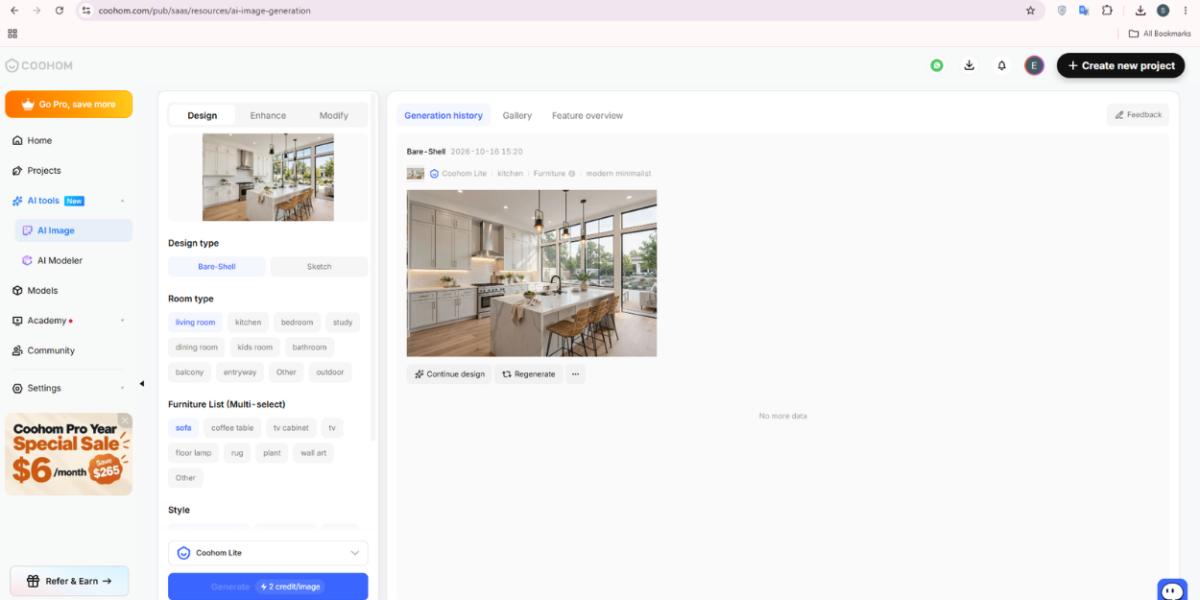
Free trial with drag-and-drop furniture library, 60,000+ products, customizable lighting and shadows. Good free ai kitchen design software entry.
Focuses on precision. Clearances. Aisle widths. GFCI requirements. NKBA rules. Bill of materials. PDF packet that can be priced and ordered. AI agent cuts design and sales cycle in half. Best ai kitchen design software for accuracy.
Best for users who want to move from inspiration to measured, orderable kitchen.
How I Use AI for Kitchen Design – 7 Steps That Actually Work
This workflow is loved by designers and avoids most common mistakes. Highly reviewed for any ai kitchen design tool.
Step 1: Capture space correctly. Stand in doorway. Use daylight. Get whole run of cabinets in one frame. Shoot wide, well-lit, high-res (JPG, PNG, WebP up to 50MB). Include floor and ceiling. Empty counters help AI focus. This is key for any ai kitchen design generator with free trial.
Step 2: Layout first, style second. Decide L-shaped, U-shaped, galley, single-wall, peninsula, or island. AI kitchen layout generators are great at maximizing small spaces, but you must tell footprint. Prevents AI adding fake cabinets. Good practice for ai for kitchen design.
Step 3: Experiment 3-5 styles quickly. Test Modern, Farmhouse, Scandinavian, two wildcards like Japandi or Industrial. Make 2 variations per style. Save favorites. This is how you explore ai design kitchen options fast.
Step 4: Isolate decision blocking you. Stuck between two cabinet colors? Use cabinet color visualizer only. Backsplash issue? Use backsplash tool only. Focused changes more accurate than full restyles. This is where ai kitchen design tool shines.
Step 5: Simulate lighting. Check morning light, evening shadows, artificial layers (pendants, under-cabinet LEDs). Warm wood looks different under cool LEDs. AI tools with Relight help here. Important for any ai kitchen design software.
Step 6: Compare side-by-side and get votes. Use before/after slider, keep source photo visible, export 3-5 best options. Share with family or contractor. Tools with voting make decisions faster for ai kitchen projects.
Step 7: Verify in real world. AI is visualization, not engineering. Confirm dimensions, clearances (at least 42 inches walkway, 48 inches near islands with seating), material samples under your lighting, appliance specs with pro. Even best ai kitchen design tool needs real-world checking.
Prompts I Actually Use – Copy-Paste
Vague prompts like “modern kitchen” waste credits. Specific prompts win. These work great in any ai kitchen design tool.
For cabinet color: “Restyle this kitchen with warm oak shaker cabinets, white quartz countertop with subtle gray veining, matte black hardware, brushed brass pendants over island, keep layout and window placement.” Perfect for ai design kitchen testing.
For small kitchen: “Small L-shaped kitchen optimization, bright white flat-panel cabinets to ceiling, light oak open shelves, white subway tile backsplash, reflective quartz countertop, integrated under-cabinet lighting, compact island with seating for two, vertical storage, preserve dimensions.” Great for ai kitchen small spaces.
For modern farmhouse: “Modern farmhouse kitchen, sage green shaker cabinets, butcher block island, white quartz perimeter counters, matte black faucet, subway tile backsplash with dark grout, rustic pendant lighting, keep original appliances in place.” Classic ai kitchen design look.
For luxury: “Luxury gourmet kitchen visualization, handleless matte white cabinets, waterfall marble island with gray veining, brass inlay, integrated appliances, statement pendant lights, warm layered lighting, keep existing layout.” High-end ai kitchen.
For material swap only: “Change only countertop to Calacatta marble, backsplash to herringbone white tile, keep cabinets, floor, and appliances unchanged, photorealistic, accurate reflections.” Focused ai kitchen design tool use.
For real estate staging: “Stage empty kitchen with light Scandinavian style, natural wood cabinets, white counters, minimal decor, bright daylight, listing-ready photorealistic.” Great for ai kitchen staging.
Pro tip: Simpler requests give more on-point results. Add negative prompts too: “no demolition, no moving fridge, no removing window, renter-friendly.” Helps any paid ai kitchen design generator stay accurate.
Small Kitchens? AI Helps Most Here
Small and galley kitchens benefit most from ai design kitchen tools. Honestly.
AI looks at walking paths and suggests:
- Floor-to-ceiling cabinets to use vertical space. Game changer.
- Light colors (white, light oak) and reflective backsplashes to make room feel bigger
- Pull-out pantry drawers, hidden appliance garages, vertical organizers, deep base drawers
- L-shaped or U-shaped layouts that give max storage while keeping work triangle efficient (stove, sink, refrigerator within 4-9 feet each)
- Island size and seating for two vs four
For 1.6m L-shape, good prompts say “raised sink height, extended countertop, sliding doors, sectional cabinets” rather than just “make it bigger.” This is smart ai for kitchen design.
AI Kitchen Design Styles You Can Test Instantly
Forget guessing. Generate these in under a minute with any good ai kitchen design tool:
Modern Minimalist, Scandinavian Warmth, Mediterranean Light, Industrial Character, Farmhouse Classic, Mid-Century Modern, Contemporary Clean Lines, Coastal Breeze, Japandi, Wabi-Sabi Essence, Zen Japanese, European Chic, Eclectic Harmony, Traditional, Transitional, Rustic, Minimalist Matte, Warm Two-Tone, Smart Storage Focused.
Each style changes cabinet shape, hardware finish, countertop material, backsplash pattern, flooring, lighting mood, decor together.
Free Trial vs Paid: Best Free Trial AI Kitchen Design Option?
Free trial ai kitchen design usually means:
- 1 to 3 watermarked or limited renders as free trial, no card (Filtrix limited trial, Home-Design.ai watermarked trial, DecorAI trial, Remodel AI trial) – watermarked downloads only
- Watermarked or low-res previews (VisualizeAI, RoomsGPT)
- Credit packs: $9 for 30 credits, $19 for 100, $29 for 200, or $14-$36/month subscription for ai kitchen design software
Best free ai kitchen design strategy I use:
- Start with free trial tests: Home-Design.ai (watermarked trial) and Filtrix AI (limited trial) – good to test interface
- Use 3 free trials from Remodel AI and DecorAI for high-quality comparison – best free ai kitchen design approach
- If need unlimited exploration for one month, pay $24-$29 for one month and cancel after finalizing materials. Cheaper than one wrong countertop order and gives full ai kitchen design software access.
Limitations of free tiers? Lower image quality, smaller export sizes, limited features, no inspiration upload, sometimes no layout keeping. Free tools also rarely warn about clearances.
Mistakes to Avoid
- Hardware warps or floats in 20-40% first tries. Generate again. Common in any ai kitchen design tool.
- Backsplash tile patterns warp, especially herringbone or complex mosaics. Keep simple first.
- Very narrow galley kitchens make AI add fake extra space. Shoot from wider end.
- AI ignores real-world limits like plumbing, electrical, code. Always check NKBA guidelines, even with best ai kitchen design software.
- Dark cabinets and flooring can make small kitchens feel even smaller in AI output. Ask for “light color palette, reflective surfaces, improved daylight” in prompt.
Never treat AI image as construction drawing. Use it to pick direction, then confirm with samples and designer.
How AI Kitchen Saves Money
- Fewer revisions: Catch layout problems before demolition.
- More accurate material choices: See quartz, marble, butcher block in your own light, not just showroom light.
- Better contractor quotes: Provide clear visuals and PDF packets with bill of materials. Validated 3D designs reduce change orders.
- Phased planning: See long-term upgrades and plan by budget while keeping final vision cohesive.
- Faster decisions: Review 50+ concepts in an hour vs weeks browsing.
Future: What’s Next for AI Kitchen?
2026 trends point to hidden intelligence. Appliances and charging systems built into custom cabinetry. Predictive maintenance. Lighting that adjusts by time of day. AI that suggests recipes based on ingredients. Design-wise, minimalist matte cabinets, warm two-tone combos, smart storage dominate, with AI letting you simulate lighting throughout day and test storage setups before installation.
We are moving from AI that shows pretty picture to AI that co-creates fully configured, accurate kitchen designs using natural language and moves directly from design to order.
FAQ
What is AI kitchen design?
AI kitchen design is a paid online tool with free trial that uses AI to create new kitchen designs from photo. Upload image, pick style, AI makes visualization of redesigned kitchen in seconds, including cabinets, countertops, backsplash, flooring, lighting. Works as planner, remodel visualizer, layout generator.
Can AI design my kitchen for free?
Yes. Tools like Home-Design.ai, Filtrix AI, and trial tiers of Remodel AI and DecorAI allow free ai kitchen design.Create personalized ideas free by uploading photo and picking style. For unlimited high-quality exports, paid plans start around $14-$29/month.
What is best free AI kitchen design tool?
For quick test without signup, Home-Design.ai watermarked trial and Filtrix AI limited trial. For best trial quality, DecorAI and Remodel AI rank highest.
What is AI kitchen design generator?
AI kitchen design generator, sometimes searched as free trial generator, converts photo or sketch into complete design concept. Finds geometry of walls, counters, cabinet fronts, backsplash areas, then rebuilds scene with updated materials, lighting, flow. Key type of ai kitchen design tool.
How do I use AI kitchen design generator free trial?
Upload clear, well-lit photo showing main features, pick preset style or add custom instructions for finishes, generate 2-3 variations, compare with original, download ideas to discuss with contractor. Any good free ai kitchen design generator works this way.
Can AI design functional kitchen layout?
Yes for style preview and optimization. AI checks dimensions, work triangle, storage needs, suggests L-shaped, U-shaped, galley, peninsula, island setups. For actual moving of plumbing or electrical, you still need measured drawings and pro. Even best ai kitchen design software needs pro check.
What kitchen styles can I test?
Over 30 including Modern, Farmhouse, Minimalist, Scandinavian, Industrial, Mediterranean, Coastal, Mid-Century, Traditional, Transitional, Japandi, Wabi-Sabi, Zen, Rustic, Contemporary.
Is AI kitchen design accurate for real renovation?
Top tools 70-80% contractor-ready first try for surfaces and colors. Structure keeping (fridge, window, ceiling height) strong in best tools. Hardware and tile weakest. Always verify measurements and samples.
What photo works best?
Well-lit, high-res, straight angle capturing as much kitchen as possible including countertops and cabinets. JPG, PNG, WEBP up to 50MB, taken in daylight from doorway. Best for any ai kitchen design tool.
Final Checklist
- Photo: wide, bright, includes floor and ceiling
- Goal: refresh only or full remodel?
- Style: pick 3 to test
- Constraint: keep layout? renter-friendly? budget cap?
- Prompt: specific materials + negative prompt
- Generate 3 times, save best 2
- Share and verify with samples
AI kitchen design does not replace good contractor or designer. It replaces guesswork. Highly rated by homeowners, with a free trial ai kitchen design generator, you walk into showroom with clarity and confidence loved by pros. That confidence saves money and gets kitchen you actually want.
Start with one free trial upload, test bold style you would never dare order without seeing, compare. In under a minute, you will know more about your kitchen’s potential than hours browsing ever showed. That is real power of ai kitchen, a.i kitchen, and every ai kitchen design tool today.
Bonus: Material Coordination Guide
When AI generates kitchen, it nails vibe but you still need coordinate real samples. Use cheat sheet:
Cabinet + Counter + Backsplash:
- Warm oak shaker + white quartz with subtle gray veining + white subway tile = safe resale
- Matte white flat-panel + Calacatta marble + brass hardware + herringbone marble backsplash = luxury modern
- Sage green shaker + butcher block island + quartz perimeter + matte black hardware = modern farmhouse
- Dark charcoal flat-panel + light oak open shelves + concrete-look quartz + black grid backsplash = industrial
Hardware rule: Matte black for modern farmhouse, brushed brass for warm transitional, polished chrome for coastal.
Lighting layers:
- Ambient: recessed ceiling lights
- Task: under-cabinet LEDs
- Accent: pendant over island (2 for 6ft island, 3 for 8ft+)
- Prompt: “warm layered lighting, 3000K, realistic shadows”
Flooring: Light oak LVP and large-format light tile make small kitchens feel larger. Dark floors shrink visually.