
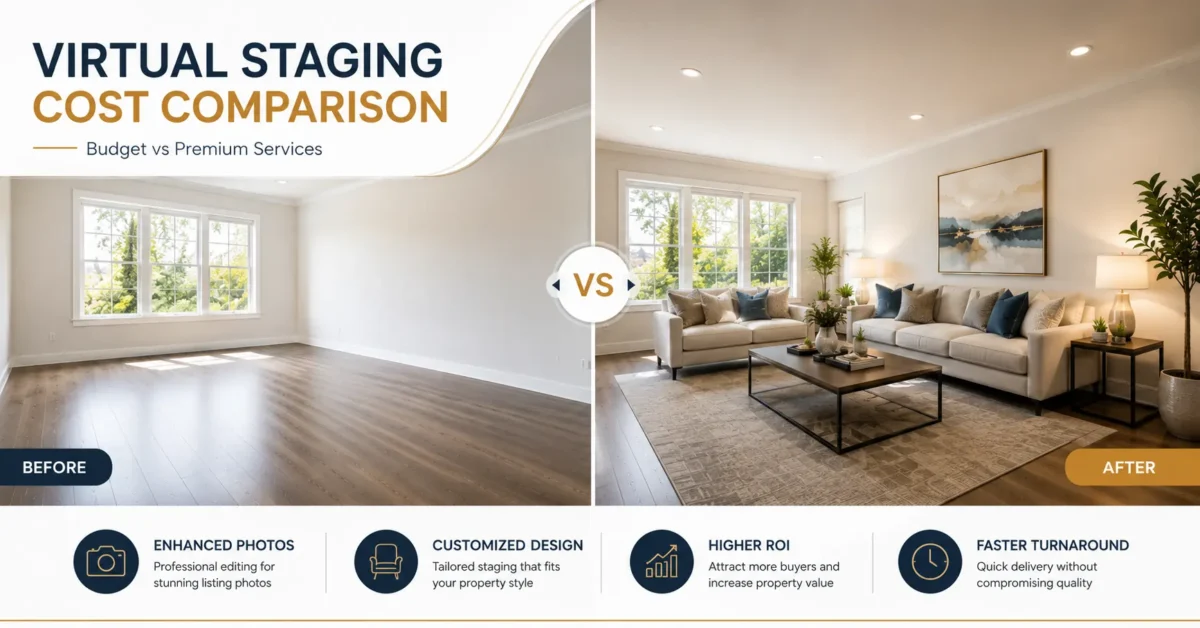
Quick answer: Virtual staging prices are not directly comparable unless the quote covers the same deliverable. As of July 22, 2026, current examples include Apply Design at $7-$10 per coin for its tool and BoxBrownie at $24 per 2D image. Custom, human-led work may cost more when it includes art direction, manual masking, quality control, and revisions.
Two virtual staging quotes can describe different products: one may cover a fast generated render, while another may include manual furniture placement, perspective matching, shadow work, a designer review, and a defined revision process. Compare the finished deliverable, not only the advertised per-image price.
This virtual staging cost comparison explains the pricing models used by AI tools, freelancers, and professional editing teams. It also shows which extras change the final invoice and what real estate photographers, agents, and property marketing teams should confirm before ordering.
Pricing note: Prices were checked on July 22, 2026 and can change. The provider links are included as market examples, not endorsements. Physical staging is priced differently; the National Association of REALTORS’ 2025 report recorded a $1,500 median cost when sellers used a staging service.
Table of Contents
What Is Virtual Staging?
Virtual staging adds digital furniture and decor to a photograph of a vacant or sparsely furnished room. A strong result preserves the room’s fixed features, matches the camera perspective and lighting, and gives buyers a believable sense of scale. See PixelShouters’ real estate virtual staging service for examples of the finished deliverable.
AI virtual staging generates a furnished version automatically. It is usually the fastest option, but geometry, furniture consistency, reflections, and small architectural details still need review. Our AI vs. manual virtual staging comparison explains where each workflow fits.
Designer-led virtual staging uses manual compositing or a hybrid workflow with human art direction and quality control. It is better suited to difficult perspectives, multi-angle consistency, specific furniture requests, and listings where revisions must be precise.
Traditional staging places physical furniture in the property and is normally priced by the project, room, and rental period. Virtual renovation changes finishes or fixed features such as flooring, cabinets, paint, or countertops, so it should be quoted separately and clearly disclosed. Learn more in our virtual renovation guide.
Expert Tip: The best virtual staging before and after transformations do not just add a sofa. They fix lighting, correct perspective, add natural window reflections, and keep furniture scale true to the room. That is what separates a $12 image from a $45 image.
Why Virtual Staging Prices Vary So Much
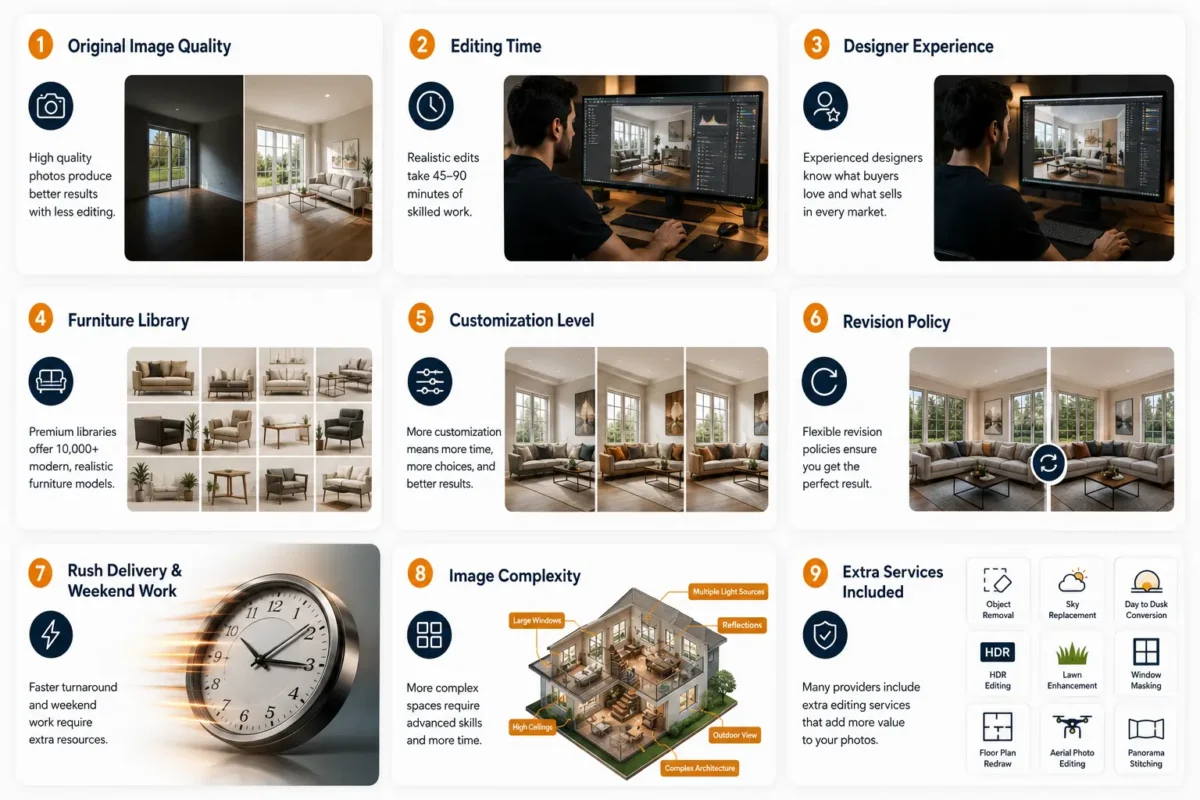
Virtual staging prices vary because providers are selling different production workflows. A generated concept, a manually composited image, and a human-reviewed hybrid may all be called virtual staging, even though the control, revision process, and finished deliverable are different.
Here are the real cost drivers that most pricing pages never explain:
1. Original Image Quality
Underexposed rooms, clipped windows, tilted verticals, and low-resolution files require correction before furniture is added. Confirm whether the quote includes color correction, perspective correction, window masking, and basic cleanup, or assumes a production-ready source image.
Once the property images are ready, Predis.ai can help you create ads to promote the listing and attract potential buyers.
2. Editing Method and Review
Production time varies by room complexity and workflow. Manual masking, perspective matching, contact shadows, reflections, and a separate quality-control review usually cost more than a one-click generation.
3. Designer Experience
An experienced real estate editor is more likely to recognize scale, lens perspective, plausible furniture placement, and the difference between staging decor and altering a fixed property feature. Local disclosure and MLS requirements still need to be confirmed by the listing professional.
4. Furniture Library and Licensing
A deeper, properly licensed furniture library makes it easier to match the property type and target buyer. Ask whether the provider can keep the same furniture style across multiple rooms and camera angles.
5. Customization Level
Do you want the same gray sofa in every image? Or do you want Scandinavian for the rental, modern farmhouse for the suburban home, and mid century for the downtown loft? Customization costs more.
6. Revision Policy
One free revision vs unlimited revisions changes the price. So does furniture replacement.
7. Rush Delivery and Weekend Work
Standard and rush turnaround vary by provider. Confirm the delivery deadline, time zone, weekend coverage, and rush fee in writing before ordering.
8. Image Complexity
An empty square bedroom is easy. A large villa with curved walls, multiple light sources, a patio, and a balcony view is complex. So are commercial spaces and builder inventory with repeating floor plans.
9. Extra Services Included
Many quotes include object removal, window masking, sky replacement, lawn enhancement, day to dusk conversion, panorama stitching, and aerial photo editing. Others charge per add-on.
Mistake Alert: The most common pricing mistake is comparing per image prices without comparing what is included. A $15 image that needs $15 in fixes for item removal and image retouching is actually a $30 image.
Virtual Staging Cost Comparison: The Complete Breakdown
This comparison uses publicly listed provider prices and real estate staging research checked on July 22, 2026. Because credits, packages, taxes, revisions, and promotional prices change, use the figures as a budgeting snapshot and confirm the current checkout price before ordering.
1. Freelancers (Upwork, Fiverr)
Average virtual staging cost: $15 to $35 per image
Freelancers are affordable and flexible. Quality varies widely. You might find a gem who does great real estate image editing, or you might get inconsistent furniture scale and fake shadows.
Best for: Agents doing 5 to 20 images per month who can vet talent.
Pros: Low cost, direct communication.
Cons: No backup if sick, inconsistent style, limited furniture library, may charge extra for photo enhancement and object removal.
Hidden costs: Rush fees, revision fees, watermark removal.
2. Virtual Staging Agencies
Average virtual staging pricing: $20 to $45 per image
Agencies have a team, standardized quality, and faster turnaround. Most include basic real estate photography editing like HDR editing and color correction.
Best for: Teams and photographers who need 20 to 200 images per week.
Pros: Consistent quality, support, bulk discounts.
Cons: Less customization than premium.
Hidden costs: Extra for virtual renovation, floor plan redraw, day to dusk conversion.
3. Premium Companies
Average price: $40 to $120 per image
Premium means high-end furniture, luxury home expertise, hand painted shadows, window reflections, and art direction. They often handle empty house staging for $1M+ homes, commercial office, and large villa projects.
Best for: Luxury listings, builders, high-end vacation rentals.
Pros: Highest realism, MLS compliance review, dedicated manager.
Cons: Higher price, sometimes longer turnaround.
ROI: Highest for expensive homes where perceived value matters more.
4. AI Virtual Staging Tools
Average AI virtual staging cost: $0.50 to $5 per image, or $29 to $199 per month
Tools like virtual staging software that use AI are incredibly fast. You upload and get results in minutes. But realism is often lower. Furniture may be warped, shadows missing, and window reflections wrong.
Best for: High volume rental listings, quick concepts, pre market testing.
Pros: Speed, price, unlimited experiments.
Cons: Generic furniture, poor perspective, not always MLS compliant, needs human cleanup.
Hidden costs: Credits expire, high res export costs extra, commercial use license.
5. Subscription Software and DIY Software
Average virtual staging software pricing: $19 to $99 per month for DIY
You do the work. Software gives you furniture. Learning curve is steep. Time cost is high.
Best for: Designers, photographers who want control.
Pros: Full control, flat monthly cost.
Cons: Time, skill needed, furniture licensing limits.
Quick Summary: For most real estate marketing, professional virtual staging at $20 to $40 hits the best balance of cost, realism, and speed. Use AI for ideas, use humans for final listing photos.
Hidden Costs Nobody Talks About
This is where cheap virtual staging price comparison breaks.
1. Image Revisions: Some companies offer zero free revisions. Each furniture replacement costs $5 to $15.
2. Furniture Replacement: Client wants a different sofa? That can be billed as a new image.
3. Extra Rooms and Angles: Some count a living room from two angles as two images.
4. Commercial Licensing: Using images for ads, billboards, or builder websites may need an extended license. $10 to $30 extra.
5. Watermark Removal: Preview is free, high res is paid.
6. Rush Orders and Weekend Work: 50% to 100% markup for 12-hour delivery.
7. Custom Furniture Requests: Want a specific IKEA model or a brand? Add $10 to $25.
8. Virtual Renovation Upgrades: Changing floors, adding lawn, sky replacement, or removing a wall is not staging. It is billed separately at $20 to $75.
9. Poor Originals Requiring Extra Work: If you send dark iPhone photos, expect extra charges for HDR editing, perspective correction, item removal, and window masking.
Warning Box: Always ask for a full invoice example: “If I need 10 images, 2 revisions, 1 rush order, and 2 virtual renovation add-ons, what is my total?” Get it in writing.
AI Virtual Staging vs Professional Designers
Both use digital home staging, but the process is very different.
AI virtual staging predicts where furniture should go. Professional virtual staging designers decide where it should go based on buyer psychology, flow, and light.
Where to spend first: The 2025 NAR Profile of Home Staging found that agents most often staged the living room, primary bedroom, dining room, and kitchen. NAR studied home staging overall, not virtual staging alone, so treat the findings as room-priority guidance rather than a guaranteed virtual-staging result.
How to Calculate Virtual Staging Cost per Listing
Use a cost-per-listing calculation instead of an invented return-on-investment percentage:
Total staging cost = number of finished images x price per image + item removal + rush fees + revision overages.
For example, six images at BoxBrownie’s currently listed $24 rate would start at $144 before any separate services or fees. A credit-based AI tool should be calculated by the number of generations needed to approve six final images, not only by the cheapest advertised credit.
Measure results with your own listing data: image saves, detail-page views, inquiry rate, showing requests, revision time, and total media cost. The 2025 NAR staging report found that 83% of buyers’ agents said staging made it easier for buyers to visualize a property as a future home. NAR’s survey covers staging overall, so it should not be presented as proof that virtual staging alone will increase a specific sale price or reduce days on market.
DIY vs Outsourcing
Time Comparison:
DIY software: 1 to 3 hours per image when you include learning, furniture placement, shadow painting, and export.
Outsourcing: 5 minutes to upload and brief.
Cost Comparison:
DIY: $49 per month + your time at $50 per hour = $100+ per image in real cost.
Outsourcing: $20 to $45 flat.
Skill Comparison:
DIY needs skills in perspective correction, color correction, window masking, and interior design.
Outsourcing includes that.
Stress Comparison:
DIY means revisions are your problem.
Outsourced means you request and receive.
Practical advice: Compare the full monthly cost: software or credits, the number of rejected generations, staff time, revisions, and delivery management. Outsourcing becomes economical when its predictable finished-image cost is lower than the time and rework required in-house.
How to Compare Virtual Staging Companies
Use this checklist before you pay.
Portfolio Quality Checklist:
- Do shadows look soft and real under chairs and tables?
- Does furniture touch the floor correctly, no floating?
- Do window reflections and outside views look natural?
- Is furniture scale consistent with room size?
- Do they show virtual staging before and after with original preserved?
- Do they handle tricky angles, dark rooms, wide-angle distortion?
Questions To Ask:
- What is included in the per image price? Does it include real estate image editing like HDR editing and photo enhancement?
- How many free revisions and furniture replacements?
- What is your policy for object removal and item removal?
- Do you provide commercial licensing for marketing?
- What is your turnaround and rush fee?
- Can you handle virtual renovation, floor plan redraw, panorama stitching, aerial photo editing, and day to dusk conversion in same order?
- What is your refund policy if quality is poor?
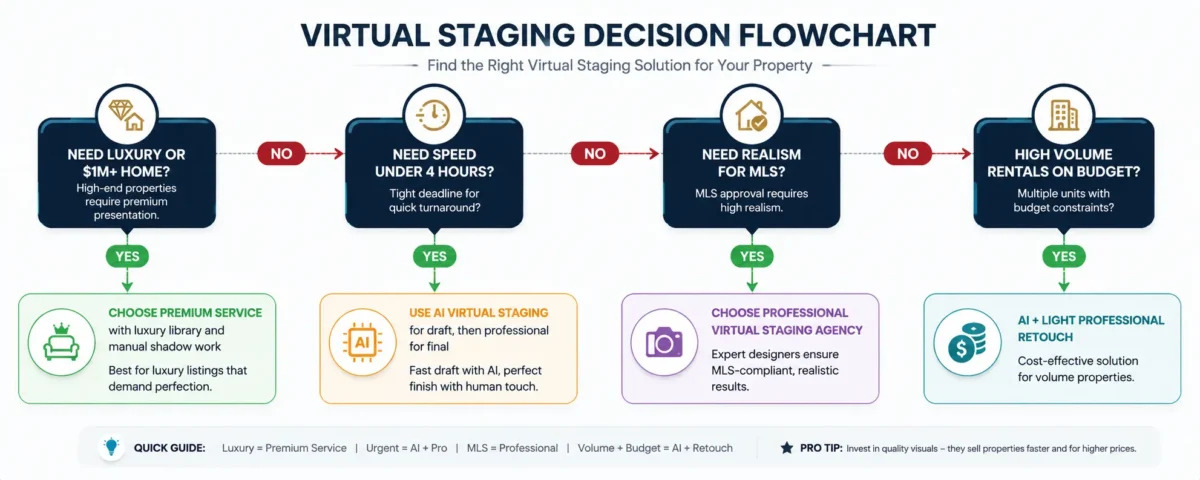
Trust Builder: Look for providers who talk about buyer psychology, not just software. Example questions they should ask you: What is the target buyer? What style sells in this zip code? What is the hero angle? That signals real experience.
A single production partner can be useful when the same listing needs source-photo cleanup, virtual staging, and consistent revisions. PixelShouters provides virtual staging alongside real estate photo enhancement, HDR blending, object removal, and related editing services. The practical benefit is one brief, one quality-control process, and one revision trail; compare that workflow with the price and specialization of standalone tools before choosing.
Common Virtual Staging Pricing Mistakes
1. Choosing the Lowest Price Without Matching Scope
A low quote is not a saving if it excludes item removal, source-photo correction, commercial usage, or the revision needed to make the image usable. Compare the same room, brief, turnaround, and revision terms.
2. Ignoring Portfolio Depth
Top 10 images look great everywhere. Ask for 50 recent images, including tough rooms.
3. No Revision Policy
You get what you get. Always confirm revisions in writing.
4. Poor Furniture Scale
Oversized sofas in small bedrooms or tiny rugs in large living rooms scream fake.
5. Fake Shadows and No Lighting Match
Flat furniture with no shadow under it floats. Buyers sense it instantly.
6. Wrong Perspective
Furniture not aligned to room vanishing points breaks trust.
7. Ignoring Licensing
Using personal use images in paid ads can cause legal issues.
8. No Quality Check
One person does all. No second eye for quality. Premium companies have a QA step.
Mistake Alert: Never stage every single room with heavy furniture. Leave utility, garage, and small bathrooms empty or lightly enhanced. Over staging looks desperate and adds cost.
Money Saving Tips Without Sacrificing Quality
1. Ask for Volume Pricing
Some providers discount larger orders or credit packs, but the threshold and effective per-image rate vary. Calculate the price using the number of finished images you expect to approve.
2. Seasonal Discounts
Many virtual staging services offer slow season deals in winter.
3. Multiple Room Packages
Ask for living + dining combo pricing.
4. Consistent Provider
Stick with one provider. They learn your style, need fewer revisions.
5. Photo Preparation
Shoot straight, bright, high-resolution photos. Less work for editor means lower price. Clean floors, open blinds, remove personal items first to reduce item removal cost.
6. Correct Camera Angles
Shoot at chest height, corner angle, not too wide. Reduces perspective correction time.
7. High Quality Originals
Good HDR editing and color correction upfront reduces staging time. Some providers bundle this cheaper than doing it separately.
8. Reuse Layouts For Builder Inventory
Same floor plan, same staging layout, discount.
Quick summary: Better source photos reduce avoidable correction work. Keep the camera level, bracket difficult interiors when appropriate, remove personal items, and send the highest-quality files available; then ask the editor to quote any cleanup separately.
Virtual Staging Cost FAQs
How much does virtual staging cost per image in 2026?
Pricing depends on the production method. As of July 22, 2026, Apply Design lists coins at $7-$10 and BoxBrownie lists 2D virtual staging at $24 per image. Custom human-led work can be higher when it includes art direction, manual compositing, quality control, and precise revisions.
Is virtual staging priced per room or per image?
Most online tools and editing services price each delivered camera angle as one image. Two views of the same room are normally two chargeable images. Physical staging is usually priced by project, room, and rental period.
What should a virtual staging quote include?
Confirm furniture placement, source-photo cleanup, item removal, lighting and perspective matching, output dimensions, commercial usage, turnaround, the number of revisions, and the cost of replacing a furniture set.
Is AI or designer-led virtual staging better?
AI is useful for fast concepts and high-volume standard rooms. Designer-led work is usually a better fit when you need multi-angle consistency, exact furniture direction, difficult masking, or precise corrections without regenerating the whole room.
Is virtual staging allowed in an MLS listing?
Rules vary by MLS and market. Keep the original photograph, identify the edited image as virtually staged when required, and do not add or remove fixed property features in a way that misrepresents the listing. The listing broker or agent should verify the applicable local rule before upload.
Which rooms should be virtually staged first?
Start with the rooms that explain the property best. NAR’s 2025 home-staging research found the living room, primary bedroom, dining room, and kitchen were the rooms sellers’ agents staged most often. A small utility room or garage may need only clean, accurate photography.
How long does virtual staging take?
AI tools can return generations in minutes. Human-reviewed services commonly quote hours or days depending on order size, room complexity, and revision policy. Treat the provider’s stated service level as the reliable deadline.
What file should I request?
Request a high-resolution JPEG in the pixel dimensions and file size accepted by your MLS and marketing channels. DPI is mainly a print setting; pixel dimensions, compression, color consistency, and preserved architectural detail matter more for online listings.
How many revisions should be included?
There is no universal standard. Confirm how the provider defines a revision, the review window, whether furniture replacement counts as a new render, and the price of additional changes before placing the order.
Should virtually staged images be disclosed?
Yes when required by the MLS, platform, local rule, or advertising policy, and whenever disclosure helps prevent a buyer from mistaking a digital concept for the property’s current condition. Preserve the original empty-room image for comparison.