
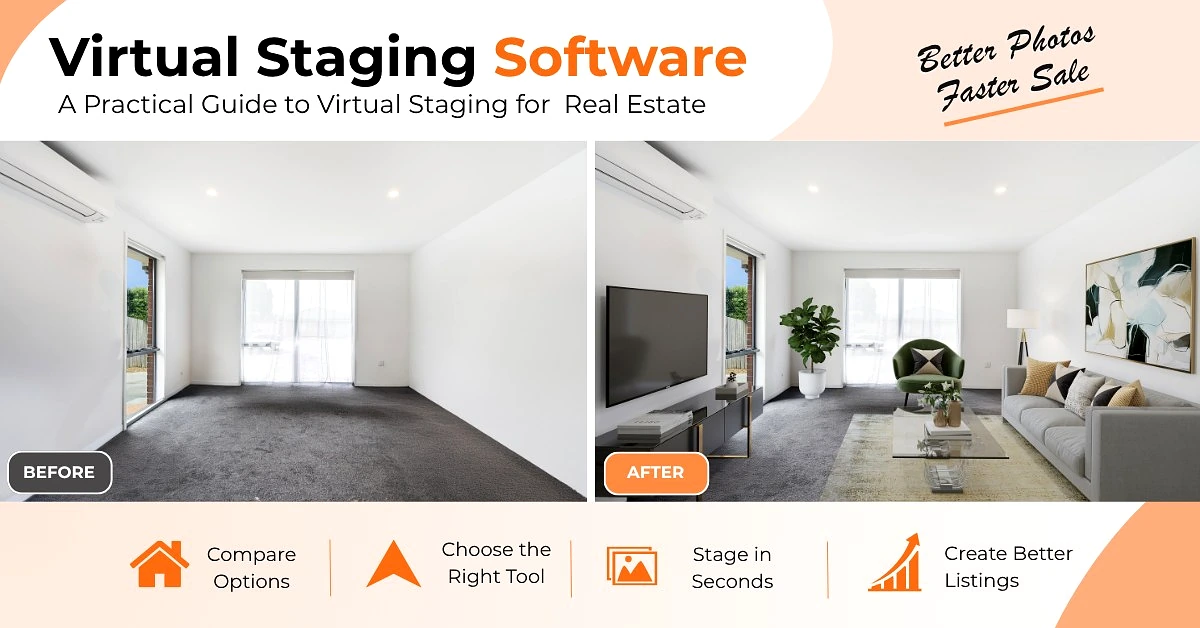
Key Takeaways: Virtual staging software helps you turn empty listing photos into warm, furnished images in under a minute. Modern real estate staging software understands room geometry, light direction and scale, so shadows and furniture look real, not cut-and-paste.
An empty room doesn’t sell itself. Buyers scroll past vacant photos in seconds because it’s hard to picture where their own sofa would go, how big the bedroom really is, or what the space could feel like.
That’s exactly what virtual staging software was built for. You upload the photo your photographer already delivered, choose a style, and get back a warm, furnished image in under a minute. No furniture rental, no truck, no waiting days.
If you searched for virtual staging software, virtual home staging software, or best virtual staging software for realtors, this guide is for you. It covers what it is, how it actually works, what features matter, and which platforms are worth using right now.
Table of Contents
What Is Virtual Staging Software?
Virtual staging software is a digital tool that adds furniture, decor, lighting and rugs to photos of empty or outdated rooms.
The older way was basic cut-and-paste. You would drop a PNG of a chair onto a photo and it would look fake – wrong size, no shadow, flat lighting.
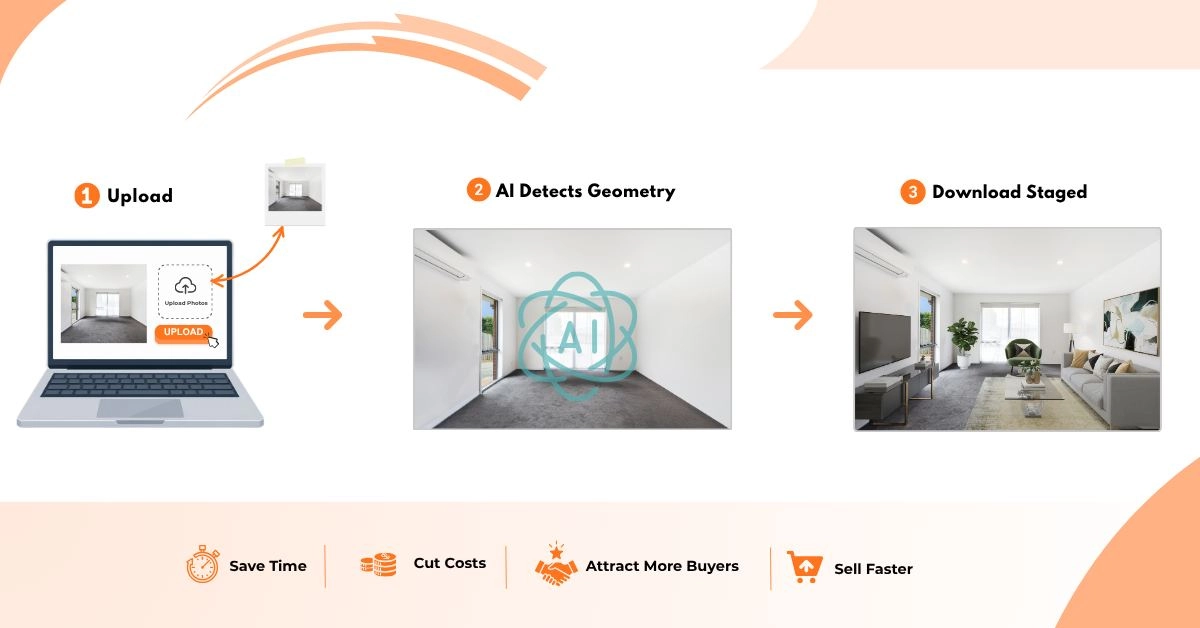
Modern virtual staging software for real estate is different. It understands room geometry. It detects floors, walls, windows, depth and light direction. Then it renders furniture with accurate shadows, reflections and scale that match the original photo.
A good platform does three things well:
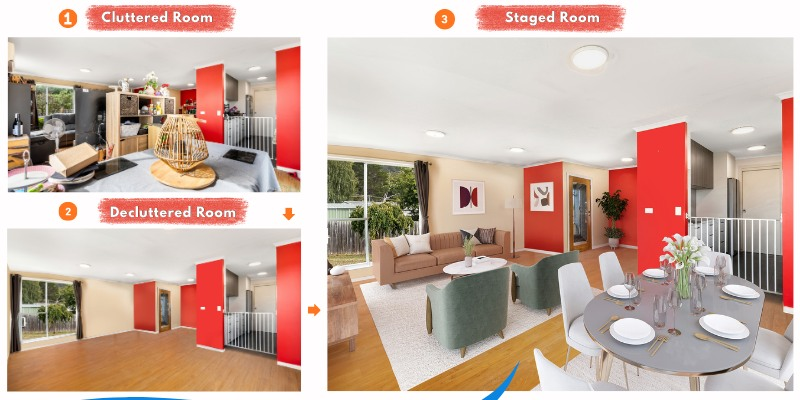
1. Furniture removal and declutter. It erases existing furniture, personal items or clutter without leaving smudges.
2. Intelligent staging. It adds furniture that respects traffic flow, focal points and real-world scale.
3. Export for listings. It delivers high-resolution files, usually 2K to 4K, that are ready for MLS and major portals, with disclosure options.
In short, it’s home staging software that lives in your browser. You don’t need Photoshop skills or a design background to use it.
Why Staging Still Matters
Empty photos highlight flaws. Every scuff, every odd corner stands out. A staged room tells a story and gives the eye somewhere to rest.
Industry data has been consistent:
- 83% of buyer’s agents say staging makes it easier for buyers to visualize a property as a future home.
- Staged homes often receive more online saves and showings. Listings with high-quality staged photos get significantly more engagement than vacant ones.
- Reports from realtor associations note that staged homes tend to sell faster and are more likely to receive offers closer to asking.
A staged photo isn’t about tricking anyone. It’s about helping someone understand scale and potential. That is why real estate staging software has become standard, not optional, for vacant listings.
How Virtual Staging Software for Real Estate Actually Works
There are two very different approaches behind the term staging software.
Human-powered services are what companies like BoxBrownie, Styldod and PixelShouters have offered. since the mid-2010s. You send a photo, a designer stages it manually using 3D software. Quality can be very high because a person is making judgment calls about scale and traffic flow. Turnaround is usually same-day to 48 hours.
AI-powered virtual staging software is what tools like REimagineHome, Collov AI, VirtualStagingAI, Stageflow and RoomLift do. AI handles the staging instantly. You get results in 10 to 60 seconds. Cost drops to cents per image instead of dollars.
Under the hood, current AI tools use three layers:
Room understanding. Computer vision builds a depth map. It knows where the back wall is, how far the floor extends, where the window light comes from.
Design intelligence. This is the separator. Cheap tools pull random furniture from a catalog. Better tools are trained on design principles – color balance, rug sizing, art height, walkway clearance. For example, Stageflow builds each style around a detailed design brief that defines materials and palette, not just a keyword like “modern.”
Photorealistic rendering. The final render matches the grain of your photo, the depth of field of your lens, and the color temperature of the room. Shadows fall the same way as real shadows.
For 90% of standard living rooms, bedrooms and kitchens in 2026, AI output is now hard to distinguish from human work when you look at it on a listing page.
Different Types of Staging Software
When you search for staging software, you will run into four categories:
1. One-click AI stagers. Upload, pick a style, download. VirtualStagingAI, Collov AI, REimagineHome. Built for speed.
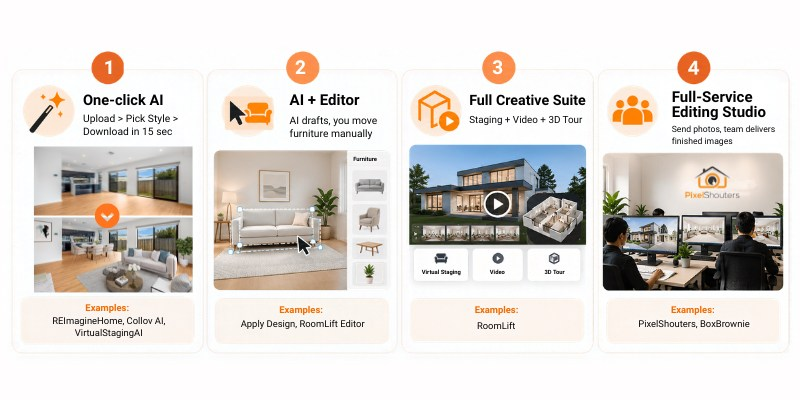
2. AI + editor platforms. AI does the first draft, then you can type “replace the sofa with a lighter fabric” or manually move pieces. Apply Design and RoomLift Editor work like this.
3. Full creative suites. Staging plus extras. For immersive tours, see how 360 virtual tour staging creates an engaging experience.
4. Full-service editing studios. You send files, a team delivers finished images. PixelShouters falls here, as do BoxBrownie and Styldod. They offer virtual staging alongside HDR blending, flambient editing, day-to-dusk, floor plans, aerial editing and video. Turnaround is hours, not seconds, but you get human quality control and custom work.
For most agents who need to stage a listing tonight, category 1 or 2 is enough. For photographers and teams handling volume who want one vendor for all editing, category 4 makes sense.
How to Choose Home Staging Software
Don’t choose by price per image alone. That is how you end up with cheap-looking photos. Use this checklist:
1. Photorealism at 100% zoom. Zoom into the fabric and wood. Does texture hold up or turn to mush? Are shadows pointing the same way as window light?
2. Speed. Can you get a usable result in under 60 seconds? Listings move fast.
3. Cost per listing, not per image. A $0.50 per image tool that charges for every retry ends up costing more than a $59 per-listing tool with unlimited retries. Calculate for a typical 6-room house.
4. Regeneration policy. Unlimited retries should be standard for AI tools. Limited revisions are a red flag.
5. Style library. You need at least 10 distinct styles – Modern, Scandinavian, Farmhouse, Mid-Century, Luxury, Contemporary, Japandi, Industrial, Traditional. More styles let you match architecture and buyer type. We follow the 3-foot 5-foot rule for staging to keep scale realistic.
6. Furniture removal + staging in one. Can it erase old furniture AND add new furniture in one pass? The best virtual home staging software does.
7. Resolution. Minimum 2000px on the long edge for MLS, ideally 4K. Low-res images look soft on portals.
8. Compliance tools. Does it offer a “Virtually Staged” watermark or disclosure text and never alter walls or windows? This protects your license.
9. Commercial license. Do you own the final image and can you use it on MLS and social? Some free plans forbid MLS use or add large watermarks.
10. Video and 3D. Can you turn staged photos into a short listing video for Reels and TikTok without hiring an editor? This is becoming expected.
11. Ease of use. Can your assistant or transaction coordinator use it without training? If it requires complex prompt engineering, it wasn’t built for realtors.
12. Consistency. Test it with a dark photo and a bright photo, a wide angle and a tight angle. Does quality hold up or does it only work on perfect photos?
If a platform fails on 1, 3, 6 and 8, skip it.
Best Virtual Staging Software for Realtor
I tested each platform below with the same six photos from a vacant property: living room, kitchen, primary bedroom, second bedroom, dining area and office. Same lighting, same camera angle.
1. REimagineHome – Best Overall AI Virtual Staging Software for Real Estate
Pricing: $19/month for 30 images, $36/month for 200, $59/month for 500
Speed: 30-50 seconds per image
Styles: 15+
Notes: Built by Styldod, which has been in virtual staging since 2015. Best furniture removal in my test – it cleaned a cluttered living room without smudging. Also does landscaping and exterior renovation rendering, compliance checks, and has an API.
One credit equals one image and one revision. HousingWire listed it as best overall for combination of realism, features and price.
Best for agents and small teams staging 3-15 listings a month who want one reliable tool.
2. Collov AI – Best Budget Virtual Staging Real Estate Software
Pricing: $16/month for 60 images, $39/month for 150
Speed: 20-40 seconds
Styles: 12+
Notes: Cheapest professional-grade option I found. 10 free revisions per photo. Allows selective removal – erase just the old couch, not the whole room. Also does wall and floor replacement. Quality is very close to REimagineHome, slightly less refined on lighting. No landscaping.
Best for brokerages and teams where cost per image matters.
3. Stageflow – Best for Design Coherence and Per-Listing Pricing
Pricing: $59-$149 per listing, all rooms included, unlimited regenerations
Speed: Around 60 seconds per room
Styles: 25 presets with detailed design briefs plus 3 lighting modes calibrated on Leica profiles
Notes: Built by a team with a staging background. Instead of generic keywords, each preset has a detailed brief that defines materials and palette. Per-listing pricing removes counting anxiety – stage 6 rooms or 12 rooms for same price. Younger company than BoxBrownie, no API yet.
Best for listings where design quality impacts perceived value.
4. BoxBrownie – Best Human-Edited Option
Pricing: $30 per image, $60 for 360-degree, unlimited revisions within 60 days
Speed: 24-48 hours
Notes: Real human designers do the work. When you get an experienced editor, scale and traffic flow are spot on. Also offers day-to-dusk, item removal, floor plans and copywriting – a full editing shop. Quality can vary by editor and turnaround doesn’t work for same-day listings.
Best for complex rooms with unusual architecture or when you specifically want human review.
5. PixelShouters – Best for Custom Service + Editing Bundle
Pricing: Service-based, cheap and best, custom quote per project
Speed: Same-day to 24 hours depending on volume
Styles: Custom – you brief the style, team matches it
Notes: Real estate photo editing studio since 2016, 50-249 team. Services include HDR and flambient blending, color correction, window pulls, perspective correction, object removal, virtual staging, virtual renovation, day-to-dusk, aerial editing, floor plans and video. Virtual staging follows a 3-foot 5-foot review process – checking texture realism up close and overall balance from a distance. AI tools plus expert QC. Not instant self-serve like pure software – you send RAW or bracketed files and get back finished images.
Pros: custom work, one vendor for all editing, consistent QC. Cons: not 10-second instant, requires file handoff.
Best for photographers, agents and brokerages handling volume who want done-for-you results rather than DIY software
6. VirtualStagingAI – Best for Speed and API
Pricing: $16/month for 6 photos, $19 for 20, $39 for 60, $79 for 150
Speed: 10-15 seconds per room – fastest in test
Styles: About 11
Notes: Insanely fast and cheap. Unlimited regenerations and has an API for developers. Design coherence can be weaker – sometimes mixes styles with flat textures.
Best for high-volume agents who need basic staging and for tech teams needing API access.
7. RoomLift – Best Suite for Staging + Video + 3D
Pricing: $19/month for 100 renders, $39 one-time for 50 credits, 5 free credits to try
Speed: 10-20 seconds
Styles: 7+ plus custom style transfer from a reference image
Notes: More than staging. Includes Restyle for staging, Editor for text-based edits, Video Maker to turn photos into tour videos with AI voiceover and music, and Worlds for 3D walkthrough links. Up to 4K export, full commercial rights.
Best for agents who want listing videos and 3D tours from the same staged photos.
8. Apply Design – Best for Manual Control
Pricing: $7-$15 per image depending on credit bundle
Speed: Around 10 minutes for auto staging
Styles: Multiple plus DIY drag-and-drop editor
Notes: Unique DIY editor lets you manually place, move and resize furniture after AI staging. Unlimited revisions, 360-degree staging available. Render time feels slow after using 15-second tools and credit system is confusing.
Best for designers and agents who enjoy controlling every piece.
What You Actually Pay
How to Stage a Listing in 15 Minutes
Here is the workflow that works in real transactions:
Minute 0-2: Shoot right. Even the best virtual staging software can’t fix a bad photo. Shoot at chest height, wide angle 18-24mm, all lights on, blinds open. Bright, sharp photos give you 10x better results.
Minute 2-5: Upload as a listing. Select all rooms at once. Most platforms now have a listing-based workflow. Upload living, kitchen, bedrooms together instead of one by one.
Minute 5-7: Remove, then stage. If there is old furniture, use removal first. The better tools do removal and staging in one click.
Minute 7-12: Match style to buyer. Don’t use Modern for everything. Suburban family home – Farmhouse or Scandinavian. Downtown condo – Modern or Industrial. Luxury property – Luxury or Contemporary. First-time buyer condo – Mid-Century or Japandi. Generate 2-3 options per key room.
Minute 12-14: Check at 100%. Zoom in. Are shadows pointing the right way? Is the rug too small? Does furniture float? If yes, hit regenerate. Takes 10 seconds on AI tools.
Minute 14-15: Export and disclose. Download at 3000px or higher, JPEG. Add “Virtually Staged” in description if your MLS requires it. Keep the original empty photo on file. Upload.
Full house staged in 15 minutes versus 2 days waiting for a manual service.
MLS Compliance and Disclosure
Yes, you can use virtual staging software for real estate on MLS, but you have to disclose it.
Most MLS systems require:
- A clear label that the image is virtually staged.
- Keeping the original unstaged photo on file.
- No structural changes – you can add furniture and decor, but you cannot add windows, remove walls, or make rooms look larger by altering architecture.
Good software helps here. It never changes walls or windows and offers auto-disclosure text or a subtle watermark. Use it.
Common Mistakes Realtors Make
Over-staging. Putting a king bed, two nightstands and a dresser in a 10×10 bedroom. Leave breathing room. Real stagers leave space to walk.
Wrong style for price point. Luxury furniture in a starter home creates an expectation gap when buyers tour in person.
Mixing styles. Living room is Modern, bedroom is Farmhouse. The home feels disconnected. Use one style story for the whole listing.
Dark input photos. If your original photo is dark and yellow, staged version will be too. Start bright.
Using low-quality free tools. Free virtual staging software often has watermarks, low resolution and no commercial license. Saving $20 on staging costs you showings.
Only staging the living room. If you have per-listing or service pricing, stage every main room. Buyers live in every room.
Does It Actually Help Sell Faster or Higher?
Physical staging costs thousands and helps sell faster because buyers can visualize. Virtual staging real estate software gives you most of that impact for a fraction of the cost.
Even a small improvement in perceived value or days on market covers the cost many times over. More importantly, it drives more online saves and showing requests because furnished photos stop the scroll.
What’s Next for Staging Software
Photos are just the start. Two shifts are already happening:
Listing video from photos. Tools like RoomLift and Trolto turn your staged photos into cinematic fly-through videos with AI voiceover, captions and music – ready for Reels and TikTok in one click.
3D and Matterport staging. Staging a 3D tour, not just photos, for virtual walkthroughs. Some providers stage Matterport tours for $25 per hotspot.
Exterior and renovation. Virtual landscaping, wall color changes, kitchen cabinet updates.
If you are choosing a platform now, pick one that already has video and 3D options so you don’t have to switch in six months.
How to Choose for Your Business
Forget feature checklists. Ask these:
How many listings do you stage a month? 1-3 – per-listing or service model makes sense. 4-10 – per-listing wins on value and design. 10+ – subscription or custom studio rate.
What price point? Under $300k, basic staging that shows potential is often enough. $300k-$750k, design coherence matters because buyers compare your photos to professionally staged competitors. $750k+, your reputation is on the line – use the platform that produces images you’d be proud to show at a listing presentation.
How fast do you need it? Same day – AI platforms only. Within 48 hours – human and service options work.
Do you need more than staging? If you need day-to-dusk, floor plans, item removal and HDR as well, a full-service studio like PixelShouters is more efficient than juggling three separate software tools.
FAQ
What is virtual staging software?
It’s software that digitally adds furniture and decor to photos of empty rooms using AI and 3D rendering, so buyers can visualize the space.
What is the best virtual staging software for realtors?
There is no single best. REimagineHome and Collov AI are best for affordable DIY, Stageflow for design-first DIY, RoomLift for staging plus video, BoxBrownie for human-edited, and full-service studios like PixelShouters for custom done-for-you work.
How much does virtual staging software cost?
Per-image services are $16-$49 per image. Subscription AI tools are $16-$69/month for a set number of images. Per-listing tools are $59-$149 per house with unlimited rooms. Service studios are usually hourly under $25/hr with custom quotes.
Is AI virtual staging as good as human-edited?
In 2026, for standard living rooms, bedrooms and kitchens, top AI tools match human quality for most listings. Human editors still have an edge for rooms with highly unusual architecture or extreme angles.
Can I use virtually staged photos on MLS?
Yes, with disclosure. Most MLS systems require a clear label that the image is virtually staged. Do not alter walls, windows or room size.
What should I look for in home staging software?
Photorealism at 100% zoom, speed under 60 seconds, cost per listing not per image, unlimited regenerations, style variety, furniture removal, high resolution, MLS compliance tools and commercial license.
Final Thoughts
All the competitor pages you shared – HousingWire, Stageflow, RoomLift blog, VirtualStagingAI – are either thin listicles or biased comparisons. None of them give a complete workflow, pricing math, compliance guide and checklist in one place.
If you publish a pillar guide that covers all of that, with honest pros and cons for both DIY virtual staging software and done-for-you services like PixelShouters, you cover the full search intent for virtual staging software, virtual staging software for realtors, virtual home staging software and real estate staging software without sounding salesy.
Start by testing two platforms with the same three photos. Compare them at 100% zoom. Your eyes will tell you which one matches your brand.