
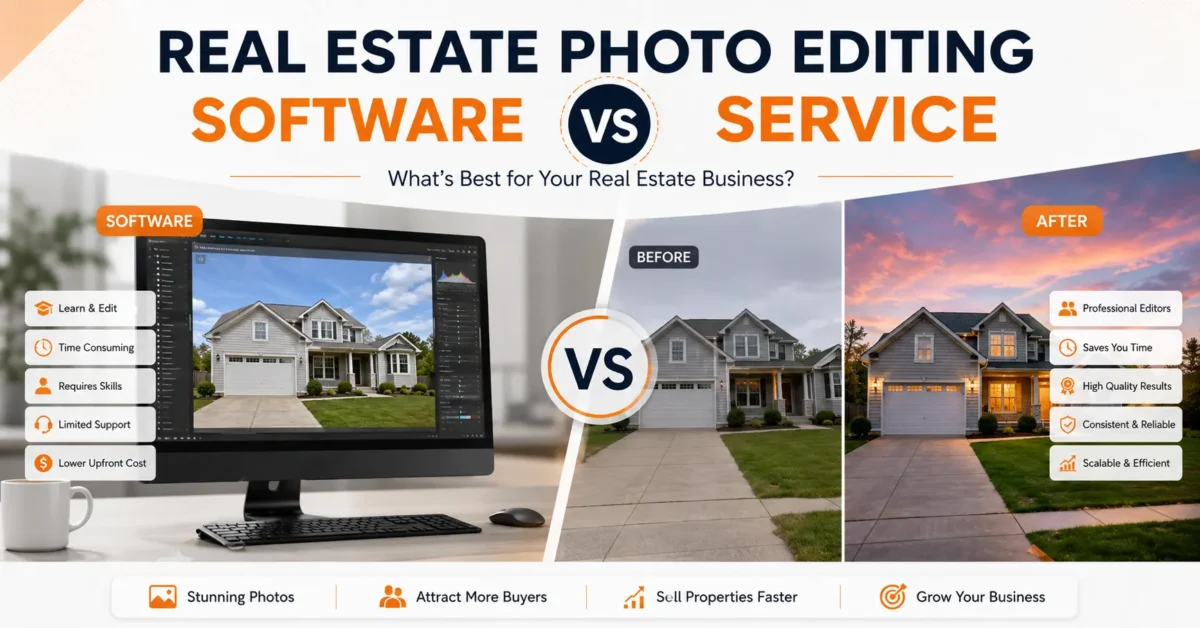
Quick answer: Choose real estate photo editing software when you want direct creative control and have enough production time to edit every listing. Choose a photo editing service when post-production delays delivery, reduces shooting capacity, or makes it difficult to keep a consistent look across photographers. A hybrid workflow is often the practical middle ground: software for culling and routine adjustments, with a specialist editing team for final production and complex work.
The useful comparison is not software subscription versus price per image. It is the total cost of producing an approved, listing-ready gallery: editing time, hardware, training, quality control, revisions, delivery reliability, and the value of the work you could do instead.
This guide compares real estate photo editing software vs. service workflows for photographers, real estate media teams, agents, and property marketing companies. The goal is to help you choose a production model, not to declare one option universally better.
Table of Contents
What Is Real Estate Photo Editing Software?
Real estate photo editing software is any program you use to process property photos yourself.
Real estate photo editing software, including options listed on SaaS Adviser, is any program you use to process property photos yourself.
That includes Lightroom for real estate photography, Photoshop real estate editing, HDR merging tools like Photomatix, and newer AI photo editing software like Luminar Neo or Radiant Photo.
Who uses it?
Beginner real estate photographers learning the craft, part-time shooters doing 1-3 homes a week, and DIY agents who shoot their own listings on an iPhone or mirrorless camera.
What you actually do:
Your real estate editing workflow usually looks like this: Import and cull, lens correction, vertical perspective correction, white balance, exposure blending or HDR real estate editing, window pull, color cast removal from mixed lighting, sky replacement, object removal for small distractions, grass enhancement, sharpening and noise reduction, export for MLS.
Time investment:
If you are new, expect 5-10 minutes per image. With presets and experience, 2-4 minutes per image. For 25 photos, that is 1-2.5 hours. And that does not include revisions when the agent says “can we make this brighter?”
Hidden costs:
The subscription is just the start. You need a color-accurate monitor, a computer with a decent GPU for AI denoise, external storage for RAW files, backup drives, Lightroom presets or plugins, and courses to learn proper window pulls and color correction. Most people forget to count learning time.
Ideal users:
People with more time than volume, people who genuinely like the editing part, and people shooting less than 100 images a week.
What Is a Real Estate Photo Editing Service?
A real estate photo editing service is a team of human editors who edit for you.
You upload your RAW or bracketed shots to a portal. Their team does the HDR blending, perspective correction, sky replacement, object removal, day to dusk editing, virtual staging, and other enhancements based on your style guide.
How it works:
- Shoot as normal. Export brackets.
- Upload via web app, Dropbox, or FTP.
- Add notes: “Keep natural sky, fix grass, remove trash bins in image 12.”
- Editors work overnight.
- You get back MLS-ready JPEGs, often in 8-24 hours.
- You request free revisions if needed.
Good services offer quality control with two levels of checking. First editor edits, second editor checks for color consistency, verticals, and halo issues.
What you gain:
Consistency across 200 photos. No late nights. Ability to take on more shoots. No need to learn complex Photoshop masking.
Professional photo editing service teams do this all day. They have seen every ugly brown living room and every blown-out window. They know how to make it look clean without looking fake, which is what MLS compliance wants.
Ideal for:
Busy photographers, real estate media companies, agencies offering property photo editing for multiple agents, luxury teams, and Airbnb / vacation rental photographers who need fast turnaround.
How Real Estate Photo Editing Software and Services Differ
Software is a do-it-yourself production system
Software gives you the tools, but you supply the labor and quality control. A typical workflow may include RAW import, culling, lens correction, vertical correction, white balance, exposure blending, window detail, color-cast removal, sky or grass work, sharpening, noise reduction, and MLS export.
Lightroom Classic and Capture One are commonly used for cataloging and batch adjustments. Photoshop is better suited to masking, object removal, window work, reflections, and layered retouching. HDR applications can create a blended base, while AI-assisted tools can accelerate culling, masking, denoise, and repetitive corrections. The final result still depends on the operator’s judgment and review process.
A service is a managed production workflow
With a real estate photo editing service, you submit source files, instructions, reference images, and a delivery requirement. The provider performs the edit, checks the gallery, exports the files, and handles revisions under its service terms.
A service does not automatically guarantee better work. The useful differentiators are first-pass approval rate, style matching, quality-control ownership, revision policy, secure file handling, realistic capacity, and whether the delivery clock is clearly defined.
Real Estate Photo Editing Software vs. Service: Side-by-Side Comparison
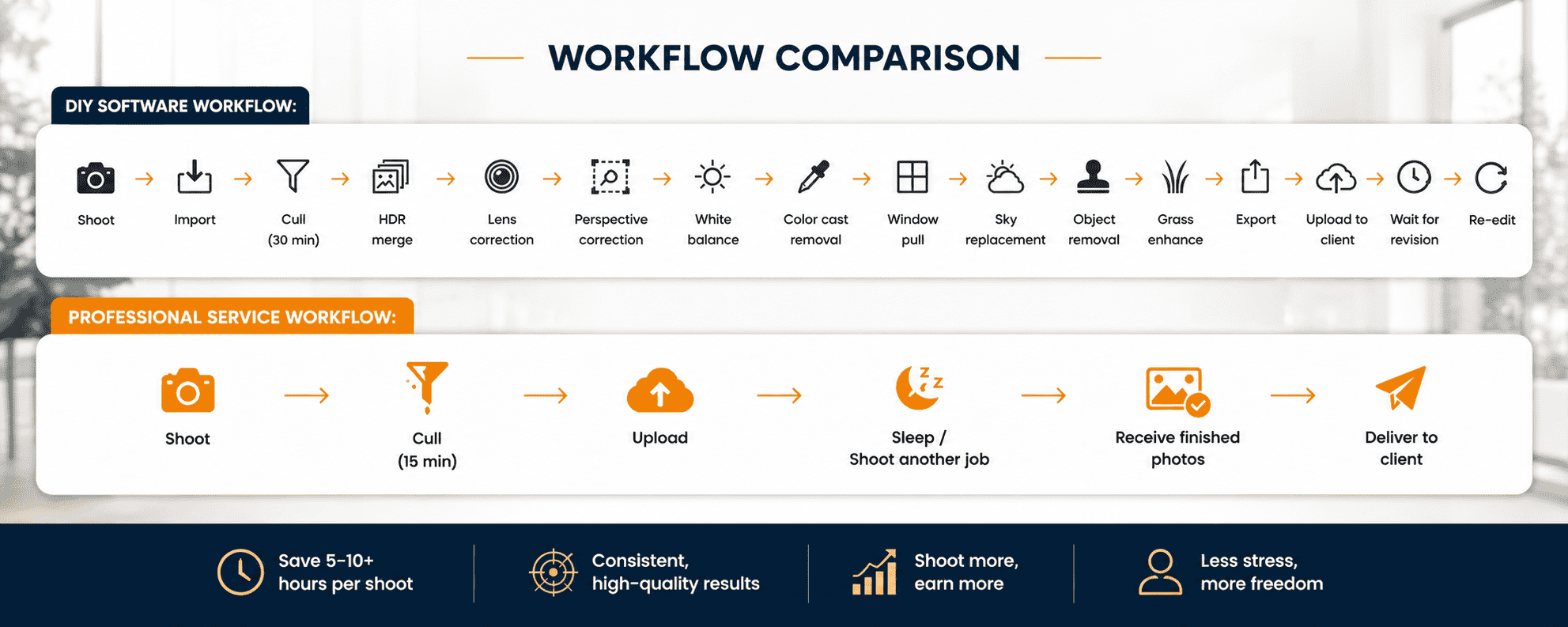
Real Editing Workflow Comparison
DIY Software Workflow:
Shoot → Import → Cull (30 min) → HDR merge → Lens correction → Perspective correction → White balance → Color cast removal → Window pull → Sky replacement → Object removal → Grass enhance → Export → Upload to client → Wait for revision → Re-edit
Professional Service Workflow:
Shoot → Cull (15 min) → Upload → Sleep / Shoot another job → Receive finished photos → Deliver to client
Calculate the True Cost of Each Workflow
Use the same unit for both options: the cost of one approved listing gallery. A monthly subscription alone cannot be compared fairly with a per-image service quote.
Time-to-Revenue Model
If you outsource and use saved time to book just two extra shoots per week at $200 each, that is $1600/month extra. Minus $400 editing costs, net gain $1200, plus no burnout.
This is why high-volume real estate photographers almost all outsource. It is not about editing skill. It is about business math.
Cash looks lower for DIY until you value your time. For photo editing for real estate agents who are not photographers, time value is even higher because each hour editing is an hour not showing homes.
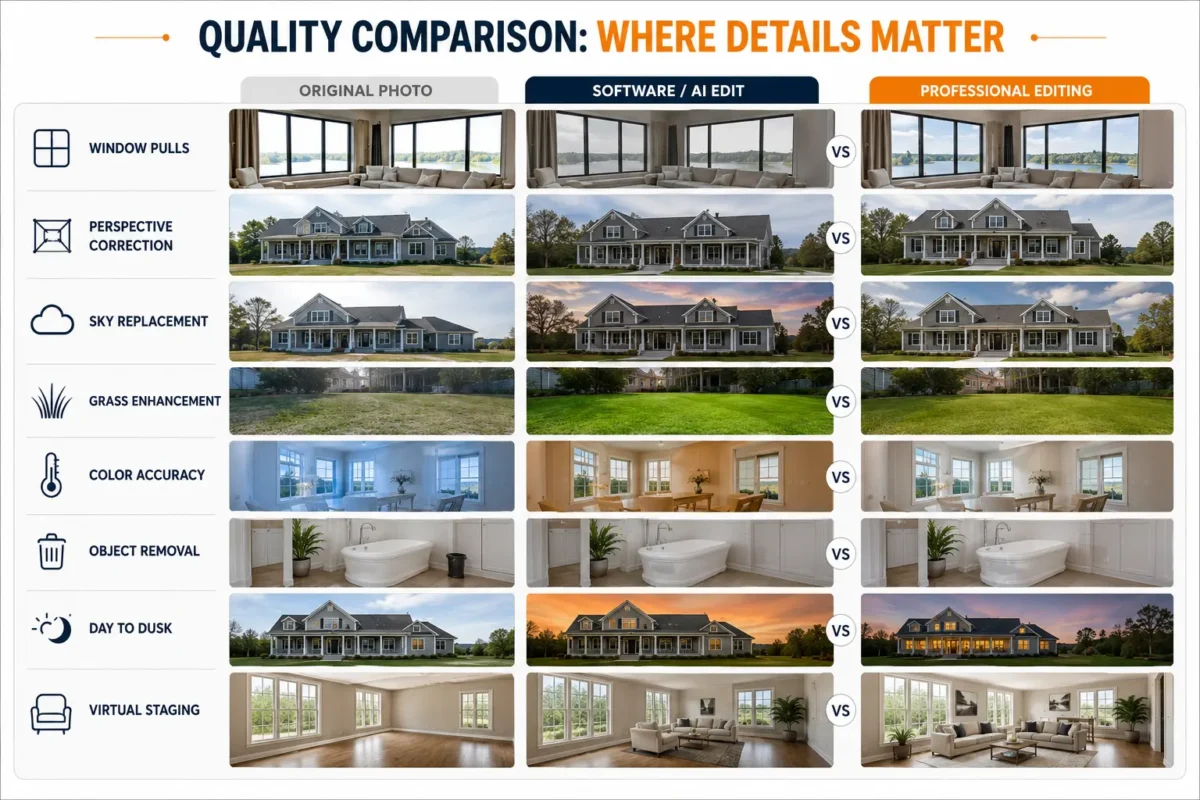
Quality Comparison: Where Details Matter
This is where Real Estate Photo Editing Software vs Service gets interesting.
Basic edits both can do: brightness, contrast, straightening verticals, lens distortion fix.
Advanced edits where quality separates:
Window Pulls: Software auto-HDR often creates gray, muddy windows or halo lines. A human editor blends the interior exposure with the exterior view exposure cleanly, keeps the natural brightness outside without fake glow.
Perspective Correction: Lightroom auto upright often crops too much or leaves verticals slightly off. Manual correction with Photoshop guides preserves more image.
Sky Replacement: AI sky replacement often leaves fringes around trees, roof lines, and picks an over-saturated fake sky. Good editors match light direction and use realistic sky libraries.
Grass Enhancement: One-click green makes astroturf. Proper grass enhancement keeps texture and variation.
Color Accuracy: Mixed lighting (warm interior + blue window light) confuses AI. Human editors use local white balance to fix color casts on walls without turning the view outside orange.
Object Removal: Removing cords, trash cans, or toilet seats is easy. Removing a large car reflection in a window or a person in a mirror requires complex cloning that AI still smudges.
Day to Dusk Editing: Software presets turn day to orange soup. Real dusk conversion needs sky replacement, interior warm light glow, exterior light balance, reflection control, and lawn light pops.
Virtual Staging: AI virtual staging often has wrong scale, floating furniture, or perspective mismatch. Professional virtual staging uses 3D furniture with correct shadows and scale.
Quality Maturity Matrix
AI Software vs Human Editors – Honest Breakdown
AI photo editing software has improved fast. Let’s be fair about where it wins and fails.
Where AI Performs Well:
- Auto white balance for single light source
- Batch auto exposure and straightening
- Basic sky replacement on clear horizon
- Noise reduction and sharpening
- Culling blurry images
Where AI Fails Today:
- Luxury homes where buyer expects perfection
- Mixed lighting: warm lamps + cool daylight + green from garden bounce
- Complex windows with blinds, curtains, reflections
- Glass shower doors, mirrors, high-gloss floors that reflect equipment
- Pools: AI makes water neon blue or muddy
- Twilight: AI cannot balance interior glow vs exterior sky properly
- Virtual renovation: removing walls or adding ceiling details
- Architectural corrections for ultra-wide lens
AI vs human editing is not either/or. The smartest real estate photographers use AI for 80% of the grunt work and human editors for the 20% that sells the home.
According to NAR research, 87% of buyers say photos are the most important feature when viewing listings online. Zillow’s research consistently shows homes with professional listing photos sell faster and often for more. That quality bar matters.
Best Real Estate Photo Editing Software
1. Adobe Lightroom Classic
Best for: Batch real estate image editing workflow
This is where most real estate photographers start and stay. It handles 200+ photos fast with presets, lens profiles, and auto straightening. You can fix verticals, white balance, and HDR merge in one place and sync it across a whole room.
Pros: Excellent batch editing, huge preset library, reliable lens corrections.
Cons: Subscription, AI denoise is slow without a good GPU, masking for complex windows is limited.
Pricing: $19.99 – $31.99/mo
Learning curve: Medium – 2-3 weeks to get consistent.
2. Adobe Photoshop
Best for: Advanced retouching, object removal, window pulls
Lightroom does 80%, Photoshop does the final 20% that sells the home. It gives you full control for clean window pulls, removing cords and trash bins, TV replacement, and reflection control in mirrors.
Pros: Complete control, best for complex retouching.
Cons: Very slow for batches, steep learning curve.
Pricing: Included in Photography plan
Learning curve: High
3. Luminar Neo
Best for: AI sky replacement and quick enhancements
Good for agents and shooters who want fast, good-looking results without learning Photoshop. Its Sky AI and Relight AI detect sky and walls automatically and replace in one click.
Pros: One-click sky replacement, simple sliders, fast results.
Cons: Can look fake if you push it, catalog system is weak for large libraries.
Pricing: $119/year
Learning curve: Low-Medium
4. Capture One
Best for: Tethered shooting and color accuracy
Preferred for luxury and architectural work where wall color has to be exact. Color handling is more accurate than Lightroom, especially for wood tones and mixed lighting.
Pros: Superior color, great for luxury property, excellent tethered shooting.
Cons: Expensive, fewer real estate presets and tutorials.
Pricing: $299 one-time or $24/mo
Learning curve: Medium-High
5. Radiant Photo
Best for: Natural color correction without presets
It analyzes each photo and corrects exposure and color without you building presets. Keeps skin tones and grass natural, which is where many AI tools fail.
Pros: True-to-life colors, fast, no preset hunting.
Cons: Less control for advanced masking like window pulls.
Pricing: $159 one-time
Learning curve: Low
6. ON1 Photo RAW
Best for: All-in-one alternative to Adobe
If you want to avoid subscriptions, this bundles HDR, panorama stitching, NoNoise AI, and layers in one app. Good value for part-time shooters.
Pros: No subscription, HDR and pano included, one-time payment.
Cons: Slower on large batches, interface feels heavy.
Pricing: $99.99 one-time
Learning curve: Medium
7. Photomatix Pro
Best for: HDR real estate editing blending
Industry standard just for merging brackets. It blends 3-5 exposures into a natural-looking base that you then finish in Lightroom. Better deghosting than Lightroom’s HDR.
Pros: Clean, natural HDR merging, great deghosting for windows.
Cons: Only does merging, you still need Lightroom or Photoshop to finish.
Pricing: $79 one-time
Learning curve: Low
8. Affinity Photo 2
Best for: Budget Photoshop alternative
Does about 90% of what Photoshop does for object removal, perspective correction, and layer blending, without a subscription. Great if you already know Photoshop shortcuts.
Pros: One-time payment, powerful layers and masking.
Cons: Smaller community, fewer real estate-specific tutorials.
Pricing: $69.99 one-time
Learning curve: High
9. AI Editors – Imagen, AfterShoot, Autoenhance
Best for: High volume culling and first pass edits
These learn your editing style after you feed them 1000+ of your edited photos. They cull blurry shots, apply your base corrections, and straighten automatically. You just review and deliver.
Pros: Very fast, learns your personal style, huge time saver.
Cons: Still needs human QA for MLS-ready consistency, can miss complex window work.
Pricing: $0.05 – $0.30 per image
Learning curve: Low
Who Should Choose Software?
Persona 1 – The Beginner Photographer: You shoot 1-2 homes a month for friends. You have time to learn. Use Lightroom + Photoshop. Learn proper real estate photography editing fundamentals.
Persona 2 – The Part-Time Shooter: You have a day job and do real estate on weekends. 3-5 homes/week max. Use software with strong presets and Photomatix for HDR. Your time is flexible.
Persona 3 – The Student / Hobbyist: Budget is tight, volume is low. Learn on Affinity or ON1. Focus on skill building.
Persona 4 – The DIY Agent: You shoot your own listings with your phone or mirrorless. You edit 10-15 photos per listing. Use Lightroom mobile and Luminar for quick sky replacement. Keep it simple.
If this is you, software is fine. Keep overhead low and invest in learning composition and lighting first.
Who Should Outsource Photo Editing?
Persona 1 – The Busy Pro Photographer: You shoot 15-30 homes/week. You cannot edit 500+ images without working nights. Outsourcing photo editing lets you shoot more, earn more.
Persona 2 – The Real Estate Media Company: You offer photos, video, drone, floor plans. You need bulk editing with consistent style across multiple shooters.
Persona 3 – Luxury Real Estate Teams: $2M+ listings need flawless image enhancement. Window pulls, fireplace enhancement, reflection control must be perfect.
Persona 4 – Vacation Rental Photographers: Airbnb hosts need fast turnaround, sometimes same-day, with object removal and decluttering.
Persona 5 – Architectural Photographers: You need precise perspective correction and color accuracy for architects and commercial property.
If you see yourself in these, outsourcing is not a luxury. It is how you stay competitive.
DIY gallery cost
DIY cost = allocated software + allocated hardware and storage + editing hours x the value of your production time + revision time.
For an illustrative example, a 30-image gallery that takes four active minutes per delivered image requires about two hours before revisions. If you value that production time at $40 per hour, the time component is $80. Replace those assumptions with a timed sample from your own workflow.
Service gallery cost
Service cost = base editing quote + advanced services + rush charges + your upload, briefing, and approval time.
Confirm what the base rate includes. HDR blending, flambient work, object removal, day-to-dusk conversion, virtual staging, and virtual renovation should not be treated as equivalent tasks. Compare the same deliverables and the same revision terms.
Decision rule: Outsourcing has positive operational value when the contribution from work completed during the recovered time is greater than the service cost and the management time it adds.
When Real Estate Photo Editing Software Fits Best
- You are still developing a recognizable editing style and want to understand every correction.
- Your weekly volume leaves enough time for careful editing and client communication.
- You need immediate control over unusual color, masking, or compositing decisions.
- You can maintain calibrated hardware, backups, presets, and a consistent review checklist.
- The cash cost of a service matters more than the opportunity cost of your editing time.
Software is also valuable when you outsource. It remains useful for culling, checking source files, reviewing delivered images, making a small emergency correction, and maintaining the reference style you expect a provider to match.
When a Professional Editing Service Fits Best
- Editing regularly pushes delivery into the evening or the next business day.
- You are turning down shoots, marketing, or account work because galleries are waiting.
- Several photographers need one repeatable finish across a shared client account.
- You need specialist work such as HDR editing, window masking, object removal, twilight conversion, or virtual staging.
- You need documented capacity, revision handling, and a predictable handoff.
Test a service with a representative batch, not only its easiest images. Include mixed lighting, bright windows, reflective surfaces, exterior sky and lawn work, and the file-naming requirements used in normal delivery. Measure first-pass approval, not only speed.
How AI Changes the Software vs. Service Decision
AI-assisted tools can shorten repetitive steps such as culling, denoise, masking, perspective suggestions, and base exposure adjustments. They do not remove the need to check geometry, window detail, color relationships, reflections, disclosure requirements, and whether the result still represents the property accurately.
Human review matters most when a correction depends on context rather than detection. Mixed light, precise masking, believable skies, complex removals, multi-angle virtual staging, and architectural color often need judgment beyond a one-click result.
A practical hybrid workflow
- Cull and organize the shoot in your preferred software.
- Apply only the source preparation required by the editing brief.
- Upload files with a written style guide and approved references.
- Keep standard and complex services in separate folders when their delivery windows differ.
- Review the returned gallery against a fixed QA checklist.
- Record revision reasons so recurring issues become updated instructions.
For delivery planning, use the related real estate photo editing turnaround benchmark. High-volume teams can also review the bulk property photo editing guide.
Software or Service Decision Checklist
Before changing your workflow, answer these questions with data from recent orders:
- How many active editing hours does a normal gallery require?
- Which corrections create most revisions?
- How often does editing delay delivery or client work?
- What is the first-pass approval rate for your current workflow?
- Which services require specialist skill?
- What happens when volume doubles for one week?
- Do you have a written style guide and backup production path?
- Does the provider define cutoff times, rush terms, and revision timing?
Run both workflows on similar test sets and compare approved-gallery cost, elapsed delivery time, active management time, first-pass quality, and revision rate. That gives you a business decision instead of a preference.
FAQs
Is Lightroom enough for real estate photo editing?
Lightroom is strong for cataloging, RAW development, lens correction, batch color, and basic HDR merging. Layered window work, complex object removal, reflections, and detailed compositing may require Photoshop or another specialist workflow.
Is outsourcing always faster than editing in-house?
No. The result depends on cutoff time, upload completion, order complexity, provider capacity, and revision handling. Compare the complete delivery window and first-pass approval rate.
How should I compare software and service costs?
Calculate cost per approved gallery. Include subscriptions, hardware allocation, storage, editing time, upload and briefing time, advanced-service charges, and revisions.
Can AI replace a human real estate photo editor?
AI can accelerate routine tasks, but every delivered gallery still needs review. Complex masking, mixed lighting, reflections, geometry, property accuracy, and multi-image consistency often require human judgment.
How do I keep a consistent style when outsourcing?
Provide approved before-and-after references, written rules for brightness and color, naming requirements, service-specific notes, and examples of unacceptable results. Track revision reasons and update the style guide.
What should be included in a service trial?
Use a representative set with interiors, exteriors, bright windows, mixed light, and at least one complex correction. Compare first-pass quality, communication, delivery, revisions, and file handling.
Is a hybrid workflow more complicated?
It can be simple when ownership is clear: software handles culling and review, the service handles defined production tasks, and one checklist controls final approval.
Final Recommendation
Use software when active editing is still a deliberate, profitable part of your work. Use a service when editing has become a production constraint. Use a hybrid model when you want to retain creative control while moving repeatable and specialist work into a managed pipeline.
The best choice is the workflow that produces accurate, consistent, listing-ready images on the promised schedule without hiding its true cost.