
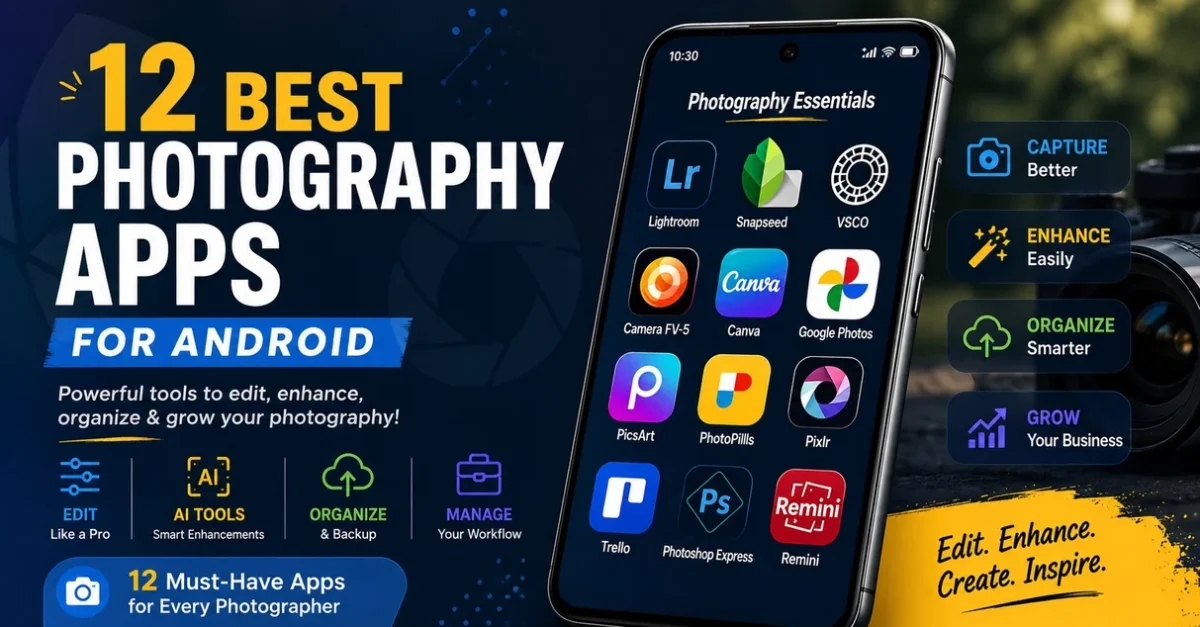
The evolution of Photography has been forever changed by smartphone technology; in 2026, this transformation will be finalized. Photographers can now capture images in raw file format, edit their work with precision tools, organize large numbers (tens of thousands) of photos, share proofs instantly with clients, and manage their customers directly from their Android devices without ever using a laptop.
In addition, there are countless mobile photography applications available that can help both novice and professional photographers create advanced photographs on these devices and systems, ultimately reducing the time it takes to complete photographs by hours each week while improving the photographers’ overall efficiency. This article provides an overview of the best photography apps for Android, including editing software, cameras, business management tools, and creative applications that photographers utilize regularly, from shooting photos to delivery.
Table of Contents
Why Photography Apps Matter
Recent advancements in Android camera apps enable users to access features previously available only on computers. This includes sophisticated AI editing functions for recognizing facial features and sky conditions, the ability to save in RAW format (an untouched digital file), automatic clofud-based backup, and built-in functionality for sharing photos on social media channels like Facebook and Instagram.
Apps also offer features and functionality to help achieve sharper images, such as manual control of focus and exposure. They let you process your photos with a professional appearance using non-destructive processing and selective masking. They allow you to store thousands of pictures in an organized manner using AI search instead of navigating endless folders; they back up your photographs automatically so that, if your phone gets lost, you won’t lose your work.
You can easily manage shoots and clients with a single calendar and task list. Apps offer numerous templates for creating social media content, enabling you to create multiple posts instantly with a single tap. Mobile apps help streamline photographers’ workflows by providing a comprehensive solution that combines all workflow steps into a single device, always accessible to the photographer.
12 Best Photography Apps for Android
1. Adobe Lightroom Mobile
Adobe Lightroom Mobile remains one of the best photography apps for Android photographers who want professional editing on Android devices without compromise.
Key Features
Some key features of our software are the ability to fully edit RAW photos while keeping highlights and shadows intact, using AI to mask out the subject, sky or background automatically, to achieve accurate color grades using separate controls for shadows, midtones, and highlights, having a seamless cloud sync to maintain identical edits on mobile and desktop devices, and also having a large library of preset options to provide consistent starting points for various types of lighting scenarios.
Why Photographers Love It
The mobile app allows you to edit pictures just like you would on a computer. While traveling or shooting clients, many creative professionals use Lightroom to quickly edit photos by selecting (culling), adjusting color, and exporting them at full resolution while they are still at the location.
Best For
This is ideal for professional photographers focused on dependable color quality; real estate photographers who need to correct perspective and exposure; portrait editing where skin tone is extremely important; and social media creators looking for consistent appearances across platforms.
2. Snapseed
Snapseed is a powerful free editing app developed by Google. It combines simplicity with advanced editing tools that work well even on mid-range phones and is considered one of the top apps for photographers.
Key Features
Major features of the program:
(a) Selective editing based on control points to modify small sections of images
(b) Healing tool that will make any spot or unwanted object disappear completely
(c) HDR effects add dynamic range to photographs without the look of artificiality
(d) Full curves adjust contrast to the degree
(e) Perspective correction will allow for straightening of buildings and rooftops and get rid of the horizon.
Reason(s): It is Unique
Unlike most other free apps, Snapseed provides professional-quality editing capabilities without intrusive advertising or watermarks (i.e., branding), so it can be relied upon for quick client projects as well as personal use.
3. VSCO
VSCO is very popular among creators who want to use a variety of aesthetically pleasing, film-like filters or edits, rather than the digital look you get with traditional film editing filters. VSCO is one of the best apps for photographers focused on Instagram aesthetics and creative color grading.
Key Features
The following are some of the main attributes of this application: There are hundreds of film-structured presets, access to a whole suite of built-in video editing software that has been created using these film-structured presets, a friendly and quiet online community for sharing work and creativity with other users, and lots of user-friendly sliders to adjust the exposure and tone after applying the colorization.
4. Camera FV-5
Camera FV-5 gives Android users DSLR-style manual controls that most stock camera apps still hide. This is one of the best photography apps for photographers who want complete manual camera control.
Key Features
Main Features: Full Manual Shutter Speed Control for Long Time Exposures, Direct ISO Control for Low Light Photography, Precise Manual Focus Control with Focus Peaking, Long Time Exposures to Create Light Trails and Capture Night Sky.
5. Canva
Canva is one of the best apps for photography business branding and marketing because it turns photos into client-ready assets in minutes.
Key Features
The main features include hundreds of social media templates in various sizes for all major platforms. flyers for mini-sessions or promotional purposes. Simple ways to create a logo. portfolio graphic templates and mood boards. Client presentation templates that help you create professional-looking prices and packages.
6. Google Photos
Google Photos is not just a gallery app; it also lets users easily organize and back up large photo collections without manually sorting each photo. It is one of the best photography apps for Android users who need automatic cloud backup and smart organization.
Key Features
Some of the key features include: AI-powered searching that allows you to find people, objects, or words within your pictures; Automatically uploading your photos over wi-fi; creating shared albums with clients to allow them to view, comment, and have access to their photos; and providing you with unlimited cloud storage space (based on your collection size).
7. PicsArt
PicsArt combines editing, design, and AI-powered creative tools in one app that is focused on speed and experimentation. PicsArt is among the top apps for photographers creating social media content and artistic edits.
Key Features
Some key features of the app include a one-tap hair and complex edge removal effect, AI filter effects for stylized photos, photo collage capabilities for before-and-after photo posts, and retouching tools to smooth skin and add details.
8. PhotoPills
PhotoPills is a planning app used by landscape and astrophotographers to know exactly where the light will be before they arrive. It is one of the best apps for photographers focused on outdoor and astrophotography planning.
Key Features
Key Features of the app include precise sun and moon tracking with date and location options; Milky Way planning, which shows visibility windows; exposure calculators for filters; and astrophotography planning, which overlays your camera’s live view with the sun’s and moon’s paths.
9. Pixlr
Pixlr has been designed to provide quick edits for photographers who are pressed for time but don’t have much experience. Pixlr is one of the best photography apps for Android users who want fast editing performance.
Key Features
The main features of Pixlr include a variety of filters and overlays, simple one-button enhancements that automatically adjust exposure and color, and a collage-making function that lets you easily set up your layouts.
10. Trello
While not a photography app per se, Trello is excellent for photography business management because it organizes work around photos. Trello is one of the best apps for managing photography business workflows.
Benefits of Using Trello
Since Photographers are usually balancing multiple things at once, including editing deadlines, shoots, invoices, and marketing campaigns, it keeps everything organized in one location, so nothing slips a photographer’s mind.
11. Adobe Photoshop Express
Adobe Photoshop Express is designed specifically for Android users to edit photos and create graphics quickly with minimal effort. It remains one of the best photography apps for photographers needing quick portrait and social media edits.
12. Remini AI Photo Enhancer
Remini is focused on rescue and restoration, using AI to turn blurry, old, or low-light phone photos into sharp HD images. Remini is among the top apps for photographers who restore old or damaged images.
Best Apps for Photography Business
There’s a lot more to running a photography business than just editing photos! You also have to manage your marketing efforts, deadlines, files, money, and calendar. These are some of the best apps for photography business management because they simplify branding, workflow, client communication, storage, invoicing, booking, editing, and delivery.
Canva – Branding and marketing
Photographers provide their clients with an image and a concept, rather than flipping through a series of photographs to find what they have to offer. The quickest way to provide that same look/feeling is via Canva.
Trello – Workflow management
When a shoot is set up, approximately 20 little tasks come out of it. Trello makes this chaos into a visual pipeline.
Google Drive – File storage
Drive serves as both an archive and a delivery space.
Lightroom Mobile – Editing and delivery
This tool connects creativity with business. Lightroom Mobile is one of the best photography apps for photographers, managing, editing, and proof delivery directly from Android devices.
Specific Apps for Photographers
This is the shortlist when you want one winner per job, not a suite.
Best Editing App – Adobe Lightroom Mobile
This is the only mobile app with true non-destructive RAW editing. It can produce AI masks that separate hair from the background with a single tap, and it syncs with the desktop app to maintain color accuracy and recoverable highlights. Nothing else can match this app’s completeness, making it one of the best photography apps for Android.
Best Free App – Snapseed
The reason it is successful is that Google provides you with selective control points, healing, curves, & perspective correction without ads, watermarks, or sign-in. You get all of these tools at no cost, and they also teach you the true logic behind editing rather than simply providing you with filters. Snapseed remains one of the best photography apps for photographers seeking free professional editing tools.
Camera Control App FV-5 is the best.
It has the best DSLR-like interface on Android (manual shutter 60 sec, ISO settings, focus peaking, DNG raw files). The manufacturer of the stock camera applications has chosen to smooth the entire experience for speed, but with FV-5, you can retain control. This makes Camera FV-5 one of the top apps for photographers who prefer manual camera settings.
Best App for Creative Filters – VSCO
Their presets use real film or photographic profiles rather than merely applying a color (overlay) to an original picture/video. Creators of lifestyle/travel content often use only one VSCO recipe across their feed, because these settings look consistent in both images and films. VSCO remains one of the best apps for photographers focused on creative editing and social media aesthetics.
Best App for Planning Shoots – PhotoPills
The reason it is winning is that it answers one question that cannot be addressed during post-processing: where will the light be? The AR view shows the times when the sun rises behind the Taj, and/or when the Milky Way core breaches the ridge in Spiti. Therefore, you can arrive at your location and capture the image you want in one trip. PhotoPills is considered one of the best photography apps for landscape and astrophotography planning.
Best App for Business Management – Trello
The reason this works is that it is graphical and has low resistance. No accounting background is necessary to do this. You simply move a card from Shooting to Editing, and you immediately know the number of hours of work you will have that week. Knowing exactly how much you have left to do is much better than a complicated CRM system for solo photographers, many of whom have 5 clients. This makes Trello one of the best apps for managing photography business workflows.
How to Get the Best Apps for Photographers using Android
Not every photographer benefits from each photo app. Before choosing which photography app to download, consider your photography style (e.g., portraits, landscape, real estate, or product photography), for example, whether you need to mask skin in portraits or measure light reflected in landscapes.
Editing Requirements
Some photographers require advanced RAW editing with local adjustments, while others need a quick filter and a bit of cropping for social media. Focus on the amount of editing you’ll do vs the features you may not use. Choosing the best photography apps for Android depends heavily on your editing workflow and photography goals.
Cost
Most editing apps have free versions. If the app you choose has a premium version, you’ll need to decide if the additional features (cloud storage, AI removal, batch export) are worth the monthly fee. Compare your monthly cost to how much time the app saves you by editing your photos.
Device Functionality
Older Android phones may not be able to run large editing applications, such as the latest graphic editing software (e.g., Adobe Photoshop), due to limitations in their processing power and RAM. Lightweight editing applications (e.g., Snapseed or Pixlr) should be much more functional on older phones.
Tips for Using Photography Apps Efficiently
If you want to recover your highlights and shadows later, take photos in RAW format whenever possible. If you’re doing an important photo shoot, back up your photos to the cloud in case your phone is lost or damaged (you will lose all of the photos you paid for).
Create preset collections so you won’t have to recreate the same look every time you edit your photos. Keep your apps up to date, as they are continually improving in AI features and camera profiles. If you plan to print or display images on a cell phone, avoid excessive editing. The images will look very unnatural due to their heavy clarity and saturation.
Professional photographers frequently use software and automate their workflow to develop an editing style they can consistently apply to their work, enabling consistent branding and faster delivery.
AI technology is revolutionizing mobile Photography very rapidly, as new apps provide capabilities previously available only to desktop users. Recent advances include
(1) AI background removal from photos with high-quality hair characterizations that do not change textures.
(2) Automatic retouching of an image based on the detection of a person’s face for balanced skin tones without blurring the texture.
(3) Smart Object Removal for filling in complex background areas from a photo.
(4) AI generated improvement recommendations for best cropping and exposure from images.
(5) Instant Sky Replacement for an image producing blended lighting characteristics with proper color matching.
As it pertains to photography apps on Android, we’re seeing a shift towards using these apps instead of desk-bound workflows for many creators, as smartphone technology improves, particularly for social media content. This rapid growth is why more creators are searching for the best photography apps for Android than ever before.
Conclusion
Android-based photography apps have revolutionized how photographers capture, edit, and manage their photos. Whether using professional-grade editing software (like Lightroom Mobile), planning tools for capturing images (like PhotoPill), or simple apps that provide quick fixes (like Photoshop Express), or rescue tools (like Remini), there’s an app designed specifically for every photography genre and work process.
There are many great photography apps available for Android. Many tools, creative editing apps, and photography business management tools help professional and beginner photographers. You need to try various apps to create a workflow that fits your needs and photography goals; once developed, it should be seamless and allow you to focus on capturing and presenting your photographs.
Answers to Commonly Asked Questions
What Photography apps are available for Android that are uniquely different than other phone photography apps?
The best photography app on Android is Adobe Lightroom Mobile because it offers many professional photo-editing features and full support for shooting in raw format. It is widely considered one of the best photography apps for Android users.
What is the best photography app that has no cost?
The best free photography app for Android is Snapseed, as it offers advanced tools with no ads or watermark limitations.
What are some of the best Android photography apps?
Canva, Trello, Google Drive, and Lightroom Mobile were listed as among the best apps for managing and marketing your photography business due to their functions for branding, workflow, storage, and delivery of your Photography.
Which app works best for editing professional-quality images?
For Android devices, both Adobe Lightroom Mobile and Snapseed offer excellent professional photo editing features. Still, Lightroom is the most comprehensive in terms of editing control, while Snapseed is the highest-quality free app available for Android users to edit pictures.
Are there any photography apps suitable for beginner photographers?
Yes. Several photography applications come equipped with automatic adjustments, easy-to-use tools for beginners, and tutorial assistance to help beginners learn manual controls quickly.
What type of application do most photographers utilize to prepare their images for use on Instagram?
Given that VSCO, Lightroom Mobile, and Snapseed offer excellent color control and social media export settings, these applications, along with many others, will be used by photographers when preparing their images for Instagram.
Can RAW images be edited using Android devices?
Yes! Applications such as Lightroom Mobile and Snapseed support RAW editing, allowing for more flexible adjustments to exposure and white balance than with JPEG images. This is one reason Lightroom remains among the best photography apps for photographers.
As an app designed ideally for landscape photography, which application is preferred?
PhotoPills is one of the best apps for photographers interested in landscape photography because it helps plan lighting, sun position, and astrophotography shots so you arrive at the right place at the right time.
Apps help, but final delivery still needs quality control
Mobile apps can help with planning, capture, notes, and quick edits. For professional property work, final delivery still needs consistent exposure, color, verticals, cleanup, and export sizing.
Real estate photographers can use apps in the field, then send selected files through a dedicated editing workflow before client delivery.